Table of Contents
Multicollab is a popular WordPress plugin designed to bring Google Docs-style collaboration and editorial workflows directly into the WordPress Gutenberg block editor.
Key Takeaways
- WordPress core handles publishing well but leaves a gap in pre-publish collaboration, with no inline comments, no track changes, and no guest access, which is why large teams drift into Google Docs and email.
- That gap has a real cost: lost feedback, mixed-up versions, missed deadlines, and errors that reach clients or go live.
- Multicollab closes the gap by bringing inline commenting, Suggestion Mode track changes, and real-time editing into the Gutenberg editor, so the draft itself is the workspace.
- Real-time collaboration supports up to five users at once over WebSocket, needs a VPS or managed host (not shared hosting), and does not run alongside Suggestion Mode.
- Guest roles (Viewer, Commenter, Co-Editor) let clients and freelancers review through a 24-hour link with no WordPress account, and access expires automatically.
- Content Workflows (WP 6.9+) and the Editorial Checklist turn an informal process into a repeatable one with defined stages, archived versions, and publish warnings.
- The Activity Center plus email and Slack notifications give editors a single view across the whole pipeline as the team grows.
Multi-author collaboration in WordPress is easy when one writer publishes one post a week. WordPress handles that on its own.
The trouble starts when the team grows. Ten writers, three editors, a few freelancers, and a couple of clients who want to review before anything goes live.
Now you have drafts sitting in Google Docs, feedback buried in email, and no clear sense of which copy is final. The bigger the team, the more time slips away into coordination instead of writing.
This is the scale problem. And it is where most WordPress editorial setups quietly fall apart. Here is how to run multi-author collaboration in WordPress without the chaos.
What does multi-author collaboration cost when it breaks down?
Disorganized collaboration costs a mid-sized content team hours of lost work each week, plus missed deadlines and errors that reach clients. The cause is not the writing. It is the coordination around it.
Think about a team of fifteen. Every post bounces between a Google Doc, an email thread, and the WordPress editor.
Each handoff is a chance for a comment to get missed, a version to get mixed up, or an edit to get lost. A writer waits on feedback sitting unread in someone’s inbox. An editor rewrites a paragraph that was already fixed in a different copy. A client’s change never makes it into the final post.
None of these are huge on their own. But across a full content calendar, they turn into missed deadlines, extra rounds of edits, and the occasional error that goes live on the site. The hours your team loses to hunting for the latest version and chasing feedback are hours nobody is spending on actual writing. That is the cost of the workaround. Now here is how to remove it.
Why does WordPress struggle with multi-author collaboration at scale?
WordPress core was built to publish content, not to manage the review that happens before publishing. It has no inline commenting, no track changes, and no way to bring in an outside reviewer without a full user account. Large teams hit those three walls fast.
Here is what is missing in native WordPress:
- No inline feedback. Native comments live on the front end for readers, not inside the draft. There is no way to leave a note on a specific sentence or block.
- No track changes. There is no built-in way to suggest an edit without overwriting the original. Editors either rewrite in place and lose the writer’s version, or paste notes into a separate document.
- No guest access. Every reviewer needs a WordPress account with a role. A client who wants to read one draft still needs a login, which means IT tickets and account sprawl.
So teams work around it. They draft in Google Docs, review there, then copy and paste the finished piece into WordPress.
That copy-paste step strips formatting, breaks blocks, and creates a second version that never quite matches the live post. Now you have two sources of truth and no clear record of which one is final.
None of this is a WordPress flaw. It is a gap. Collaboration happens outside the editor, and the editor becomes the last stop instead of the workspace.
What does multi-author collaboration in WordPress need to work at scale?
A workflow that scales needs five things: inline feedback inside the draft, role-based permissions, a defined path from draft to publish, guest access for outside reviewers, and a single view of what is moving. Miss any one and the team drifts back to email and Google Docs.
- Feedback inside the draft, so notes never get lost in an inbox.
- Clear roles, so a freelancer can comment without being able to publish.
- A defined path from draft to live, so nobody has to guess the next step.
- Guest access for outside reviewers, so clients join without a full account.
- One clear view of the pipeline, so an editor sees what is moving and what is stuck.
That is the checklist. The rest of this guide covers how Multicollab closes each gap for large-scale content publishing, with the technical detail that matters when you are choosing a tool for a real team.
How does Multicollab bring collaboration into the WordPress editor?
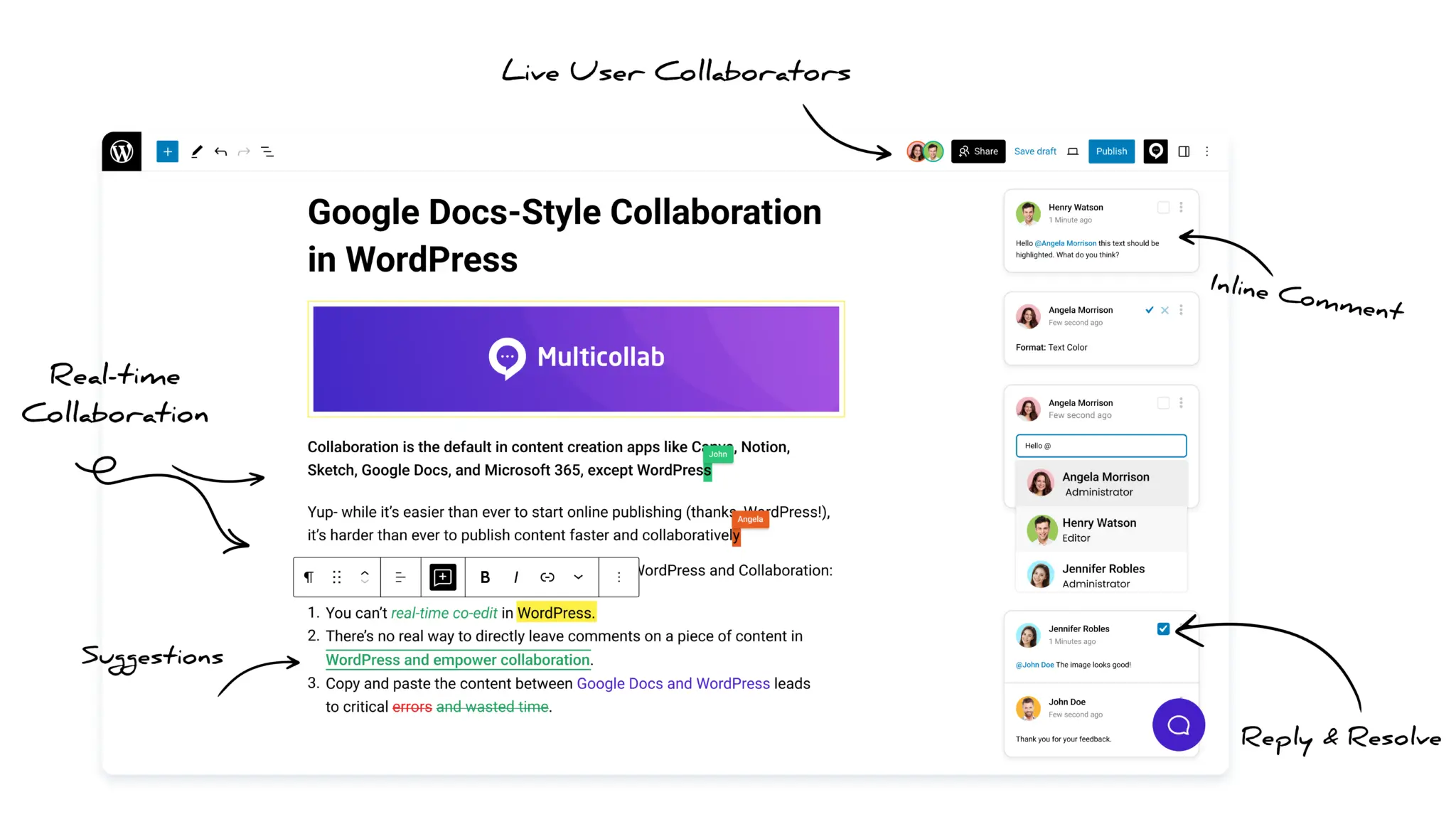
Multicollab adds Google Docs-style review directly inside the Gutenberg block editor, so the live draft is the workspace. There is no separate document and no copy-paste step. Feedback, tracked edits, and co-editing all attach to the actual blocks of the post.
How does inline commenting work in Multicollab?
Reviewers highlight text and leave a comment pinned to that exact block, the same way they would in Google Docs. The comment stays attached to the content it refers to, even as the draft changes around it.
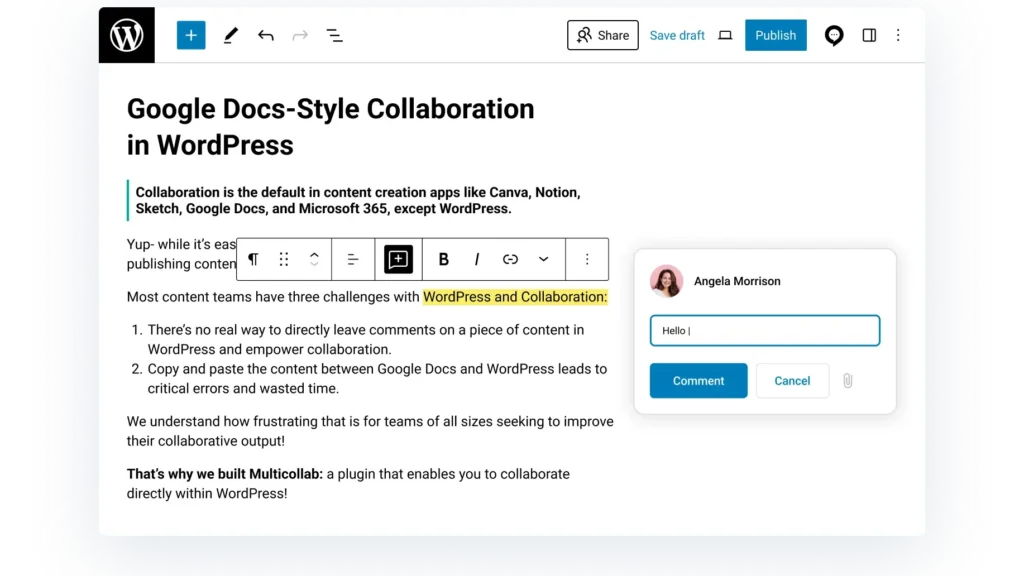
Each comment supports @mentions that notify a specific person, emoji reactions to keep threads short, and file attachments in .jpg?quality=90, .png?quality=90, .doc, and .pdf formats when a note needs a reference image or document.
Shareable comment links point a teammate straight to a single note, so you can send someone directly to the feedback that needs them. Commenting works across reusable blocks and custom blocks, so even a complex page layout stays fully reviewable.
What is Suggestion Mode and how does it handle track changes?
Suggestion Mode is Multicollab’s track-changes system. It shows every edit as a color-coded change: green for added content and red for deleted blocks, so the writer sees exactly what an editor proposes before anything is committed.
An editor can rewrite a line without overwriting the original. The writer then reviews each suggestion and accepts or rejects them, including in bulk in a single pass rather than one at a time.
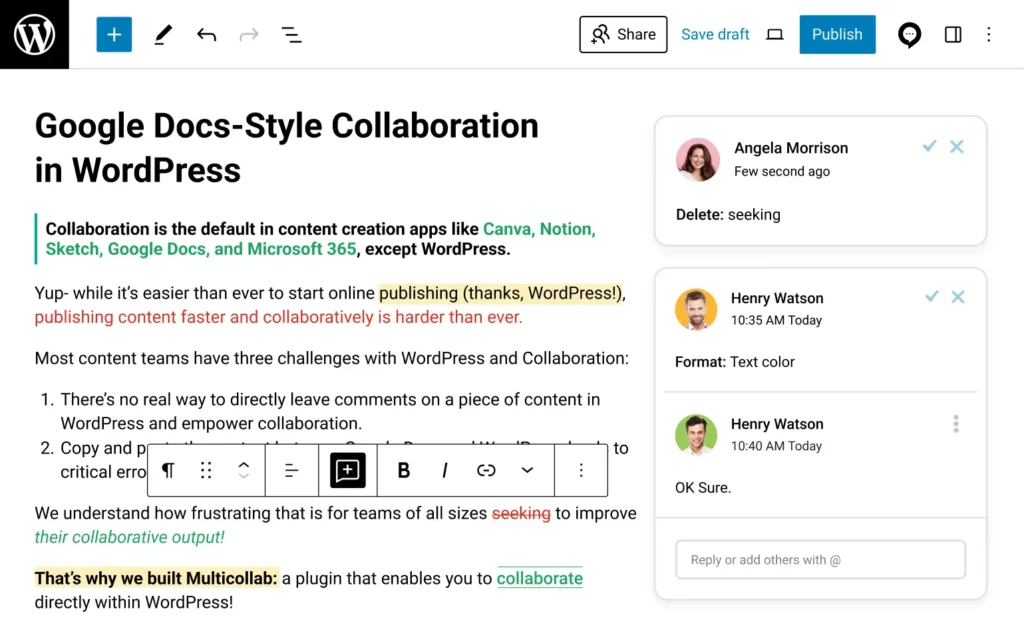
Suggestion Mode handles captions and custom or dynamic blocks, so structured content is covered, not just plain paragraphs. One important limit: Suggestion Mode and real-time collaboration cannot run at the same time. You pick the mode that fits the task, structured review or live editing.
How does real-time co-editing work, and what does it require?
Multicollab’s real-time collaboration lets up to five users edit the same post at once over a WebSocket connection, with each active user shown in their own color. It is the mode for a live editing session or a quick pre-publish pass, where waiting on comment threads would slow everyone down.
The technical requirements are specific, and they matter when you plan a rollout:
- User cap: Five simultaneous editors per post. For larger teams, asynchronous review through comments and Suggestion Mode has no such cap.
- Performance: Real-time sync is fastest on lighter posts. A post with many non-text or dynamic blocks can slow the live session, so heavy layouts are better suited to comment-based review than live co-editing.
Knowing these limits up front is the difference between a smooth rollout and a stalled one.
How do you manage roles and permissions for a large WordPress team?
Multicollab assigns collaboration access to your existing WordPress roles rather than creating new custom roles, so you work within the permission structure your site already uses. An Author still cannot do what an Administrator can. Multicollab layers review rights on top of that, it does not replace it.
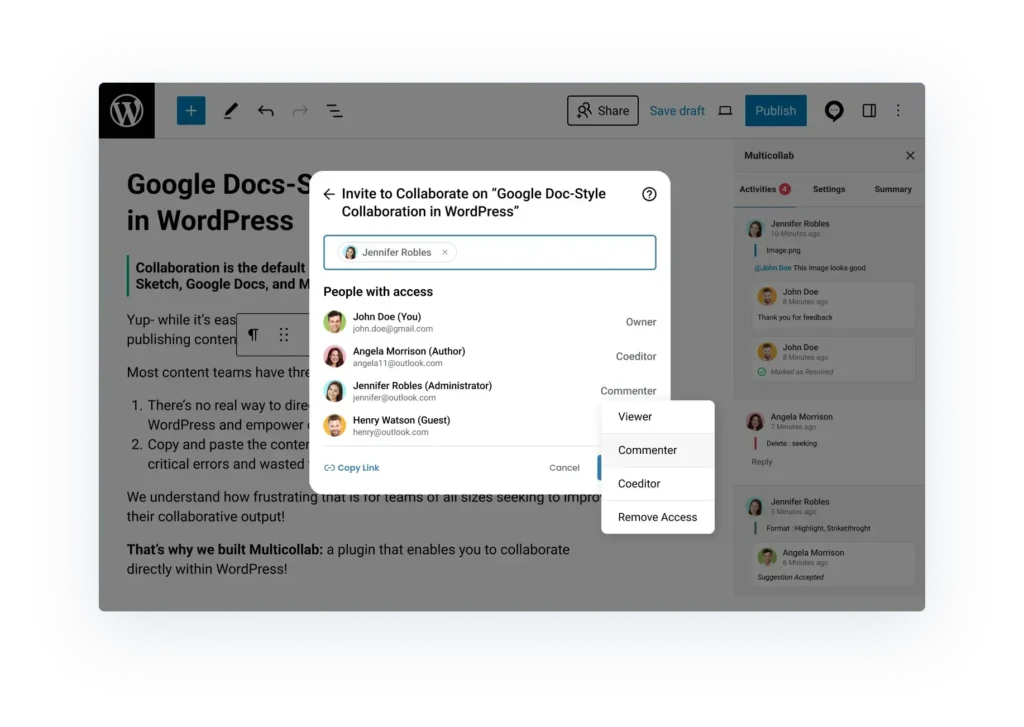
For people outside your team, guest collaboration solves the account problem. You invite a client or freelancer by email or @mention, assign one of three guest roles, and they join through a 24-hour link with no WordPress account required.
- Viewer can read the draft only
- Commenter can read and leave feedback
- Co-Editor can make edits directly
This means a client can review and comment without ever touching your dashboard, and a contract editor can work in a draft without becoming a permanent user on your site. The link expires in 24 hours, so access does not linger after the review is done. The account-sprawl problem disappears.
How do you standardize an editorial process across many authors?
You standardize it with defined stages and required checks, so every post moves the same way regardless of who is writing it. Multicollab does this with two features: Content Workflows and the Editorial Checklist.
What do Content Workflows do?
Content Workflows let an admin define the stages a post moves through, from first draft to ready-to-publish. Each stage keeps an archived version, so you can look back at exactly what changed and when.

This replaces the spreadsheet or Slack thread that most teams use to track status. The stages are admin-defined, so they match how your team actually works rather than a fixed template. Content Workflows require WordPress 6.9 or later.
What does the Editorial Checklist enforce?
The Editorial Checklist adds required tasks per post type, with role-based completion and publish warnings. A post cannot go live with the SEO title missing or the featured image unset, because the checklist blocks it.
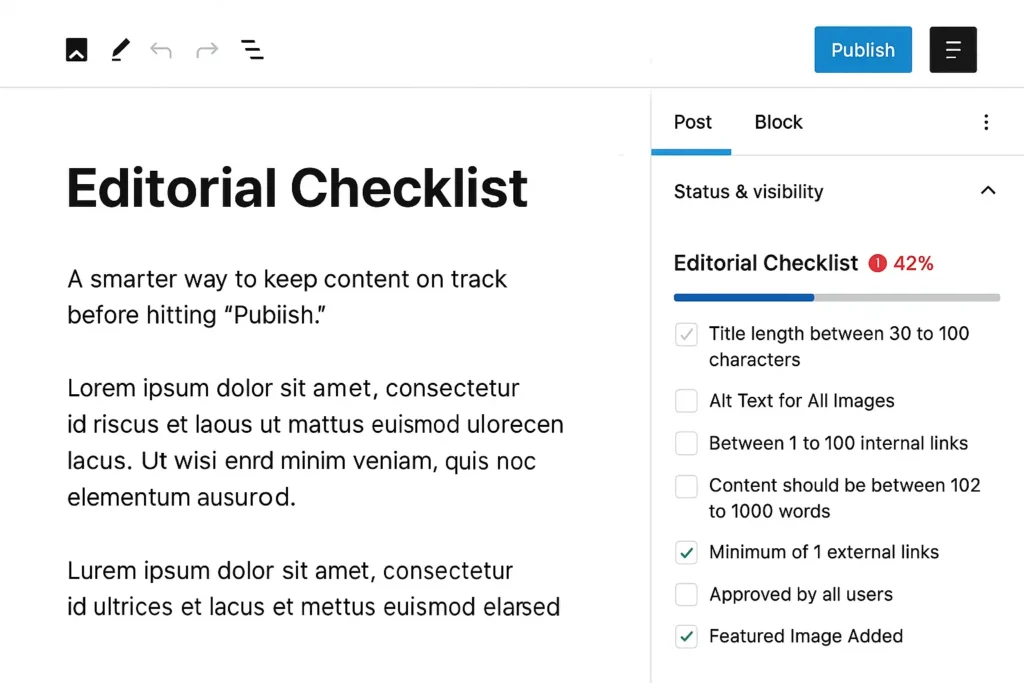
Every contributor sees exactly what “done” means before a piece advances. Together, Content Workflows and the Editorial Checklist turn an informal, memory-based process into a repeatable one, which is what a growing team needs to keep quality steady across dozens of authors.
How do you keep visibility across a large content pipeline?
You keep visibility with a single activity log and notifications that reach people where they work. Multicollab’s Activity Center gives a time-ordered record of every action on a post, with filters and per-post comment counts.
An editor can open one view and see who commented, what was resolved, and where a draft is stuck, without chasing anyone for a status update.
Notifications go out over both email and Slack, so a mention or a stage change reaches people in the tools they already check, instead of sitting unseen in a dashboard nobody opens.
For distributed teams, this visibility is the difference between a workflow that scales and one that quietly stalls.
What is the right order to set up multi-author collaboration in WordPress?
For the right setup of an editorial workflow with large teams, set it up in this order: map roles first, then guest access, then workflow stages, then quality checks, then feedback and monitoring. Each step builds on the one before it.
- Map your roles. Match your team to existing WordPress roles and decide who publishes, who edits, and who only comments.
- Set up guest roles. Configure Viewer, Commenter, and Co-Editor access for clients and freelancers so outside reviewers never need accounts.
- Define your workflow stages. Set Content Workflow stages to match how a post actually moves from idea to live.
- Build your checklists. Create an Editorial Checklist per post type so quality gates are automatic.
- Run feedback inline. Use inline commenting and Suggestion Mode instead of email, and watch the whole pipeline through the Activity Center.
The goal is simple. Every part of getting a post ready happens in one place, inside the editor, visible to everyone who needs to see it.
Conclusion: Scale multi-author collaboration without the chaos
Adding more authors is the easy part. Keeping them coordinated is the hard part, and it is where most WordPress teams lose their time.
Multicollab closes those gaps in the one place the work already lives, the Gutenberg editor.
- Inline comments keep feedback on the exact block.
- Suggestion Mode gives editors real track changes.
- Guest roles bring clients and freelancers in without accounts.
- Content Workflows and the Editorial Checklist make the process repeatable, and
- the Activity Center keeps the whole pipeline in view.
None of that requires a new tool to learn or a second platform to manage. The draft stays the source of truth, and the team works around it instead of around each other. That is what lets a content operation grow from one writer to twenty without the workflow falling apart.
Ready to run your editorial team inside WordPress instead of around it? You can see how Multicollab fits your workflow and skip straight to the pricing details.
Frequently Asked Questions
How many people can collaborate on a post at the same time in WordPress?
With Multicollab’s real-time collaboration, up to five users can edit the same post at once over a WebSocket connection. For asynchronous review through comments and Suggestion Mode, there is no user cap.
Do external reviewers need a WordPress account to collaborate?
No. With Multicollab, guest collaborators are invited by email or @mention and join through a 24-hour link with a Viewer, Commenter, or Co-Editor role, without any WordPress account. The link expires after 24 hours.
Can Multicollab replace our Google Docs review process?
Yes. Inline commenting and Suggestion Mode bring the same highlight-and-comment and track-changes experience into the editor, which removes the copy-paste step between Docs and WordPress and the second version it creates.
Can I use Suggestion Mode and real-time collaboration together?
No. The two modes cannot run at the same time. You choose the one that fits the task: Suggestion Mode for structured editorial review, real-time collaboration for live simultaneous editing.
Does Multicollab create new user roles on my site?
No. Multicollab assigns collaboration access to your existing WordPress roles rather than creating custom ones, so it works within your current permission structure. Guest roles are separate and apply only to invited external reviewers.
How do I keep track of what everyone is doing across many posts?
The Activity Center provides a time-ordered, filterable log with per-post comment counts, and notifications go out over email and Slack so nothing gets missed.
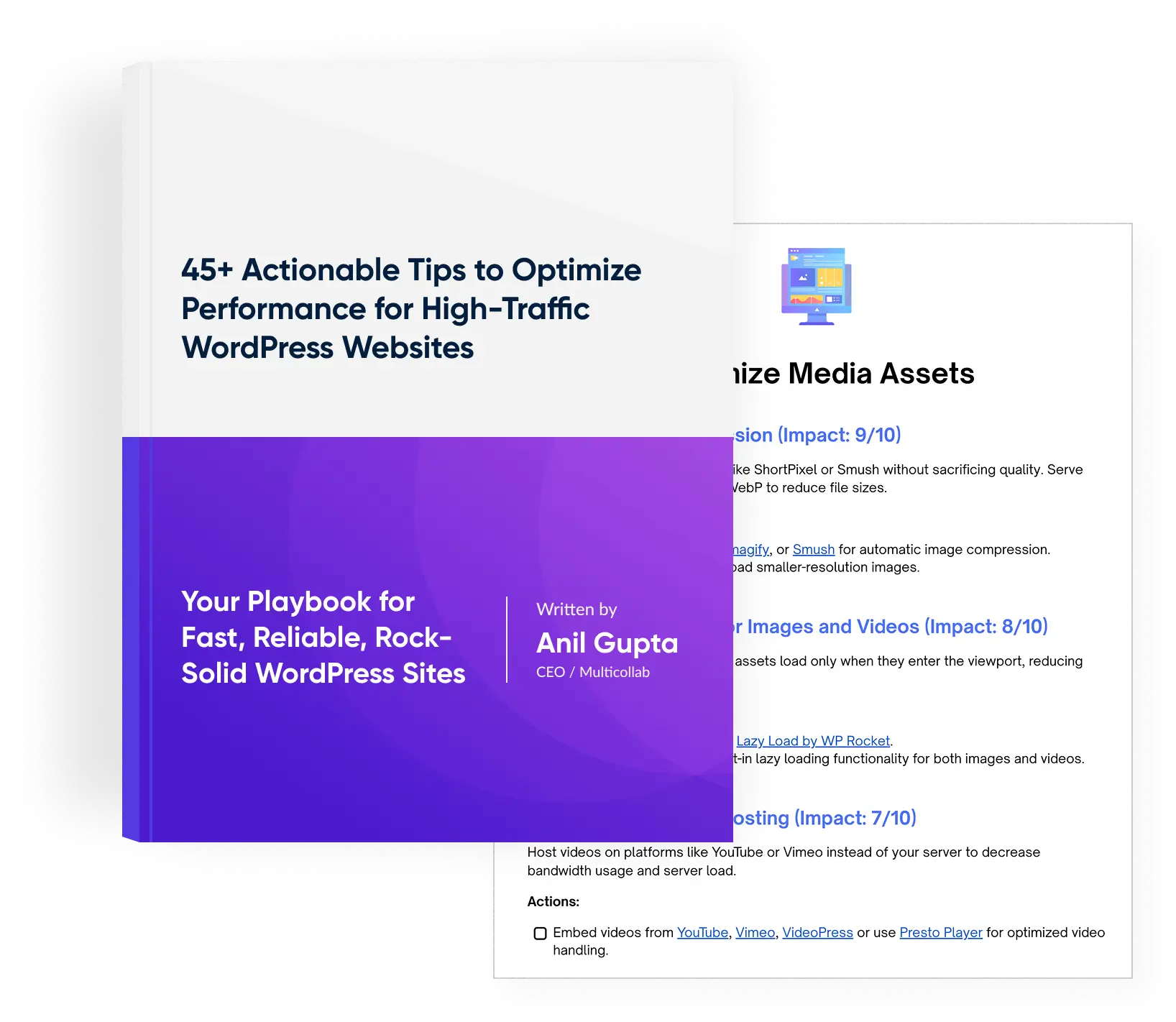
Download a Free Actionable Guide: 45+ Actionable Tips to Optimize Performance for High-Traffic WordPress Websites
Performance Optimization Techniques: Speed up your site with caching, image compression, and code minification.
Hosting and Scalability Suggestions: Learn to choose the right hosting solutions and scale efficiently.
Security and Protection Guidelines: Safeguard your site from DDoS attacks, malware, and performance threats.
Content and Plugin Management Tips: Optimize your database, plugins, and themes for peak performance.