

Table of Contents
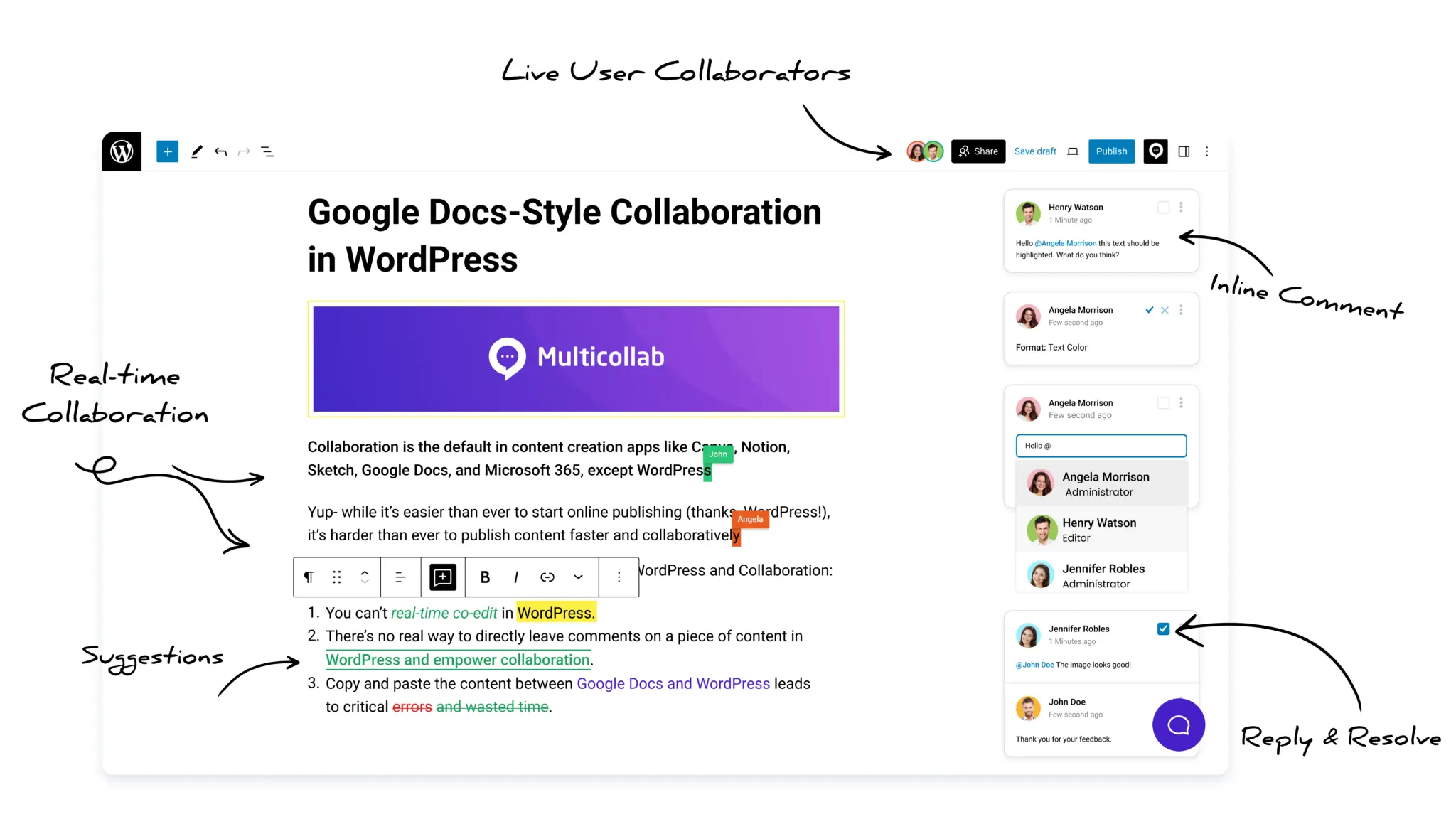
Multicollab is a popular WordPress plugin designed to bring Google Docs-style collaboration and editorial workflows directly into the WordPress Gutenberg block editor.
Key Takeaways
- Almost everyone edits AI content already. Only about 7 percent of marketers publish it untouched. So the real question is not whether to review, but how to review fast enough to keep up.
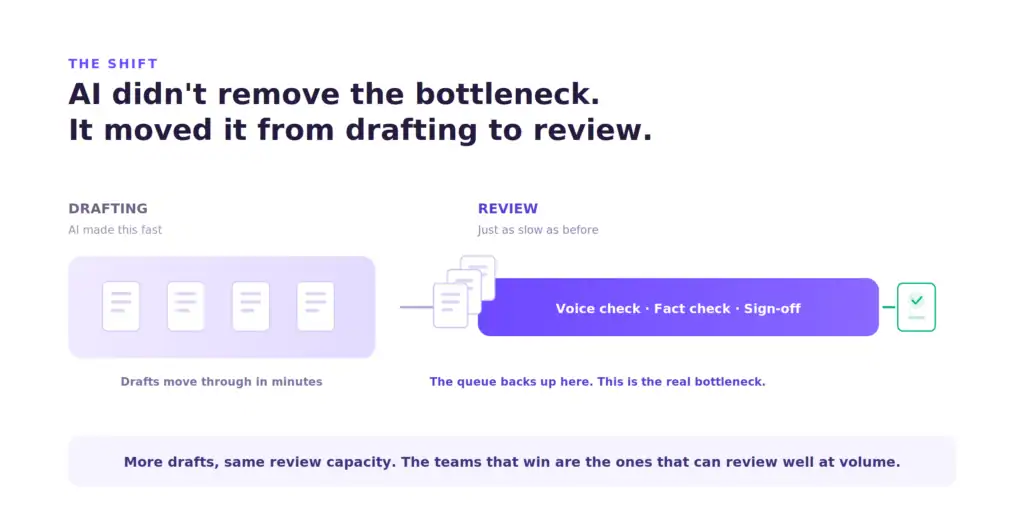
- AI roughly doubled how much a team can write, but review speed stayed the same. The slow point moved from writing to review, and that is where quality now wins or loses.
- AI does not get grammar wrong. It gets facts, fake sources, brand voice, and sameness wrong, and none of those show up in a spell-checker. You need a review process built to catch clean-looking mistakes.
- Sorting drafts by how much is at stake fixes the speed problem. Low-risk drafts get a quick look, high-risk drafts get the full check, and nobody wastes a senior editor’s time on a simple listicle.
- Scattered feedback is the hidden cost. Move review into the editor where the draft lives, so notes sit on the exact block and everyone works from one version.
The short answer, before we explain it
If AI has buried your team in more drafts than your editors can handle, the fix is not a better prompt or a faster writer. It is a review process built for volume. Here is the whole thing in four steps, and the rest of this piece explains each one.
First, sort every draft by how much is at stake before anyone reviews it. A product launch post and a simple how-to do not need the same level of checking. Treating them the same is why review feels slow.
Second, review against a fixed checklist, not a gut feeling. AI fails in the same few ways every time. A reviewer who knows what to look for works far faster than one who just senses something is off.
Third, keep every note in one place, attached to the exact line it is about. Feedback spread across email, chat, and a stray doc is where hours quietly go missing.
Fourth, make sign-off a real step with a named owner, so nothing goes live on the hope that someone probably checked it.
Why AI made editorial review the slow point
Writing used to be the slow part of publishing. A writer stared at a blank page, and everything waited on them. AI removed that wait. A usable first draft now takes minutes, and teams noticed. Companies using AI publish around 42 percent more content per month, a jump from a median of 12 articles to 17.
But look at what did not change. Every one of those extra drafts still needs a person to check the voice, confirm the facts, and approve it. The writer got faster. The editor did not. So the line that used to form at the writer’s desk now forms at the reviewer’s.
This is not a small scheduling problem. It is where your content’s quality is decided. Nearly every team uses the same few AI tools with similar prompts, so first drafts across your whole industry come out looking alike. The one thing that sets your content apart from a rival’s is what your editor does to it before it goes live. Review is no longer a formality. It is now your main edge, and it happens to be the stage nobody added staff for.
There is a real cost to getting this wrong. Teams that raised their output without raising their review effort saw traffic drop within 90 days, once Google spotted the pattern as scaled content abuse. More posts did not mean more traffic. It meant more thin, unchecked pages that pulled the whole site down.
Where AI-generated content actually fails review
To review AI content fast, you have to know exactly what breaks. AI writes smoothly, and that is the trap. The text looks clean, so the errors hide inside sentences that read perfectly. Here are the failures worth training your reviewers to catch, roughly in order of how much damage they do.
Made-up facts and sources. This is the dangerous one. When a model is unsure, it does not stop. It fills the gap with something that sounds right. Invented numbers look believable. Fake sources are worse, because the model has learned what a real source looks like: a proper author name, a real-sounding journal, even a correctly formatted link that leads nowhere. In one 2026 study, more than a third of the sources AI cited could contain made-up content. A reviewer skimming for typos will miss a confidently invented source every time.
Confident wrong claims. On top of fake sources, AI states things that are simply not true, and it says them in the same steady tone it uses for facts it gets right. There is no hint to warn you. Treat every fact in an AI draft as unconfirmed until a person checks it. The smooth writing works against you here.
Brand voice drift. Left alone, AI slides into a generic, polite, corporate tone. It no longer adheres to the brand voice. The grammar is perfect and the writing has no personality. If your voice is short and direct, AI will pad it. If it is warm, AI will flatten it.
Sameness. AI has tells. It leans on lists of three, it warms up with filler before it says anything, and it writes paragraphs of nearly the same length that create a flat, blocky rhythm. Readers notice, even when they cannot say why. In one survey, 67 percent of B2B buyers said they could usually spot unedited AI content, and 58 percent said spotting it made them trust the publisher less.
No real point. AI is good at covering a topic and bad at having an opinion. It sums up what everyone already knows and stops there. The insight, the take, the specific example from your team’s own work: that is the part a person has to add, because the model does not have it.
None of these show up in a grammar checker. That is the whole problem, and it is why a fixed checklist beats a general read every time.
How to build an AI content review workflow for your team
Knowing what breaks is half of it. The other half is reviewing fast enough to keep up with the drafts. Here is the workflow.
Sort drafts by risk first
Not every draft needs the same level of checking, and pretending they do is why review feels impossibly slow. Split incoming content into groups before anyone opens it.
A high-risk draft is anything with a claim you can be wrong about in public: a launch post, a data piece, a comparison, anything with numbers or sources, anything a customer will act on. These get the full check, every failure looked for, every fact confirmed against the real source.
A low-risk draft is routine and safe: an internal update, a light how-to, a simple roundup. These get a quick pass for voice and obvious errors. You are not confirming a source that is not there.
This one step keeps your senior editors from spending their best hours on content that never needed them, so the high-risk work gets the attention it actually needs.
Review against a checklist, not a feeling
Give every reviewer the same short list, built from the failures above. Check the facts and every source against the real thing. Check the voice against a piece you already know is on-brand. Check for the AI tells. Check that the piece actually says something, instead of just circling a topic.
A checklist turns review from an open-ended read into a fast, repeatable pass. It also means a junior reviewer catches what a senior one would, because the knowledge lives in the list, not in one person’s head.
Confirm facts by spotting disagreement
Here is a simple trick for the fact-checking step. AI does not make the same mistake twice. A model will not reliably invent the same false fact again. So when a claim matters and you are unsure, check it against a second source, or even a second AI tool. Where they disagree, you have found the exact spot to look into, instead of re-reading the whole draft. The disagreement is the clue. It points your reviewer straight at the risky claim.
Keep feedback in one place, on the draft itself
This is where most teams quietly lose time. Feedback lives in an email from one reviewer, a chat ping from another, tracked changes in a downloaded doc, and a comment someone made out loud in a meeting. Nothing sits next to the line it is about. Two reviewers say opposite things. A fix gets lost. The writer ends up guessing what to change, and every guess is another round trip.
Fix it by moving review to where the draft already is. When a note is pinned to the exact block, it cannot drift. When everyone reviews the same version, nobody works from an old copy. This one change cuts more delay than any prompt tweak ever will.

Make sign-off a real step
Finally, approval has to be a clear action with a named owner, not a vague sense that the piece is probably fine. Someone checks the criteria for that draft and clears it on the record. Without that step, drafts go live on the assumption that somebody, somewhere, must have looked. That assumption is exactly how a clean-looking mistake reaches your readers.
How Multicollab supports AI content review inside WordPress
The workflow above needs a place to live. Email, chat, and downloaded docs are what created the slow point, so the answer is to review where you publish. That is what Multicollab does. It brings Google Docs-style collaboration and editorial review into the Gutenberg block editor, so your team runs the whole review process without leaving WordPress.
- Inline comments pin feedback to the exact block, so a note never drifts from the line it belongs to. Reviewers can @mention each other, add a reaction, and attach files, which keeps the fact-check and voice-check talk tied to the specific claim instead of spread across five tools.
- Suggestion Mode shows edits as tracked changes, green for added and red for cut, so the writer sees every change and can accept or reject them in bulk. It is built for the confident-wrong-claim problem: a reviewer can rewrite a shaky line and the writer sees exactly what changed and why.
- Editorial Checklist sets the required steps for each post type, which is how you put the risk sorting into practice. A high-risk post type carries the full fact-and-source list, a routine one carries a lighter list, and nothing goes live until its list is done.
- Content Workflows move a draft through set stages with saved versions, so a piece goes from draft to review to sign-off with a clear owner at each step and a record of who cleared it.
AI handed your team more drafts than it knows what to do with. The teams that come out ahead will not be the ones writing the most. They will be the ones that can still review well when the volume climbs. Writing is a solved problem now. Review is the real work, and it is work a team does together.
Ready to make review keep up with your content? Explore Multicollab.
Frequently asked questions
Why has AI made editorial review harder instead of easier?
AI sped up writing but left review moving at the same pace as before. Teams now produce far more drafts, and each one still needs a voice check, a fact check, and a sign-off. That work does not vanish. It moves from writing to review, and review becomes the new slow point. Only about 7 percent of marketers publish AI content without editing, so nearly every team is already doing this work. The challenge is doing it fast enough.
How do you review AI-generated content quickly?
Sort drafts by risk first, so a routine post does not get the same checking as a launch announcement. Then review high-risk drafts against a fixed checklist covering facts, sources, brand voice, structure, and whether the piece actually says something. A checklist turns review into a fast, repeatable pass instead of an open-ended read, and it lets a junior reviewer catch what a senior one would.
Where should humans stay involved in an AI content workflow?
People own the review. That means confirming facts against real sources, judging the brand voice, checking the structure, and deciding a piece is ready before it goes live. AI can produce a draft, but a person has to be the one who confirms it is right, because the model states wrong claims with the same confidence as correct ones.
Does publishing more AI content hurt SEO?
It can, if you raise output without raising review. Teams that scaled volume without checking quality saw traffic drop within about 90 days, once Google flagged the pattern as scaled content abuse. Publishing more thin, unchecked pages pulls the whole site down. The teams that gained traffic grew their review effort alongside their output.
How does Multicollab help teams review AI content faster?
Multicollab moves review inside the WordPress editor itself. Inline comments attach feedback to the exact block. Suggestion Mode shows edits as tracked changes. Editorial Checklist sets a review list for each post type, which is how you sort by risk, and Content Workflows walk a draft through its stages with a clear owner at each one. Because everyone works from one version, nothing gets lost.
Download a Free Actionable Guide: 45+ Actionable Tips to Optimize Performance for High-Traffic WordPress Websites
Performance Optimization Techniques: Speed up your site with caching, image compression, and code minification.
Hosting and Scalability Suggestions: Learn to choose the right hosting solutions and scale efficiently.
Security and Protection Guidelines: Safeguard your site from DDoS attacks, malware, and performance threats.
Content and Plugin Management Tips: Optimize your database, plugins, and themes for peak performance.