

Table of Contents
Key Takeaways
- In WordPress, editing a published post updates the live page immediately. There is no built-in review layer once content is live.
- Reviews and approvals only work when enforcement exists inside the publishing system. External approvals communicate intent.
- Safe updates separate editing from publishing. Changes are made on a version, reviewed there, and merged only after approval.
- Post statuses and roles organize work, but they do not prevent risky live updates.
- Multicollab supports controlled publishing through Create Version, Content Workflows, and Editorial Checklists.
In WordPress, a published post has no safe edit state by default.
This is why safely updating published content in WordPress requires a different approach than editing drafts.
If someone clicks Update, the change is live.
Safe updates solve this by moving edits into a versioned change path that can be reviewed and approved before anything reaches the public page.
By the end of this article, you will understand:
- Why editing published content is a structural risk in WordPress
- What “safe updates” actually mean in operational terms
- Why reviews alone do not protect live pages
- What kind of system prevents SEO, UX, and trust issues at scale
This article explains the decision logic behind safe content updates, not just the tools used to implement them.
What Happens When You Update Published Content in WordPress

When a post is published in WordPress, it exists in a live state.
Any edit made to that post is applied directly to the public page when the ‘Update’ button is clicked.
There is no native draft or review layer for published content. WordPress does not distinguish between editing and publishing once a post is live.
This is true whether you are a solo blogger or a multi-editor team. WordPress treats an edit on published content as a publish action.
Why Editing Published Content Creates Risk for SEO, UX, and Trust
Updating published content is routine. Teams fix errors, refresh SEO pages, update pricing, and improve evergreen content every day.
This creates three predictable issues.
- User experience risk: Visitors can see incomplete, incorrect, or changing content during edits.
- SEO risk: Unreviewed changes can affect rankings, internal links, metadata, or page structure.
- Trust risk: Published content changes without oversight weaken confidence in reviews and approvals.
When editing and publishing are the same action, risk is unavoidable.
Why Reviews and Approvals Do Not Protect Live WordPress Content
Most teams already review content before it goes out.
- Someone looks at the changes.
- There is agreement that the update is fine.
- From the team’s point of view, the content is approved.
The gap shows up after the post is already published.
Most teams still end up making the final change directly on the live page.
Those approvals usually live outside WordPress. They sit in a Slack message, a comment thread, or a shared document. Everyone involved knows what was approved, but WordPress does not.
When a published post is edited, WordPress does not check whether that change was reviewed or signed off. It simply applies the update as soon as it happens.
As long as approvals exist outside the publishing system, they depend on coordination and timing. They do not control what goes live.
What “Safe Updates” Mean for Published WordPress Content
A safe update does not touch the live page while work is in progress. The change is prepared somewhere else, reviewed there, and only applied to the live page once it is approved.
In practical terms, this means three things.
- First, edits happen on a separate version of the content. The published page stays exactly as it is while changes are being made.
- Second, review and approval happen on that version. Comments, suggestions, and sign-off all happen before anything goes public.
- Third, publishing is a deliberate step. Someone explicitly decides when the approved version replaces the live one.
When these conditions are in place, updates stop being risky because unfinished changes cannot reach the live page.
Why Careful Update Processes Stop Working as Teams Scale
A manual review process can work when updates are rare.
As updates become frequent, teams run into the same failure pattern.
One person edits a live page while another is still reviewing. A small change goes out before it is checked. An urgent fix bypasses the usual steps.
The problem is that coordination cannot act as a safeguard when the CMS publishes instantly. At that point, you need the CMS to enforce the boundary, not the team to remember it.
Why post statuses, labels, and roles do not prevent risky updates
Post statuses describe where content is supposed to be.
A post marked “Pending review” can still be edited and updated once it is published.
An editor with the right role can still update a published page directly.
Statuses and roles explain who is responsible, but they do not create an approval gate for live updates.
This is why teams often feel they have structure but still experience unexpected live changes.
Preventing risky updates requires control over actions, not labels.
How Safe Updates to Published Content Are Implemented Using Create Version
Once teams accept that live content cannot be edited safely by default, the question becomes practical.
Where do WordPress updates happen, and how are they controlled?
Multicollab addresses this with Create Version.
Create Version allows a team to branch a published post into a separate working version. That version becomes the only place where edits, reviews, and discussions happen.
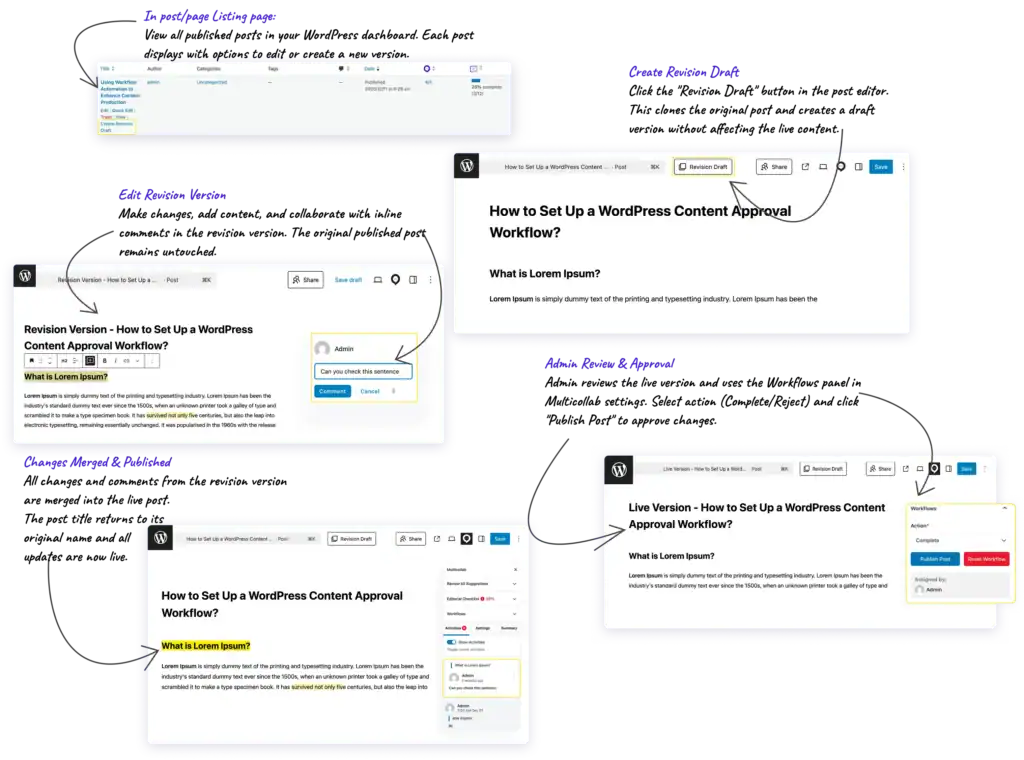
When updating published content, Create Version gives teams a controlled path:
- Create a version of the published post
- Review changes on that version using comments and suggestions
- Merge the version only after approval
This is ideal for SEO refreshes, correcting outdated information, or improving evergreen posts. Multicollab features take this workflow up a notch:
- Updates are made on a controlled version using Create Version.
- They move through defined review and approval stages using Content Workflows.
- Quality checks are applied consistently using Editorial Checklists.
Watch:

Multicollab Ensures Controlled Publishing After Content Is Live
Statuses and roles help organize work, but they do not prevent live updates. Reviews may exist, but without enforcement inside the CMS, they cannot determine when changes go public.
Multicollab solves this by enforcing separation between editing, review, and publishing after content is live.
The result is a publishing system where edits do not imply publishing, approvals are enforced, and live content changes only when the process is complete.
Multicollab provides a WordPress publishing model designed for teams that need predictable updates on high-impact pages.
If your team regularly updates published content and needs those changes reviewed before they go live, the next step should be to explore how Multicollab’s Create Version and Content Workflows fit into your existing WordPress editorial process.
Download a Free Actionable Guide: 45+ Actionable Tips to Optimize Performance for High-Traffic WordPress Websites
Performance Optimization Techniques: Speed up your site with caching, image compression, and code minification.
Hosting and Scalability Suggestions: Learn to choose the right hosting solutions and scale efficiently.
Security and Protection Guidelines: Safeguard your site from DDoS attacks, malware, and performance threats.
Content and Plugin Management Tips: Optimize your database, plugins, and themes for peak performance.