
Table of Contents
Managing a WordPress editorial team can feel like herding cats—especially when it comes to handling feedback. We’ve all been there: emails get lost, comments are missed, and the final product can end up far from what you imagined. Juggling input from writers, editors, and stakeholders can turn feedback into a bottleneck instead of the creative boost it should be.
But here’s the good news: it doesn’t have to be this way. Imagine a feedback system that integrates directly into your WordPress workflow, helping you cut down on confusion and speed up your editorial process. With the right tools and approach, feedback can go from being a time drain to a productivity booster.
In this post, we’ll explore how adopting collaborative feedback can streamline your team’s workflow, improve content quality, and enhance team dynamics. Plus, we’ll dive into how the Multicollab plugin transforms WordPress collaboration, making it easier for teams to create content together, in real-time.
What is Collaborative Feedback?
Collaborative feedback is all about gathering input, ideas, and suggestions from multiple team members during the creation or review of content. Instead of feedback going just one way—from manager to writer—it becomes a two-way street, encouraging open communication. This approach allows every team member to contribute their unique perspective, leading to higher-quality content and better team dynamics.
For WordPress content teams, this approach can be transformative. From editors and writers to designers and SEO specialists, everyone can contribute their expertise to fine-tune content. This not only leads to better results but also strengthens the team as a whole.
The Benefits of Collaborative Feedback for Your WordPress Team
Improves Content Quality: Collaborative feedback allows multiple sets of eyes to review content before it’s published. Different team members catch different issues—whether it’s a typo, a factual error, or a structural improvement. This ensures your content is polished, accurate, and ready to engage your audience.
Speeds Up the Editorial Process: When feedback happens in real-time and team members collaborate on a draft simultaneously, the content creation process moves much faster. What used to take days through email chains can now be resolved instantly, keeping your deadlines on track.
Enhances Creativity: Multiple viewpoints encourage creativity. One person might suggest a more engaging headline, while another proposes a fresh take on the story. Collaborative feedback helps avoid groupthink and fosters innovation within your team.
Builds a Stronger Team Dynamic: When everyone contributes to each other’s work, they feel more invested in the final product. This shared responsibility fosters stronger teamwork and trust.
Streamlines the Review Process: Managing revisions and edits is a crucial part of any editorial workflow. Collaborative feedback ensures smoother communication during this process, reducing bottlenecks and clarifying what needs improvement.
Multicollab: Supercharging WordPress Collaboration
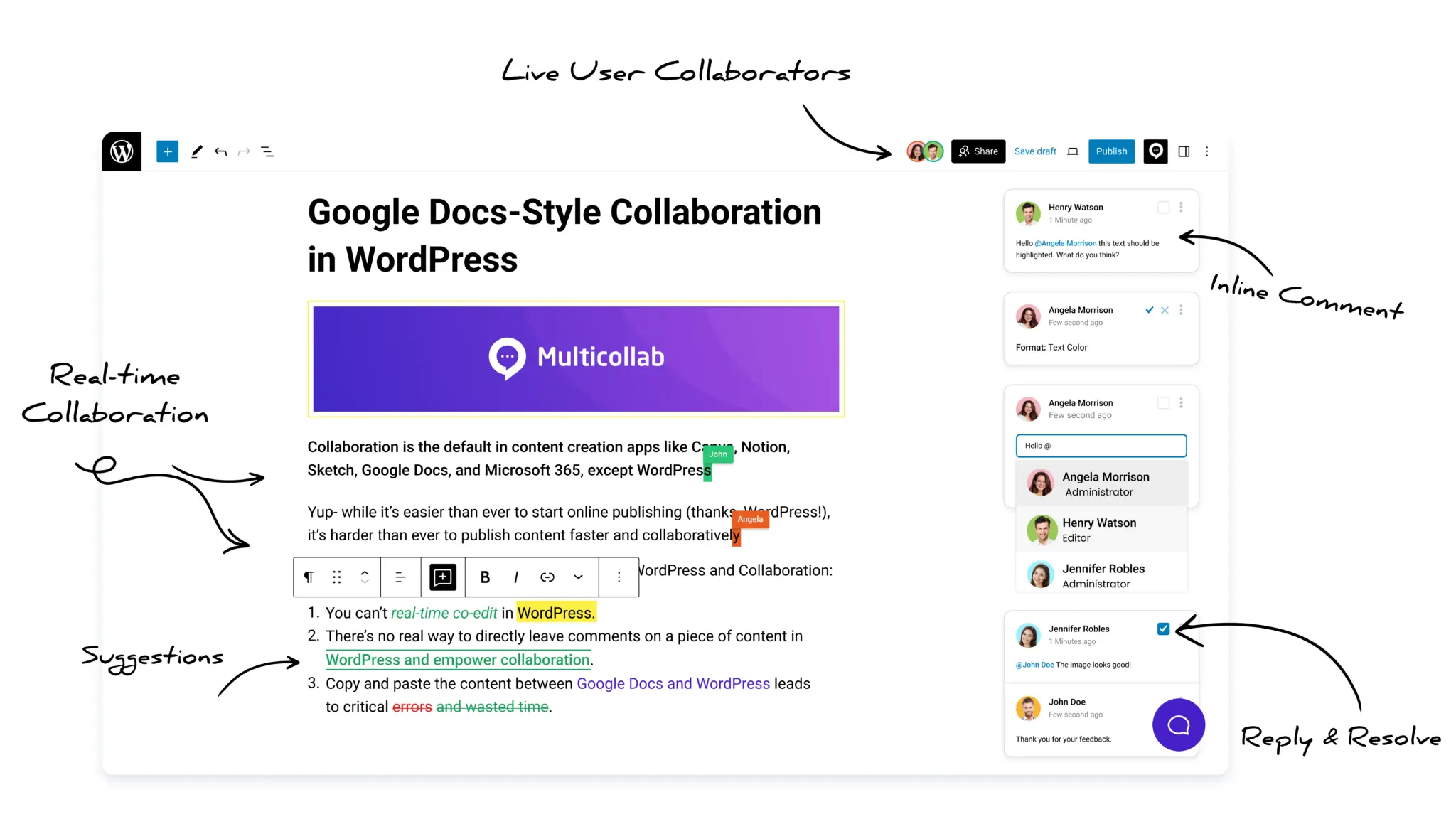
When it comes to collaboration within WordPress, Multicollab is a game-changer. This plugin enhances the native capabilities of WordPress by enabling real-time collaboration, inline comments, suggestion mode, and more. Let’s break down how these features can significantly improve your team’s efficiency.
Real-Time Collaboration
Imagine working on a blog post with multiple contributors, all making changes at the same time. With Multicollab’s Real-Time Collaboration feature, that becomes a reality.
This functionality allows multiple users to simultaneously edit the same post or page in real-time, much like you can in Google Docs. No more waiting for one editor to finish before someone else can jump in. Your content teams can collaborate instantly, ensuring that every aspect of the post is addressed more efficiently.
For instance, if your team is preparing a major announcement post for a product launch, your writer can craft the content while the SEO specialist optimizes it and the designer tweaks the images—all at once. This speeds up the entire process and ensures all stakeholders are on the same page (literally!).
Inline Commenting
Feedback needs to be clear and actionable, and Multicollab’s Inline Commenting feature allows for just that. Editors can leave comments directly on specific sections of a draft, whether it’s a piece of text, an image, or any other media.
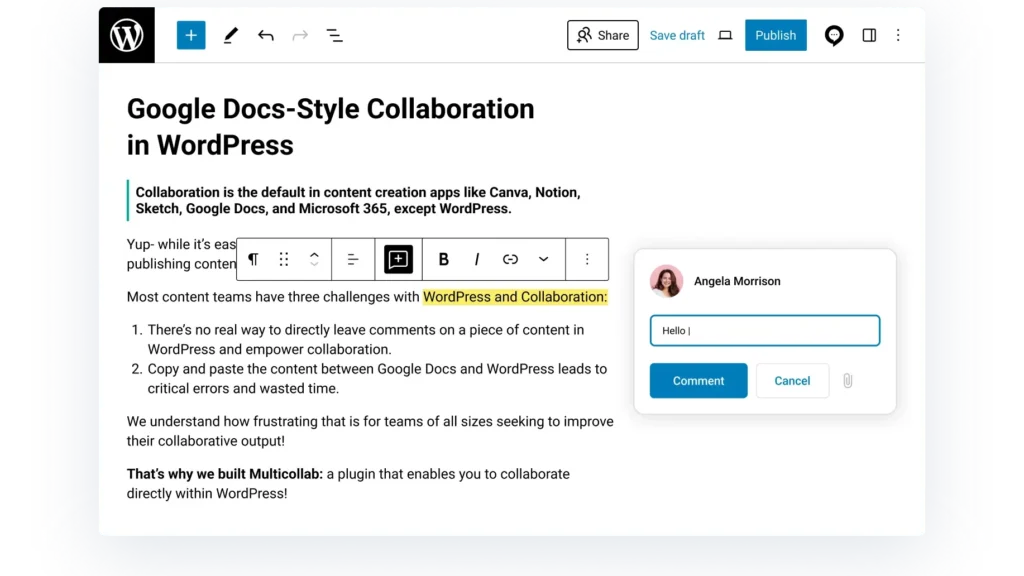
This makes the feedback process far more efficient than tracking changes through endless emails or spreadsheets. Team members can review and address comments directly within the WordPress interface, ensuring quick resolutions and more cohesive content.
Let’s say you’re reviewing a blog post about SEO strategies. The SEO expert can leave comments highlighting necessary keyword optimizations, while the writer implements these suggestions without having to leave the WordPress dashboard.
Suggestion Mode
The Suggestion Mode feature in Multicollab is particularly useful for editors who want to make changes without directly altering the original content. In this mode, suggested edits are highlighted for the writer or another team member to either accept or reject.
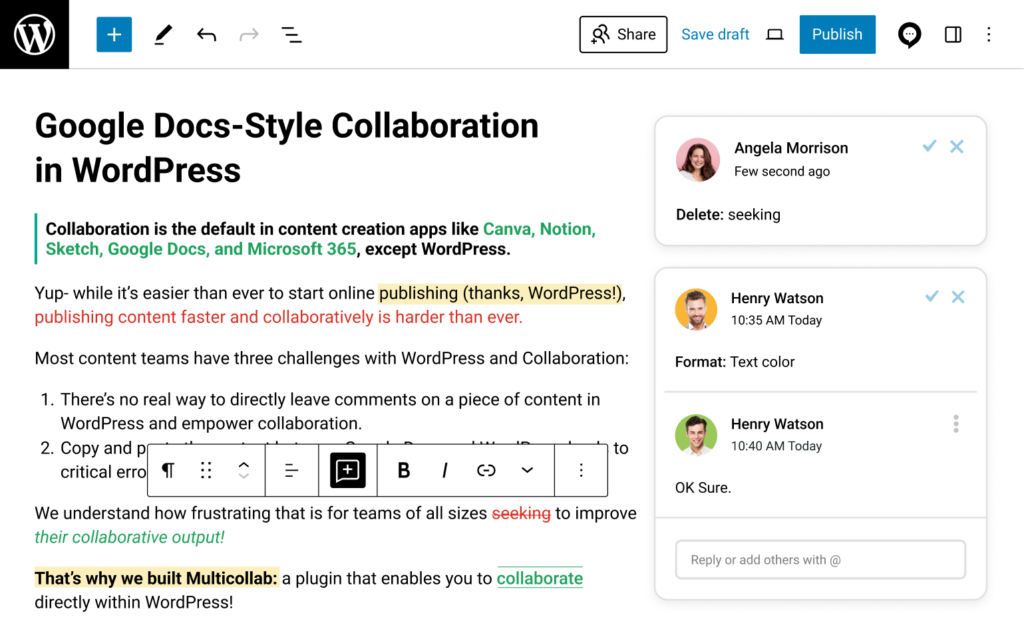
This is perfect for maintaining editorial control while allowing team members to contribute to the final version. When suggestions are accepted or rejected, the history of those changes is tracked, ensuring transparency throughout the revision process.
Guest Collaboration
Another standout feature of Multicollab is Guest Collaboration. External stakeholders like clients or freelance contributors can review, comment, and collaborate on posts without needing a full WordPress account. This opens up the collaborative process to a wider audience while maintaining control over the final content.
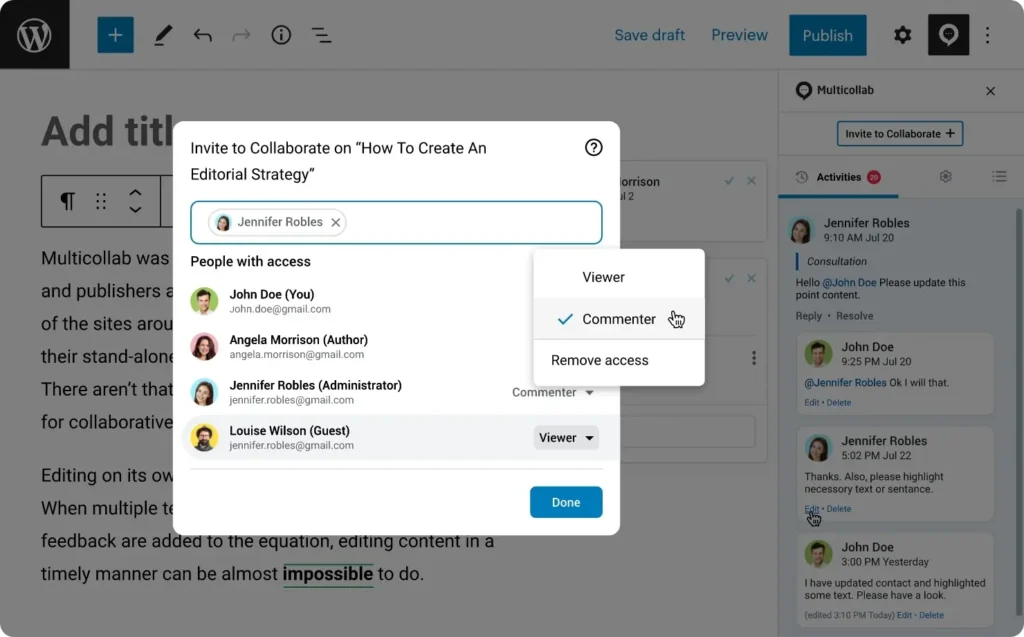
This feature is especially useful for WordPress teams that work with external clients or guest bloggers. You can invite clients to review and comment on drafts without needing them to sign up for an account, speeding up approval processes and keeping all feedback in one place.
Slack Notifications
Many teams rely on Slack for internal communication, and Multicollab’s Slack Notifications feature integrates seamlessly with this workflow. Whenever there’s a mention or new comment activity, notifications are pushed to the team’s Slack channel. This real-time update system helps team members stay connected and address feedback or revisions quickly.
Attach Documents to Comments
Sometimes, a comment needs a bit more context, and the Attach Document to Comment feature allows team members to include images, PDFs, or other relevant files directly in their feedback. This feature opens up new possibilities for collaboration, enabling more thorough and effective feedback.
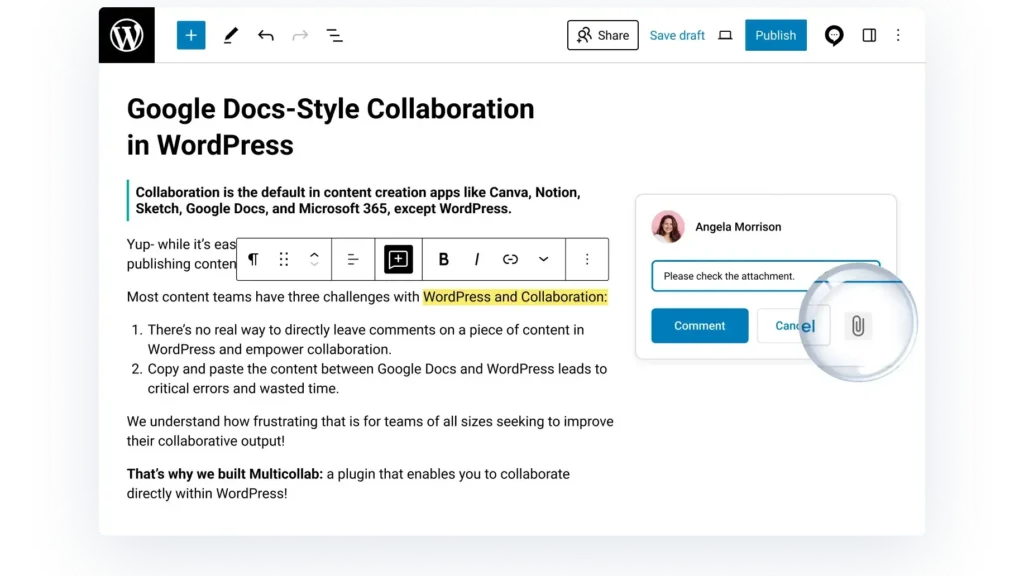
Imagine the possibilities: a designer attaches a mock-up for a featured image, or a marketing specialist attaches a competitor’s blog post for inspiration—all directly within the comments of the WordPress draft.
Reports and Activity Timeline
With Multicollab’s Reports and Activity Timeline, WordPress editorial teams can easily monitor and track the progress of their content. This tool offers a transparent view of who contributed what, when, and where. It also helps editorial managers ensure that deadlines are being met and no important feedback is being overlooked.
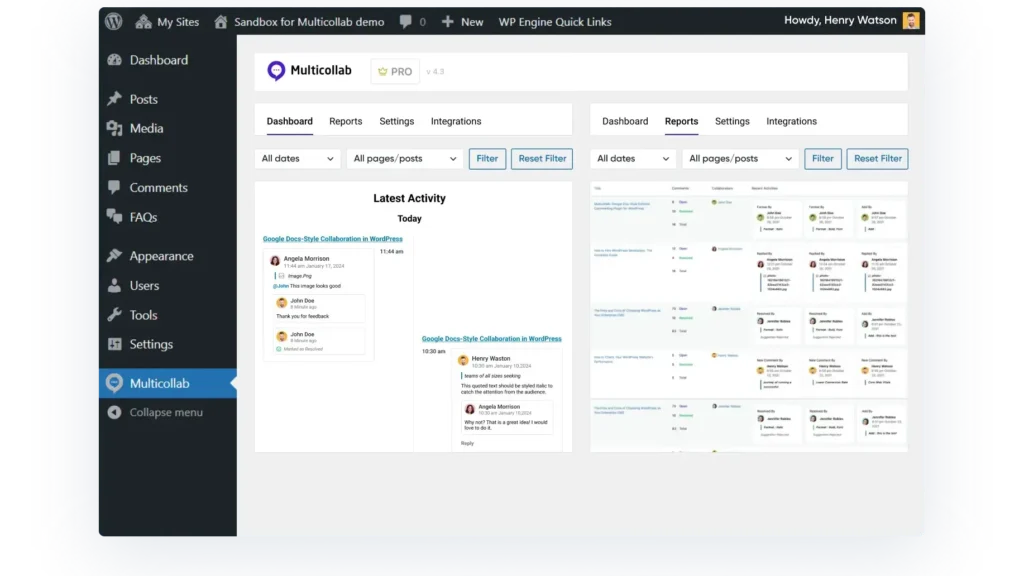
This feature is especially useful for high-volume content teams, who need to maintain a clear overview of their editorial process. With reports and activity monitoring, managers can quickly identify any bottlenecks and address them before they impact deadlines.
Top Tips for Improving Collaborative Team Efficiency
- Make sure everyone knows their part in the content creation drama. When roles are crystal clear, the team can hit their marks without stepping on each other’s toes.
- Set up dedicated spaces for feedback—like special threads or shared documents—so nothing gets lost in the shuffle.
- Use a structured approach like the “SBI” (Situation-Behavior-Impact) model to make feedback straightforward and actionable.
- Prompt, specific feedback helps avoid bottlenecks and keeps the creative juices flowing. Timely insights mean quicker tweaks and less waiting around.
- Foster an environment where open dialogue and constructive criticism are the norm. When team members feel comfortable sharing their thoughts, creativity blossoms and collaboration becomes second nature.
- Get the team together to review and reflect on the feedback process. It’s like a team huddle—discuss what’s working, what’s not, and tweak the game plan for even better results.
- Shared documents, project management apps, and communication platforms can make collaboration smooth and keep feedback flowing seamlessly.
- Equip your team with the skills and guidelines they need for effective feedback. Think of it as giving them a map and compass for navigating the feedback landscape, ensuring every comment is constructive and on point.
- Not all feedback is created equal. Develop a system to prioritize feedback based on impact and urgency. Focus on what really matters to keep the content sharp and deadlines in check.
- Having team members review each other’s work not only enhances content quality but also builds a culture of collaboration and continuous improvement.
Get Started with Multicollab
Collaborative feedback is more than just a process—it’s the key to unlocking the full potential of your WordPress team. By opening the lines of communication, inviting diverse perspectives, and smoothing out the review process, you’ll not only create better content but also build a stronger, more cohesive team. Tools like Multicollab make this all happen effortlessly, letting your team focus on what matters—creating great content.
Ready to transform your editorial process? Try Multicollab today and watch your team’s productivity and creativity take off. Your next big breakthrough could be just one collaborative session away!