

Table of Contents
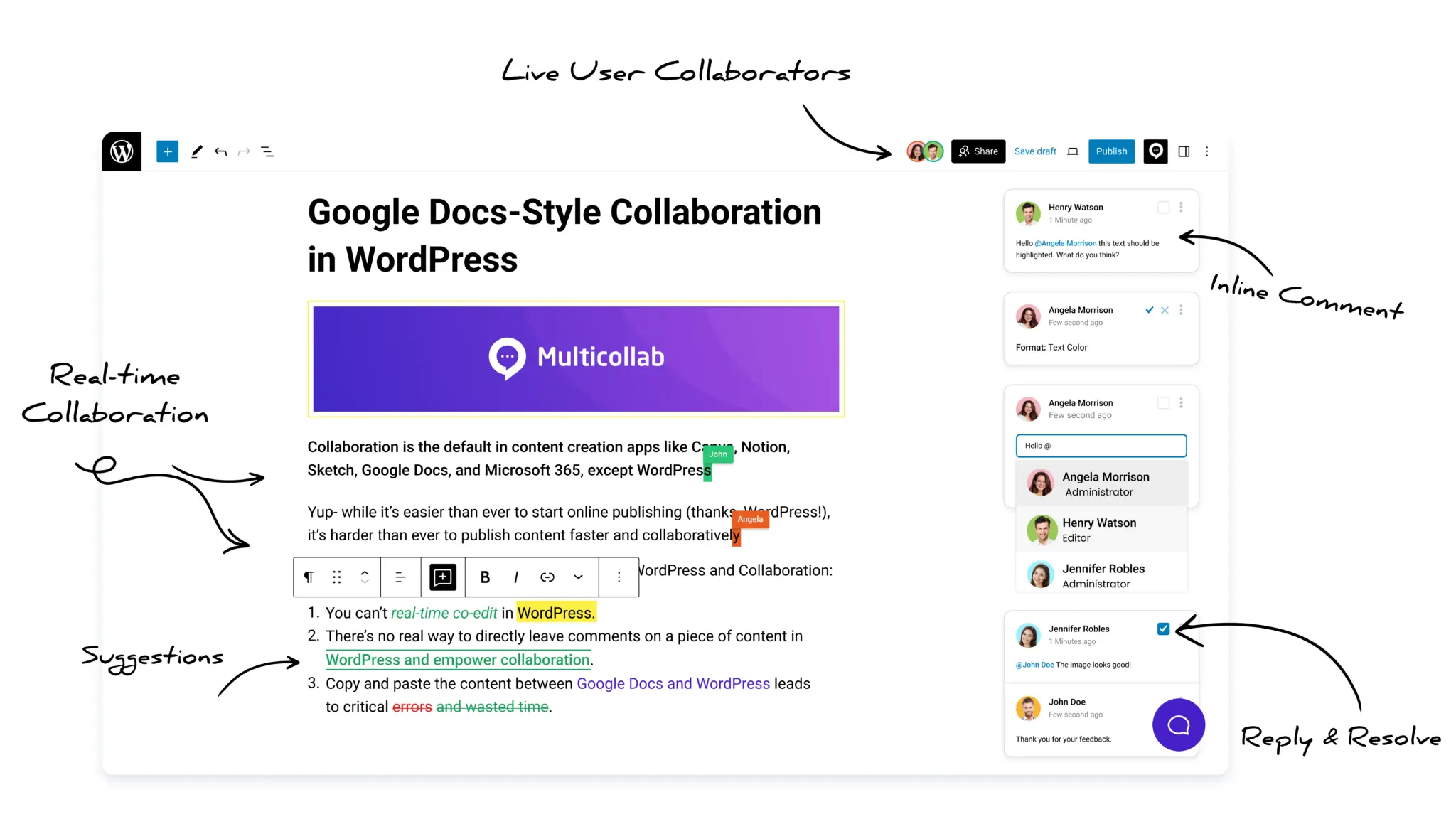
Multicollab is a popular WordPress plugin designed to bring Google Docs-style collaboration and editorial workflows directly into the WordPress Gutenberg block editor.
Brand voice consistency is hard to keep when freelancers write a large share of your content. Freelance drafts often arrive accurate and on time, but they don’t sound like your brand. Many editors fix this by rewriting the draft themselves.
That fixes the post in front of them. The freelancer never sees the changes, so the next draft has the same problems.
Quick answer: To edit a freelancer’s draft into your brand voice without rewriting it, define your tone of voice guidelines with examples instead of adjectives. Put one first-hand input in every brief. Edit structure before style. Make voice edits as visible suggestions with a one-line reason. Then add the edits you keep repeating to your voice guide, so each new draft needs fewer changes.
Why is brand voice consistency hard with freelance writers?
Freelancers write for many brands. When your guidance has gaps, they fill them with their own habits. Most voice problems start before the draft arrives: in vague voice guides, thin briefs, and feedback the writer never sees.
Many content teams depend on freelancers. In a 2026 benchmark of 321 B2B SaaS marketing leaders, 47% of teams outsourced 26 to 50% of their content production.
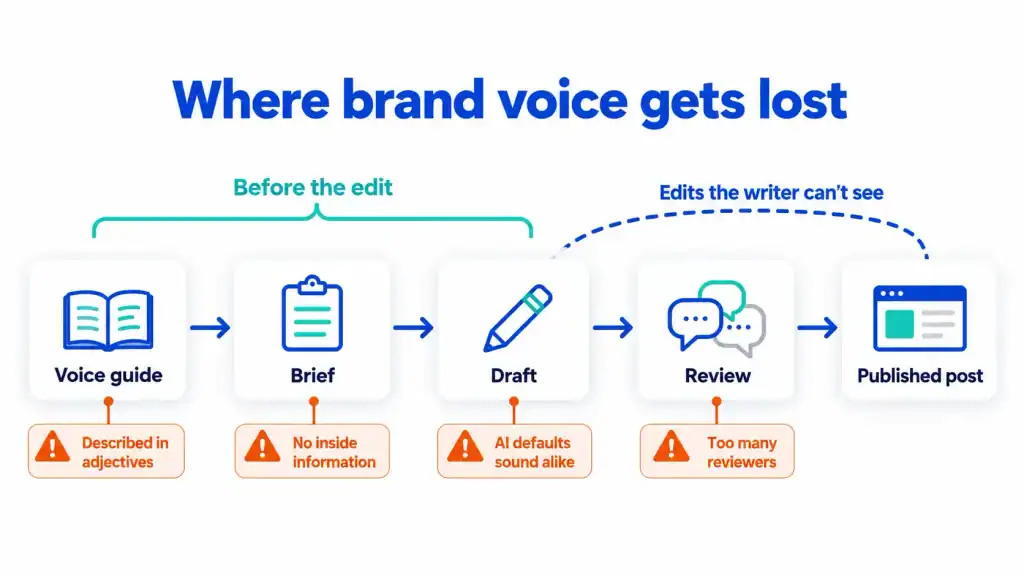
The most common reasons freelance drafts lose brand voice consistency during editorial workflows are:
- Voice described in adjectives: Words like “friendly,” “expert,” and “approachable” mean something different to every writer. Without examples, each writer guesses.
- Briefs with no inside information: A keyword and a word count give the writer nothing that is specific to your brand. In Contentoo’s State of Content Teams 2026 survey of 203 B2B content leaders, 56% blamed poor or incomplete briefs for drops in content quality.
- Too many reviewers: Each reviewer edits toward their own taste. In the same survey, 40% of content leaders said too many stakeholders weaken the message.
- AI-assisted drafts sound alike: Many freelancers draft with AI tools. Researchers at NYU found that essays written with an instruction-following AI model, the type behind today’s chat assistants, were more similar to each other. The researchers think the AI’s suggestions weaken the writer’s own voice.
- Edits the writer can’t see: When an editor rewrites a draft, the writer can’t tell what changed or why.
Fixing the draft alone won’t solve this, because most of these causes come before the edit.
Why does rewriting a freelancer’s draft slow your team down?
Rewriting makes your editor do the writer’s job on every post. The extra work never goes away, because the freelancer keeps making the same choices and
Content leads already spend a lot of time on coordination. Contentoo found that 43% of content leaders spend 40% or more of their week coordinating work instead of creating it. Rewriting drafts adds to that load.
| Rewrite the draft yourself | Suggest edits with a reason | |
| Time on this draft | Less | A little more |
| What the writer learns | Nothing | What you changed and why |
| The next draft | Needs the same edits | Needs fewer edits |
| Your voice guide | Stays the same | Gets new rules from your edits |
Rewriting saves time on one draft, then costs the same time again on the next one.
How do you edit a freelancer’s draft into your brand voice?
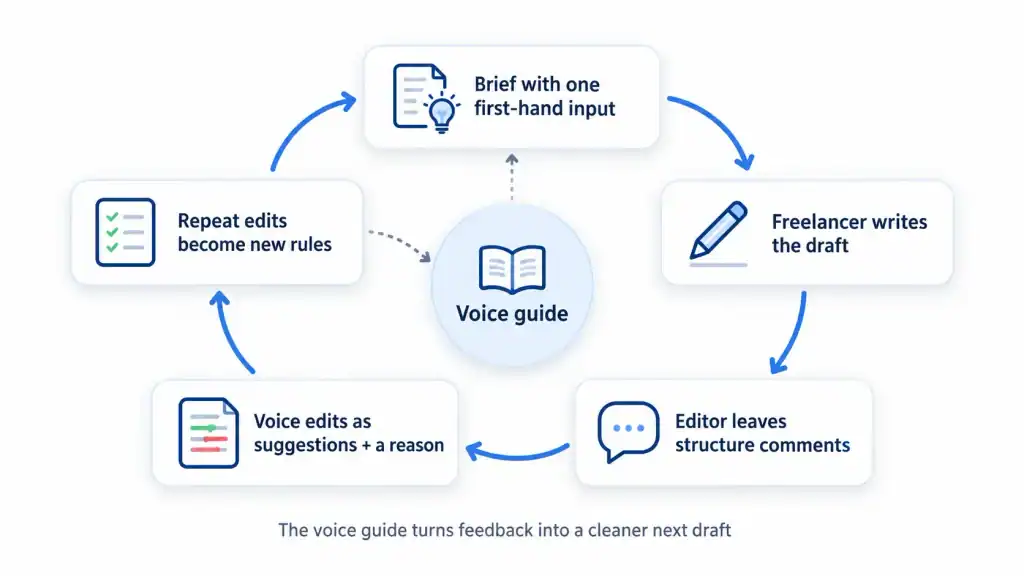
Follow five steps. Steps 1 and 2 happen before the draft arrives. Steps 3 to 5 happen during and after the edit.
- Write brand voice guidelines built on examples.
- Put one first-hand input in every brief.
- Edit structure first, voice second.
- Make voice edits visible and explain them.
- Turn repeat edits into voice rules.
Step 1: Write brand voice guidelines built on examples
Your voice guide should give writers examples of your voice. Keep it to one page, so writers read all of it.
- Place your voice on four scales: Nielsen Norman Group’s research describes tone on four dimensions: funny or serious, formal or casual, respectful or irreverent, and enthusiastic or matter-of-fact. Mark where your brand sits on each one.
- Add “say this / not this” pairs: Put a sentence in your voice next to the same idea in a voice you avoid.
- Link three model posts: Pick published posts that sound most like your brand. Tell writers what to notice in each one.
- List banned words and phrases: Include the filler words and clichés your editors cut most often.
| Say this | Not this |
| Your editor sees every change before it goes live. | This innovative platform empowers teams to achieve editorial excellence. |
| Turn on Suggestion Mode, then edit as usual. | Simply harness powerful suggestion capabilities to transform your workflow. |
Keep the guide where writers work. WordPress is testing a Content Guidelines feature in the Gutenberg plugin. It stores tone, voice, and vocabulary rules inside WordPress, so writers and AI tools read the same rules. It’s still an experiment, and it doesn’t check drafts against your rules.
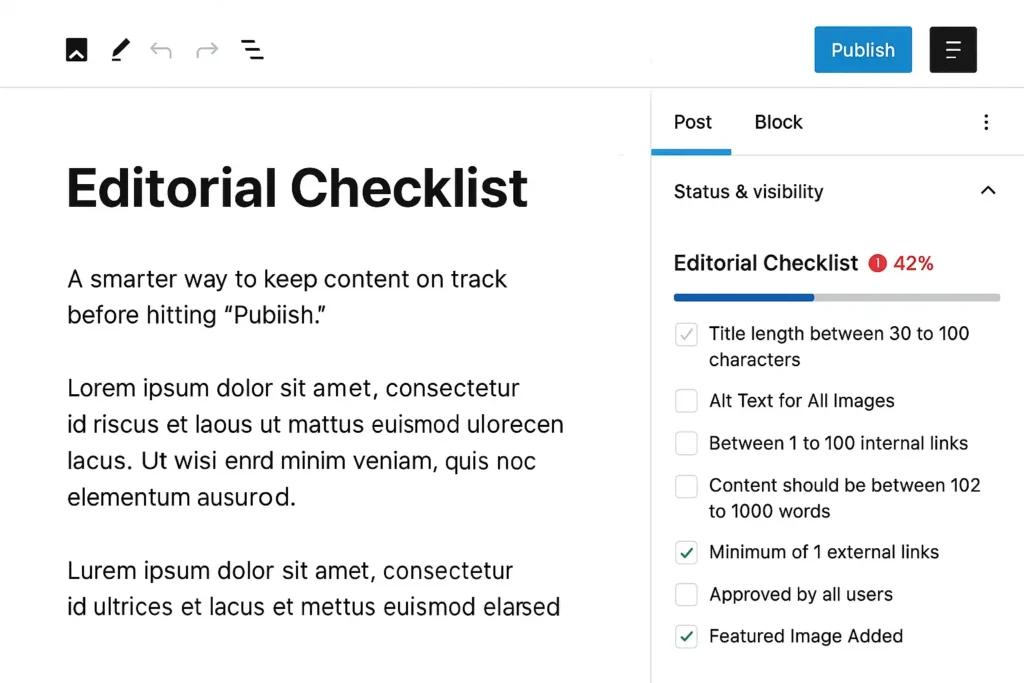
Until it reaches WordPress core, use a shared document and link it in every brief. If you use Multicollab, our Editorial checklist feature can help freelancers avoid publishing mistakes and keep content quality consistent.
A short guide full of examples gives writers more to work with than a long list of adjectives.
Step 2: Put one first-hand input in every brief
Freelancers don’t know your customers, your numbers, or your team’s opinions. Add at least one of these to the brief, so the draft includes something only your team knows.
- A customer quote or story: Take it from support tickets, sales calls, or reviews.
- An internal number: Use a usage figure or a result from your own tests.
- Your team’s opinion: Say what your team believes, including what it disagrees with.
- An example from your work: Share a screenshot or a short walkthrough of your own workflow.
Also include the reader, the one point the post must make, and a link to your voice guide. These inputs help writers who use AI tools too, because the tool works from your details instead of generic ones.
The more of your own details the brief includes, the less voice editing the draft needs.
Step 3: Edit structure first, voice second
Read the whole draft before you change anything. Fix the argument and the order first. Fix the wording after that.
- Structure pass: Leave comments only. Mark sections to cut, move, or expand, and anything that misses the brief.
- Return the draft: Let the writer fix the structure. They learn more from making the fix than from reading yours.
- Voice pass: Edit sentences only after the structure is right. That way, you don’t polish paragraphs that get cut later.
- Accuracy pass: Check facts, names, numbers, links, and product claims last, on the near-final text.
Doing structure, voice, and accuracy in separate passes takes less time than fixing everything at once.
Step 4: Make voice edits visible and explain them
Suggest the change instead of making it, and add one line on why. The writer can then see what you changed and why, in the same place.
- Keep the original visible: The writer’s sentence and your version should both show until someone accepts the change.
- Give the reason in one line: For example, “Open with the answer. Readers skip warm-ups.”
- Link the rule: Point to the line in your voice guide that the edit follows. If no rule covers it, add one.
- Skip reasons for small fixes: Explain voice and structure choices. Typos and commas don’t need a note.
When writers can see your edits and the reasons for them, they can apply them to the next draft.
Step 5: Turn repeat edits into voice rules
When you make the same edit three times, add it to your voice guide. Over time, the guide covers the edits your team makes most often.
- Keep a running list: Note edits you make more than once, for each writer and across writers.
- Add a rule with an example: Write the rule in one line and add a “say this / not this” pair.
- Tell the writer: Let them know which new rule came from their draft.
Your repeat edits show you what your voice guide is missing.
How do you show a freelancer what you changed in WordPress?
WordPress shows changes through revisions and lets you explain them with Notes. For one or two freelancers, that’s enough. If your team edits many freelance drafts each week, a plugin with tracked suggestions cuts down the back-and-forth.
The free WordPress way
- Give freelancers the Contributor role. Go to Users > Add New User and choose Contributor. Contributors can write and edit their own drafts, but they can’t publish, upload files, or edit a post after it goes live. Because they can’t upload files, your team adds the images.
- Have the writer submit for review. The writer clicks Submit for Review, and the post moves to Pending status for an editor.
- Explain edits with Notes. In WordPress 7.1, you can attach a note to a specific piece of text, @mention the writer, and keep several conversations on one block.
- Show changes with revisions. After you edit, the writer can open Revisions in the post’s settings sidebar and compare the two versions.
This is enough when: you work with one or two freelancers, edits are light, and your writers are willing to open the revisions screen.
Where the free way stops
- No accept or reject: As of WordPress 7.1, core doesn’t include tracked suggestions. You either change the text yourself or describe the change in a note for the writer to make.
- Edits and explanations are separate: The revisions screen shows what changed. The note that explains why is somewhere else.
- No view across writers: Nothing shows which writers need the most edits, or whether that number goes down over time.
Where Multicollab fits
Multicollab adds tracked suggestions, comments on selected text, and reports to the block editor. Each edit and its explanation sit together in the draft.
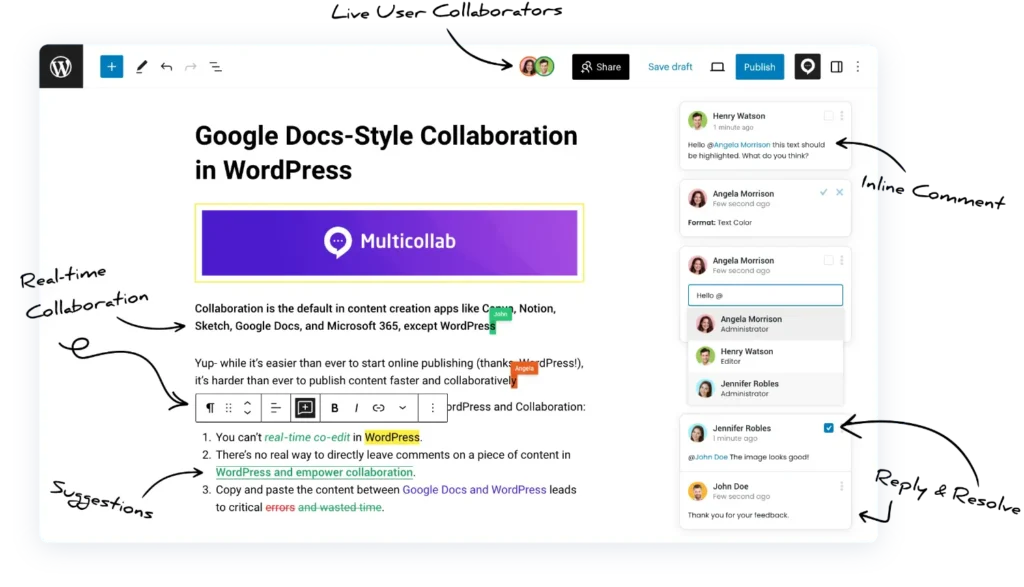
- Suggestion Mode: Your edits show as suggestions instead of replacing the writer’s text. Each person’s suggestions appear in their own color, and you can accept, reject, or comment on each one. To turn it on, go to Multicollab > Settings > Suggestion Mode.
- Comments on selected text: Add the one-line reason on the suggestion and @mention the writer. Email and Slack notifications let them know the draft is ready.
- Attachments on comments: Attach a file to a comment, such as your voice guide.
- Custom permissions: Choose which roles can manage comments and suggestions. For example, writers can review each suggestion while editors make the final decision.
- Guest access for outside reviewers: Invite a client or subject-matter expert with a unique email link. Guests join as a Viewer or Commenter without a WordPress account.
Keep these limits in mind:
- Paid feature: Suggestion Mode and guest access are part of Multicollab’s paid plans. See the pricing page for current plans.
- Block support: Suggestion Mode doesn’t cover every block type.
- One mode at a time: Suggestion Mode and real-time co-editing can’t run together. Freelance drafts are usually edited by one person at a time, so Suggestion Mode fits this work.
- Guest editing: Guests can edit only when real-time collaboration is turned on. Otherwise, they view and comment.
How do you know your edits are working?
Track how many edits each writer’s drafts need over time. If the number goes down, your guide and feedback are working. If it stays the same, your guide is missing rules.
- By hand: Count suggestions or notes per draft in a spreadsheet, with one row per writer.
- With Multicollab reports: Filter Reports and Activity by user, content category, and date to compare a writer’s early drafts with recent ones.
- With an editorial checklist: Multicollab’s Editorial Checklist lets you add custom tasks for each post type and warns before publishing if any are unfinished. Add your most common voice rules as tasks, so they get checked on every post.
This is how you keep brand voice consistency as you add more freelance writers.
When is rewriting the right call?
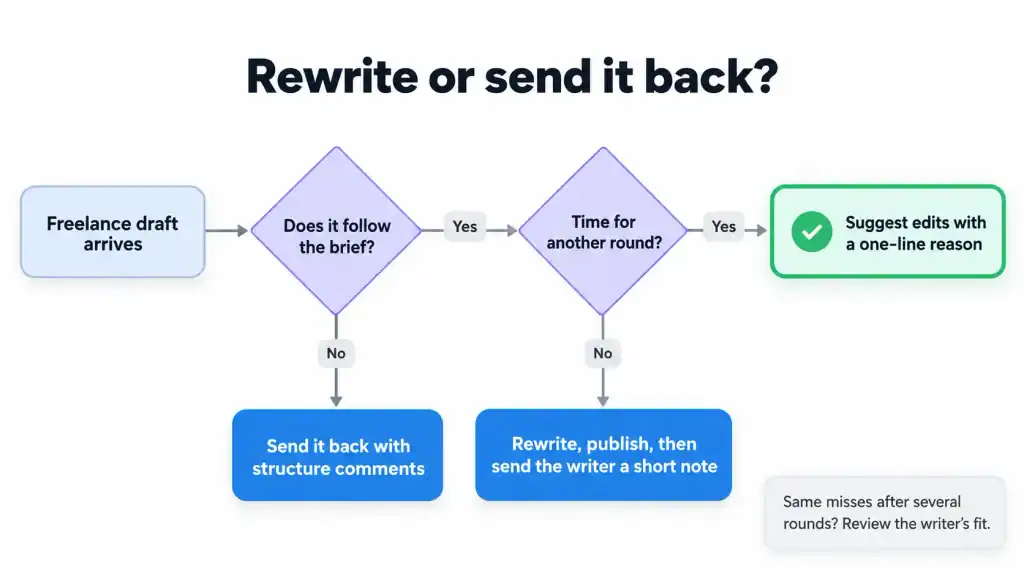
Rewrite only when a hard deadline leaves no time for another round. Even then, tell the writer what you changed and why.
- Hard deadline: Rewrite and publish. Then send the writer a short note on the two or three biggest changes.
- Missed brief: Send the draft back with structure comments. A new draft from a clearer brief takes less time than a full rewrite.
- Repeated misses: If a writer still misses the voice after several rounds of explained edits, look at the fit. Some writers suit some brands better than others.
Keep rewrites for these cases, and explain the changes each time.
Quick checklist
- Write a one-page voice guide with four-scale placement, “say this / not this” pairs, and three model posts.
- Add one first-hand input to every brief.
- Do a structure pass with comments only.
- Make voice edits as visible suggestions with a one-line reason.
- Check facts, names, links, and claims in a final accuracy pass.
- Add every repeated edit to the guide as a rule.
- Track edits per draft for each writer.
Frequently asked questions
How do you maintain brand voice with freelance writers?
To maintain brand voice, give freelance writers a one-page voice guide built on examples, and add one first-hand input, such as a customer quote, to every brief. Make voice edits as visible suggestions with a one-line reason. When you make the same edit more than twice, add it to the guide as a rule.
Should editors rewrite freelance content or send it back?
Send it back in most cases. A rewrite fixes one post, but the writer never sees what changed, so the next draft needs the same edits. Rewrite only when a hard deadline leaves no time for another round, and then send the writer a short note on the biggest changes.
What should brand voice guidelines for freelancers include?
Brand voice guidelines for freelancers should include where your voice sits on four scales (funny or serious, formal or casual, respectful or irreverent, enthusiastic or matter-of-fact), “say this / not this” pairs, three model posts, and a list of banned words. Keep the guide to one page, so writers read all of it.
Does WordPress have track changes?
Not in core, as of WordPress 7.1. Revisions let you compare saved versions, and Notes let you comment on specific text, but neither lets an editor suggest a change that someone else accepts or rejects. For tracked suggestions in the block editor, you need a plugin, such as Multicollab with its Suggestion Mode.
Can freelancers write in WordPress without publishing access?
Yes, give freelancers the Contributor role. Contributors can write, edit, and submit their own drafts for review, but they can’t publish, upload files, or edit a post after it goes live. Your team adds the images and publishes the post, or you can give trusted writers the Author role instead.
How do you show a writer what you changed in a WordPress post?
Use revisions to show what changed and Notes to explain why. Revisions compare saved versions side by side, and Notes attach comments to specific text with @mentions. If your team edits many freelance drafts each week, a plugin with tracked suggestions keeps each edit and its explanation in one place.
Can clients review a freelancer’s draft without a WordPress account?
Not in core WordPress, where reviewers need an account to open drafts. With Multicollab’s guest collaboration, you invite a client or subject-matter expert with a unique email link, and they join as a Viewer or Commenter without an account. Guests can edit only when real-time collaboration is turned on.
Download a Free Actionable Guide: 45+ Actionable Tips to Optimize Performance for High-Traffic WordPress Websites
Performance Optimization Techniques: Speed up your site with caching, image compression, and code minification.
Hosting and Scalability Suggestions: Learn to choose the right hosting solutions and scale efficiently.
Security and Protection Guidelines: Safeguard your site from DDoS attacks, malware, and performance threats.
Content and Plugin Management Tips: Optimize your database, plugins, and themes for peak performance.