

Table of Contents
Multicollab is a WordPress plugin built for content review, bringing inline comments, suggestion mode, and editorial approval workflows into the Gutenberg editor.
Key Takeaways
- Content review is the quality gate that protects accuracy, brand consistency, and trust before anything publishes.
- A good review process has clear stages, defined reviewers, and a single place where feedback lives.
- The most common reasons reviews fail are scattered feedback, unclear ownership, slow cycles, and reviewer bias.
- Best practices: use a checklist, gather diverse perspectives, keep feedback constructive, and document decisions.
- A dedicated review tool keeps the process fast and accountable. For WordPress teams, Multicollab brings review into the editor.
Publishing without review is how errors, off-brand messaging, and inaccurate claims reach your audience. Content review is the quality gate that catches those problems first. Done well, it protects your credibility and improves every piece before it goes live. Done badly, or skipped, it lets mistakes through and erodes trust.
This guide is a complete look at content review in 2026: what it is, why it matters, the step-by-step process, the best practices that make review effective, the common reasons it breaks down, and the tools that keep it running. Whether you run a small blog or a high-volume publishing operation, the principles are the same.
What is content review?
Content review is the process of checking content for accuracy, quality, clarity, and brand consistency before it is published. It usually involves one or more reviewers, an editor, a subject matter expert, an SEO specialist, or a manager, examining a draft, leaving feedback, and approving it once it meets the required standard.
Content review is broader than proofreading. Proofreading catches typos and grammar. Review also checks whether the content is accurate, on-brand, well-structured, optimized, and fit for its audience. It is the difference between content that is merely error-free and content that is genuinely good.
Why content review matters
Skipping or rushing review is a false economy. A strong review process delivers real value:
Protects accuracy and credibility. Review catches factual errors, outdated information, and unsupported claims before they reach readers. This matters most for ecommerce and content-heavy sites, where credibility and trust directly affect revenue.
Maintains brand consistency. Multiple writers naturally produce inconsistent tone and style. Review enforces your brand voice and standards across every piece, so the content reads as one coherent voice.
Improves quality. A second set of eyes catches gaps, weak arguments, and unclear structure that the writer is too close to see. Review consistently raises the quality of the final piece.
Reduces risk. For regulated industries or sensitive topics, review is a safeguard against legal, compliance, and reputational problems.
Builds trust with the audience. Consistent, accurate, well-crafted content signals professionalism, which builds the reader trust that drives conversions and loyalty.
The content review process, step by step
A repeatable process is what turns review from a bottleneck into a fast, reliable stage. Most effective review processes follow these steps.
- Set clear standards. Before review begins, define what good looks like: a style guide, brand guidelines, and a pre-publish checklist. Reviewers cannot enforce standards that are not written down.
- Assign reviewers and roles. Decide who reviews for what. An editor checks structure and clarity, an SEO specialist checks optimization, a subject matter expert checks accuracy, and a manager gives final approval. Clear ownership prevents work from being duplicated or dropped.
- Review against the checklist. Reviewers examine the draft and leave specific, actionable feedback tied to the relevant part of the content, not vague notes at the bottom.
- Revise and iterate. The writer addresses feedback. For complex or critical content, more than one round may be needed to refine it progressively.
- Approve. A designated owner signs off, confirming the content meets every standard before it goes live.
- Publish and document. The content is published, and the feedback and decisions are recorded as a reference for future content.
A documented editorial workflow keeps these steps consistent, and a clear content approval workflow makes the final sign-off accountable.
Content review best practices
The process gives you structure. These practices make the review itself effective.
Use a checklist. A pre-publish checklist ensures every piece is held to the same standard, covering accuracy, brand voice, SEO, links, images, and formatting. It also speeds up review by giving reviewers a clear scope.
Gather diverse perspectives. Involve reviewers with different expertise and backgrounds, from different departments or with different specialties. Diverse input produces a more well-rounded evaluation and catches problems a single reviewer would miss.
Keep feedback constructive. Foster an environment where feedback focuses on improving the content, not criticizing the writer. Specific, actionable, respectful feedback gets acted on; vague or harsh feedback creates friction.
Make feedback specific and in-context. Comments tied to the exact sentence or block they refer to are far clearer than general notes. In-context feedback reduces misunderstanding and speeds up revision.
Document feedback and decisions. Recording feedback creates a reference for future content and helps the team improve over time. It also makes the process transparent and accountable.
Address reviewer bias. Unconscious bias can skew evaluations. Diverse review teams, awareness training, and an inclusive-language checklist help keep reviews fair and objective.
Set realistic deadlines. Review should be thorough but not endless. Clear deadlines for each round keep content moving without sacrificing quality.
Common reasons content review fails
Even teams that believe in review hit the same recurring problems. Knowing them helps you design them out.
Scattered feedback. When feedback lives across email, chat, and document comments, things get missed and revision becomes guesswork. The fix is a single place where all feedback lives with the content.
Unclear ownership. When no one is clearly responsible for approving, content stalls or ships without proper sign-off. The fix is a named owner for each review stage.
Slow review cycles. Without deadlines and visible status, drafts sit waiting between rounds. The fix is a shared workflow where everyone sees what is due and who owns it.
Over-reliance on one reviewer. A single reviewer becomes a bottleneck and a single point of failure. The fix is distributing review across roles so no one person blocks everything.
No defined standard. Reviewers cannot enforce what is not written down. The fix is a documented style guide and checklist that everyone reviews against.
What content needs review
Not every piece needs the same depth of review, but most published content benefits from some. Content that should always be reviewed includes blog posts and articles, landing pages, product descriptions, email campaigns, and anything making factual or legal claims. Higher-stakes content, regulated topics, eCommerce product information, and anything affecting revenue or compliance, warrants the most thorough review.
Tools that streamline content review
Best practices hold up only when the tools support them. A content team generally needs a place to plan, a place to collaborate and review, and a way to track progress. For teams that publish on WordPress, the review stage is where time gets lost, copying drafts into Google Docs, chasing feedback, and managing approvals across separate tools.
Multicollab brings the entire review stage into the WordPress editor:
- Inline comments and @mentions: Leave specific, in-context feedback on any text, image, or media block, and notify reviewers by email or Slack.
- Suggestion Mode: Reviewers propose edits as tracked changes that an editor accepts or rejects in bulk, so review does not mean rewriting (Pro plan).
- Content Workflows: Move content through Draft, Review, Approval, and Publish, with a reviewer assigned at each stage (Pro plan).
- Editorial Checklist: Enforce your pre-publish standards automatically, so nothing ships incomplete (Pro plan).
- Role-based permissions: Control who can comment, resolve, and approve, keeping review accountable.
- Guest collaboration: Bring in external clients or subject matter experts as a Commenter or Viewer, without a WordPress account.
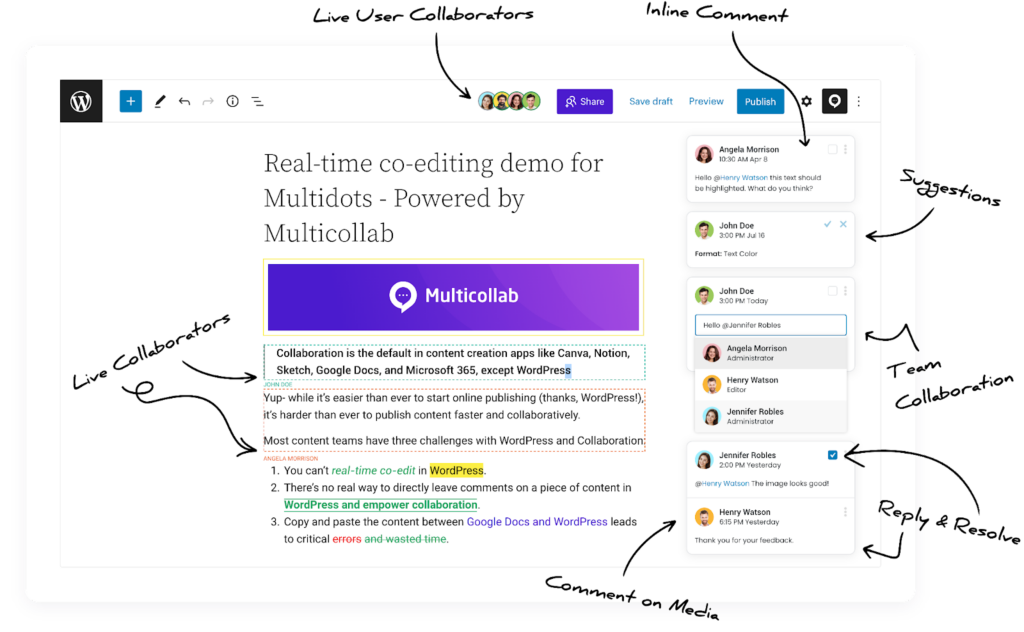
Multicollab maps directly onto the process and best practices above: inline comments keep feedback specific and in one place, Content Workflows give each stage an owner, and the Editorial Checklist enforces your standard. For a closer look, see our guides on collaborative editing and working collaboratively in WordPress. Keeping review inside your own site also supports secure collaboration, since content and feedback never leave your environment.
Conclusion
Content review is not overhead. It is the quality gate that protects accuracy, brand consistency, and trust. The teams that do it well share the same habits: clear standards, defined reviewers, a repeatable process, and feedback that lives in one place.
If your team publishes on WordPress, Multicollab brings review into the editor, with inline comments, suggestion mode, content workflows, and an editorial checklist, so feedback stays specific, accountable, and fast, from draft to approval.
Start a 14-day Multicollab trial, today.
Frequently Asked Questions
What is content review?
Content review is the process of checking content for accuracy, quality, clarity, and brand consistency before it is published. It typically involves editors, subject matter experts, or managers reviewing a draft, leaving feedback, and approving it once it meets the required standard. It is broader than proofreading, which only catches grammar and typos.
Why is content review important?
Content review protects accuracy and credibility, maintains brand consistency across writers, improves overall quality, and reduces legal and reputational risk. For ecommerce and content-heavy sites, where trust drives revenue, it is especially important.
What is the difference between a content review and a content audit?
A content review evaluates a specific piece before it is published, focusing on quality, accuracy, and brand fit. A content audit reviews existing published content across a site to find what to update, keep, or remove. Review is pre-publish and piece-by-piece; an audit is periodic and site-wide.
What are the steps in the content review process?
Set clear standards, assign reviewers and roles, review against a checklist, revise and iterate, approve, then publish and document the feedback. A repeatable process keeps review consistent and prevents content from skipping a stage.
How do you manage feedback from multiple reviewers?
Use a single platform where all feedback lives with the content, assign clear reviewer roles, and set deadlines for each round. In-context comments tied to specific parts of the content reduce confusion and speed up revision.
What tools help with content review?
A content team needs a way to collaborate, review, and track progress in one place. For WordPress teams, Multicollab brings inline comments, suggestion mode, content workflows, and an editorial checklist into the editor, so review happens where the content lives.
Download a Free Actionable Guide: 45+ Actionable Tips to Optimize Performance for High-Traffic WordPress Websites
Performance Optimization Techniques: Speed up your site with caching, image compression, and code minification.
Hosting and Scalability Suggestions: Learn to choose the right hosting solutions and scale efficiently.
Security and Protection Guidelines: Safeguard your site from DDoS attacks, malware, and performance threats.
Content and Plugin Management Tips: Optimize your database, plugins, and themes for peak performance.