

Table of Contents
Multicollab is a WordPress editorial collaboration plugin that brings real-time editing, inline commenting, and suggestion mode directly into the block editor, so review happens where the content already lives.
Key Takeaways
- Cross-team collaboration breaks down when feedback lives in email, chat, and meetings instead of alongside the content.
- Real-time collaboration inside WordPress keeps editing, commenting, and approvals in one place and cuts revision cycles.
- Multicollab runs inside the block editor, so teams collaborate without switching to an external tool.
- Guests can join through an email invite or a 24-hour link with Viewer, Commenter, or Co-Editor access, no WordPress account needed.
- Real-time editing supports up to five simultaneous users and runs separately from Suggestion Mode.
Have you ever felt like your team is speaking different languages when trying to get content over the finish line? One person sends feedback via email, someone else replies in Slack, and before you know it, revisions, comments, and suggestions are all scattered across different platforms.
Now imagine if everyone could sit around the same table, even in a remote team setup, collaborating directly within WordPress without missing a beat. That’s the magic of real-time collaboration—turning communication into a smooth, efficient process where everyone stays in sync.
For content teams—whether in marketing, publishing or even education—cross-team collaboration can be one of the trickiest parts of the job. Especially if you’re dealing with teams spread across different departments or time zones. Without the right tools, things can get overwhelming fast. The good news? Mastering cross-team collaboration is easier than you might think, especially with WordPress as your foundation and the right real-time tools to back you up.
The Challenges of Cross-Team Collaboration in WordPress
When you’ve got multiple teams working on a project, collaboration can sometimes feel like organized chaos. Here are a few challenges you’ve probably faced:
Scattered Communication: Conversations spread across email threads, chats, and meetings can make it hard to track the latest feedback or changes.
Version Control Issues: Without a proper system in place, managing different document versions becomes a game of “Which file did we update last?”
Slow Feedback Loops: Waiting for approvals or input can cause bottlenecks, especially when feedback is delayed or buried in a never-ending email chain.
Silos: Teams working in isolation can result in misaligned goals, inconsistent messaging, and duplicate efforts.

Why Real-Time Collaboration is the Game Changer
Enter real-time collaboration tools—the superhero cape your WordPress setup needs. These tools allow team members to work on content simultaneously, without the back-and-forth of emails or endless revision cycles. Everyone can leave comments, suggest changes, or approve edits instantly.
Here’s why real-time collaboration matters:
Instant Feedback: With real-time commenting and suggestion modes, there’s no need to wait for emails. Input happens in the moment, right where the content is being created.
Improved Efficiency: Teams can work together on content, even if they’re miles apart, which reduces turnaround time.
Clarity in Communication: No more scattered feedback—everything stays organized and visible within your content management system.
How to Integrate Real-Time Tools in WordPress
WordPress, with its flexible structure, is already a powerful platform for content creation. Adding real-time collaboration tools can elevate its functionality, transforming it into a hub for seamless teamwork. There are a few key steps to successfully integrate these tools:
Train Your Team: Even the best tools won’t be used effectively if your team isn’t on board. Ensure everyone knows how to use the platform’s features and understands the value of real-time collaboration.
Identify Your Team’s Needs: Are you struggling with feedback management? Need better version control? Start by identifying what your team is missing, then look for tools that address those pain points.
Choose the Right Plugins: There are various plugins designed to improve collaboration within WordPress. But not all are created equal. Look for tools that offer real-time editing, inline commenting, and secure permissions to ensure a smooth workflow.
Establish Clear Processes: Just having the tools isn’t enough. Set clear processes for how your teams will collaborate—define who reviews content, how feedback is handled, and the final approval stages.
Multicollab: The Best Real-Time Tool for Mastering Cross-Team Collaboration in WordPress
When it comes to mastering cross-team collaboration within WordPress, Multicollab stands out as a powerful real-time collaboration tool designed specifically for content teams. What sets Multicollab apart from other external platforms is that it’s built directly into WordPress, meaning you don’t have to jump between different applications to get the job done.
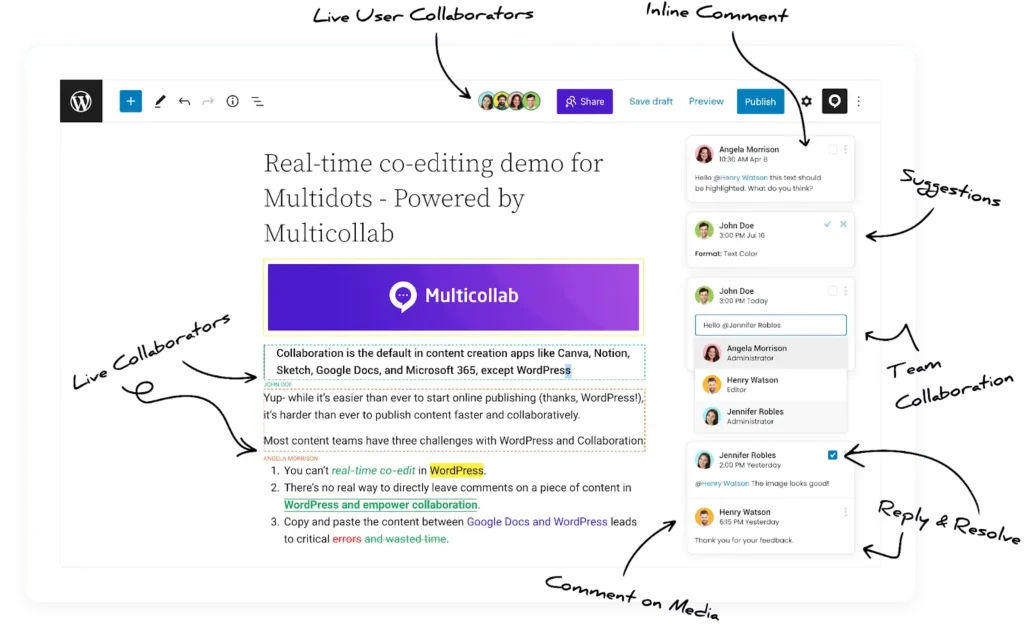
Here’s why Multicollab is a game changer:
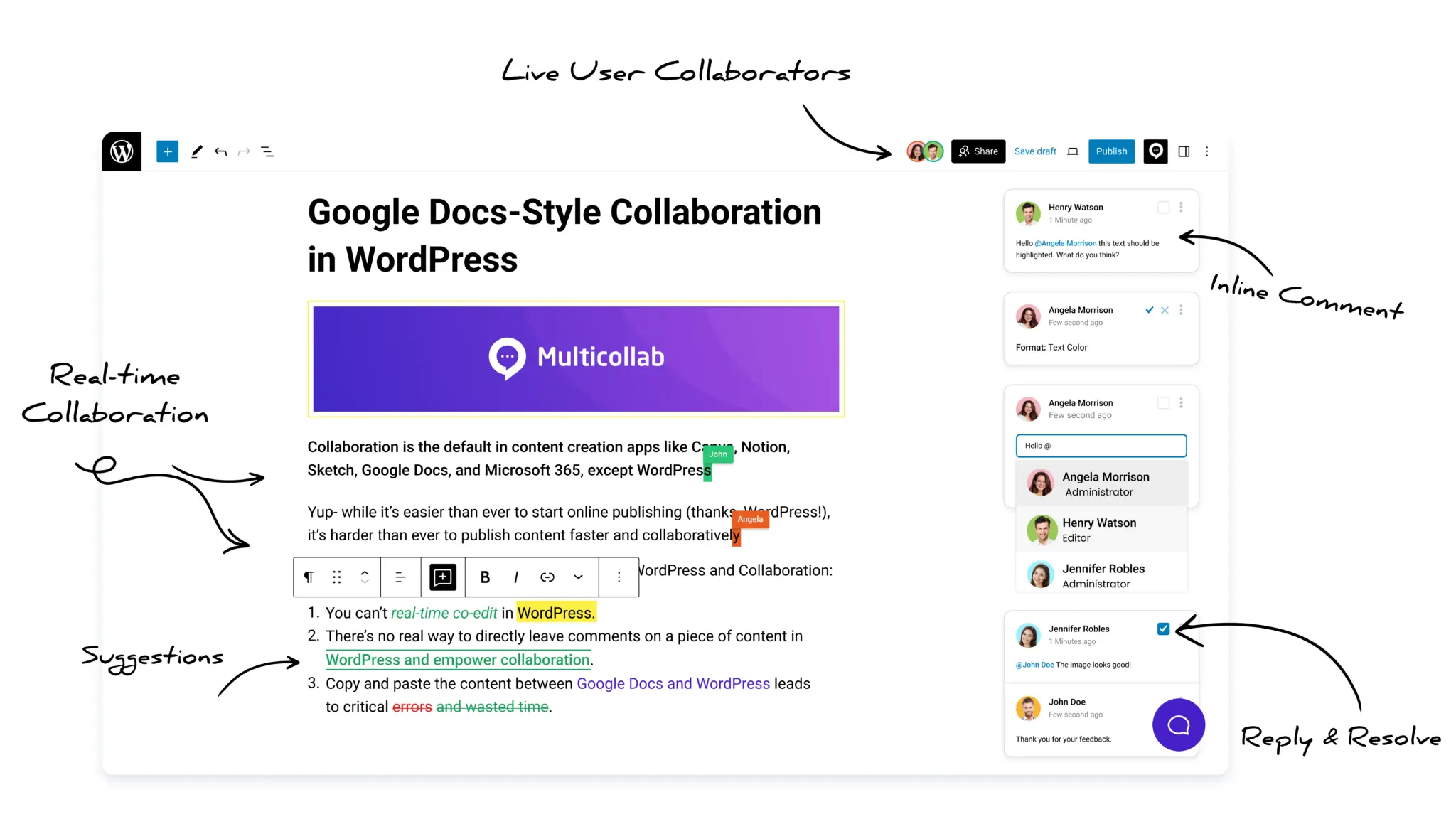
Real-Time Editing and Commenting: No need for lengthy email threads or side chats. With Multicollab, your team can leave comments and suggestions directly on the draft, allowing for a streamlined feedback process.
Inline Comments and Suggestion Mode: Need to make a quick suggestion or ask a clarifying question? Multicollab allows team members to add comments or make suggestions inline—without affecting the content. This ensures that feedback stays visible and contextualized.
Role-Based Permissions: Multicollab configures permissions for your existing WordPress roles, so you control who can view, comment, or edit. This is especially useful when multiple teams like marketing and design work together but only certain people need editing access. Guests can also join with Viewer, Commenter, or Co-Editor access without a WordPress account.
Slack Integration: Got feedback on the go? Multicollab sends notifications to Slack, keeping everyone in the loop without missing a beat.
Guest Collaboration: Working with freelancers or guest writers? Multicollab allows you to collaborate with external contributors without giving them full access to your WordPress dashboard.
Let’s take a look at a real-world example to illustrate just how impactful Multicollab can be for cross-department collaboration.
Imagine a company launching a global marketing campaign. Teams from marketing, sales, design, and legal need to collaborate on the content. Typically, each department works with separate tools, leading to delays, version mix-ups, and miscommunication.
Here’s how Multicollab can streamline this process:
- All teams work on the content directly within WordPress, viewing edits and updates in real-time. Marketing drafts the copy, sales adds input to ensure it aligns with the customer journey, and legal checks compliance—all in one place.
- Legal leaves comments on sections that need compliance checks. Sales and marketing resolve questions and refine messaging without ever leaving WordPress.
- The design team provides feedback on visuals with limited access, so they can comment without altering the core content. Legal can view and approve final content securely.
- Slack notifications keep everyone informed of feedback and changes, reducing back-and-forth and avoiding confusion.
This process helps the company cut its approval time in half, eliminate version control issues, and ensure every team stays aligned—leading to faster, more efficient content creation and a successful campaign launch.
Wrapping Up: Collaborate Smarter, Not Harder
Effective cross-team collaboration can transform your workflow from chaotic to cohesive. With the right real-time tools seamlessly integrated into your WordPress environment, you’ll foster clearer communication, expedite feedback, and keep projects on track.
Multicollab isn’t just about convenience—it’s about enhancing your team’s ability to collaborate effortlessly. When your teams can work together smoothly and stay aligned, crafting exceptional content becomes second nature.
If cross-team coordination has been a challenge, it’s time for a change. Streamline your process, align your team, and manage all your collaborative efforts directly within WordPress. Elevate your collaboration game with Multicollab today and turn your content creation into a well-oiled machine.
Frequently Asked Questions
What is cross-team collaboration in WordPress?
Cross-team collaboration in WordPress means multiple teams, such as marketing, design, and legal, working on the same content inside WordPress rather than across separate tools. It keeps feedback, edits, and approvals in one place instead of scattered across email and chat.
Can multiple people edit the same WordPress post at once?
Yes. With a real-time collaboration plugin like Multicollab, up to five people can edit the same post simultaneously and see each other’s changes live. Real-time editing and Suggestion Mode run separately, so teams pick the mode that fits the task.
How do you manage feedback from different teams in WordPress?
Use inline comments and suggestion mode to keep every note attached to the exact block it refers to. Reviewers comment in context, contributors resolve items in place, and nothing gets lost in a separate thread.
Can external collaborators work in WordPress without an account?
Yes. Multicollab lets guests join through an email invite or a link that expires after 24 hours, with Viewer, Commenter, or Co-Editor access. They contribute without a WordPress account or dashboard access.
Download a Free Actionable Guide: 45+ Actionable Tips to Optimize Performance for High-Traffic WordPress Websites
Performance Optimization Techniques: Speed up your site with caching, image compression, and code minification.
Hosting and Scalability Suggestions: Learn to choose the right hosting solutions and scale efficiently.
Security and Protection Guidelines: Safeguard your site from DDoS attacks, malware, and performance threats.
Content and Plugin Management Tips: Optimize your database, plugins, and themes for peak performance.