
Table of Contents
Key Takeaways
- WordPress collaboration means working on content inside the WordPress editor, not in external tools like Google Docs that create version conflicts and formatting loss
- Default WordPress lacks inline feedback and suggestion-based editing, forcing teams to move collaboration outside the publishing system
- Effective collaboration requires three capabilities: inline comments on specific content, suggestion mode for proposed edits, and real-time visibility into changes
- Collaboration does not stop at publishing—safe updates to live content require version isolation so revisions can be reviewed before going live
- When collaboration happens inside WordPress, review cycles shorten, version confusion disappears, and the editor becomes the workspace where editorial work actually happens
WordPress collaboration means writers, editors, and reviewers working together on content inside the WordPress editor. The default WordPress installation does not support this. It supports publishing, but lacks the feedback and review capabilities teams need to collaborate effectively.
Because these capabilities are missing, teams use Google Docs for collaboration and return to WordPress only to publish. This creates version conflicts, formatting issues, and slower publishing cycles.
The solution is enabling collaboration directly inside WordPress, where the content already exists.
What WordPress collaboration actually means
WordPress collaboration describes the process of creating, reviewing, and refining content through coordinated work between writers, editors, and stakeholders.
This process requires three interactions:
Feedback on specific content. Editors must be able to comment on exact sentences, paragraphs, or blocks rather than the entire post.
Proposed changes, not forced edits. Reviewers need to suggest modifications without overwriting the writer’s work.
Shared visibility into changes. Writers and editors must see comments, suggestions, and updates as they happen.

WordPress provides drafts, user roles, and revision history. These features manage access and track changes after the fact. They do not enable real-time collaboration during content creation and review.
Why WordPress collaboration breaks in practice
The breakdown happens during the review process.
Editors cannot attach comments to specific blocks or sentences. Feedback applies to the entire post, forcing vague explanations instead of precise guidance. Writers receive general comments without context and must interpret what needs to change and where.
Edits also lack boundaries. When reviewers modify content directly, they overwrite the draft. This removes visibility into what changed, why it changed, and whether the writer agreed with the change.
Because WordPress lacks inline feedback and suggestion-based editing, teams move collaboration into Google Docs. Drafts are written or copied into Google Docs, reviewed there, then copied back into WordPress for publishing.

This external workflow creates predictable problems:
- Feedback loses context during copy-paste. Comments tied to specific paragraphs in Google Docs become generic notes when content moves to WordPress.
- Multiple versions exist simultaneously. The Google Doc version, the WordPress draft, and any in-progress edits create confusion about which version is current.
- Formatting breaks when content moves between tools. Headings, lists, embedded media, and block-specific formatting degrade or disappear during transfer.
- Review cycles slow down. Clarification loops increase because feedback requires re-contextualization in each tool.
The core problem is structural. Collaboration happens outside the system where publishing happens.
The capabilities required for native WordPress collaboration
To collaborate effectively inside WordPress, three capabilities are essential.
Inline feedback. Editors must comment on exact blocks, paragraphs, or sentences. This removes ambiguity and connects feedback directly to the content being reviewed.
Suggestion-based editing. Reviewers need to propose changes without overwriting drafts. Writers should clearly see what is suggested versus what is final, and accept or reject suggestions individually.
Real-time visibility. Writers and editors must see comments, suggestions, and responses as they happen. This prevents conflicting changes, eliminates duplicate work, and maintains alignment across team members.
Without these capabilities, collaboration remains external. With them, WordPress becomes a functional workspace for editorial teams.
Why collaboration does not stop after publishing
Most teams treat publishing as the end of collaboration. It is not.
Published content requires updates. Marketing pages need revised messaging. Blog posts require factual corrections. Documentation needs version updates. Product pages reflect new features.
The traditional WordPress approach creates a problem. Updating published content means editing it directly. Any mistake during editing appears immediately on the live site.
Teams solve this by creating unpublished duplicates, editing those duplicates, then replacing the published version. This workaround introduces the same problems as Google Docs: multiple versions, lost context, and coordination overhead.
Safe updates to published content require the same collaboration capabilities as draft content, plus version isolation. Editors need to propose changes to published posts without those changes going live immediately. Teams need to review, refine, and approve updates before publishing them.

When this capability exists, teams can update published content with the same review process they use for new content. Collaboration extends through the entire content lifecycle, not just the initial publishing phase.
How native collaboration changes editorial workflow
When collaboration happens inside WordPress, the workflow structure changes.
- Writers draft content directly in the WordPress editor.
- Editors review that same content and leave inline comments tied to specific sections.
- Suggestions appear as proposed changes rather than forced edits.
- Writers respond to feedback and update content with full context visible.
There is no need to move content between tools. There is no confusion about which version is current. Formatting stays intact because content never leaves WordPress.
The publishing flow itself remains unchanged. Only the collaboration layer improves.

For published content, the workflow extends. Editors create a working version of the published post. They propose updates, leave comments, and iterate with writers. When the revision is approved, it replaces the published version. The live site remains unchanged until the update is ready.
This approach works for:
- Content teams publishing frequently across multiple authors and editors.
- Agencies managing editor-writer feedback loops for client content.
- Publishers handling long-form content with multiple review stages.
- Distributed teams reviewing content across time zones without real-time coordination.
- Marketing teams updating published pages without risking live site errors.
The workflow is not specific to content type. It applies anywhere editorial review happens.
Where Multicollab fits in this model
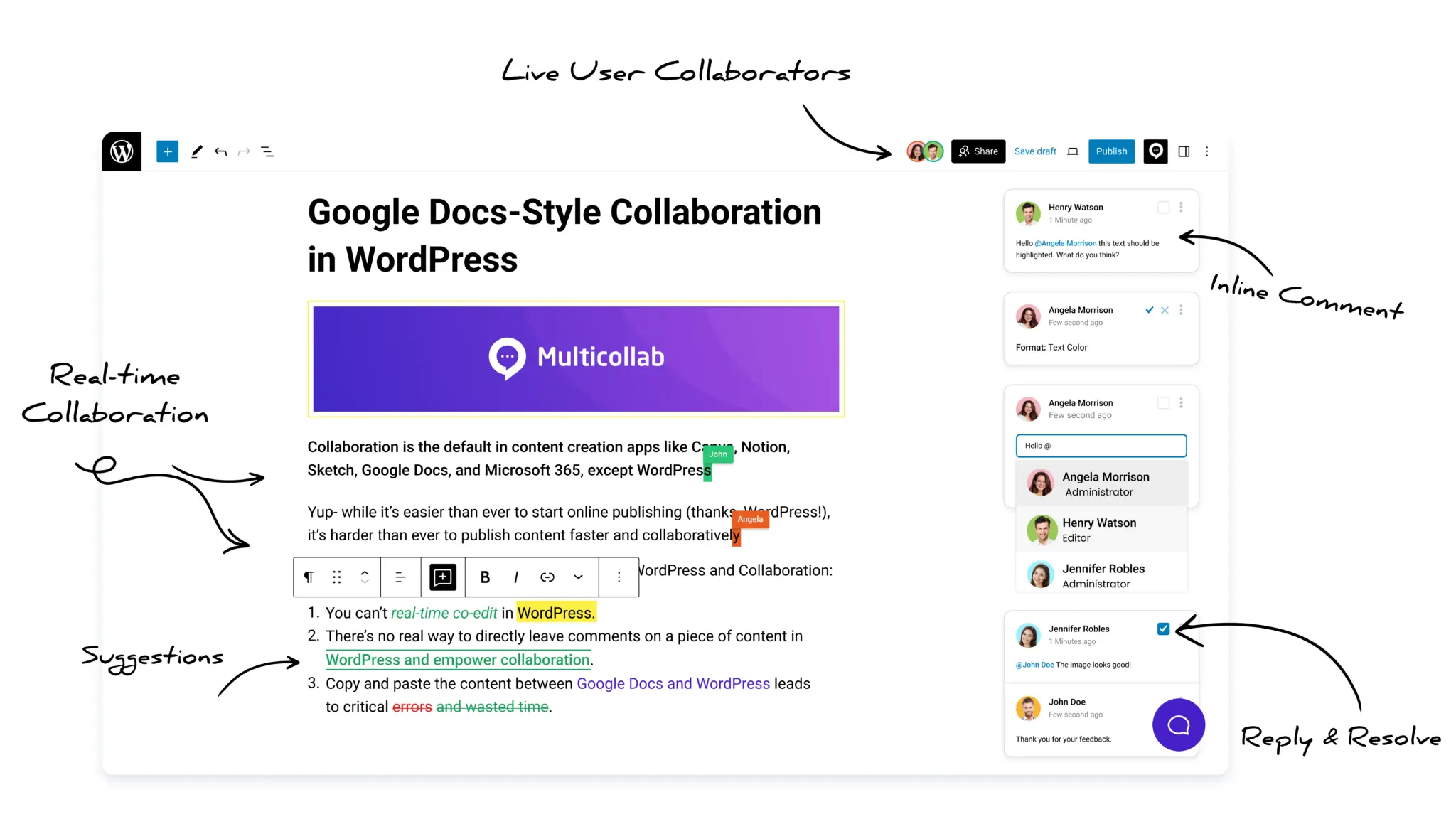
Multicollab adds the collaboration capabilities described above directly into the WordPress editor.
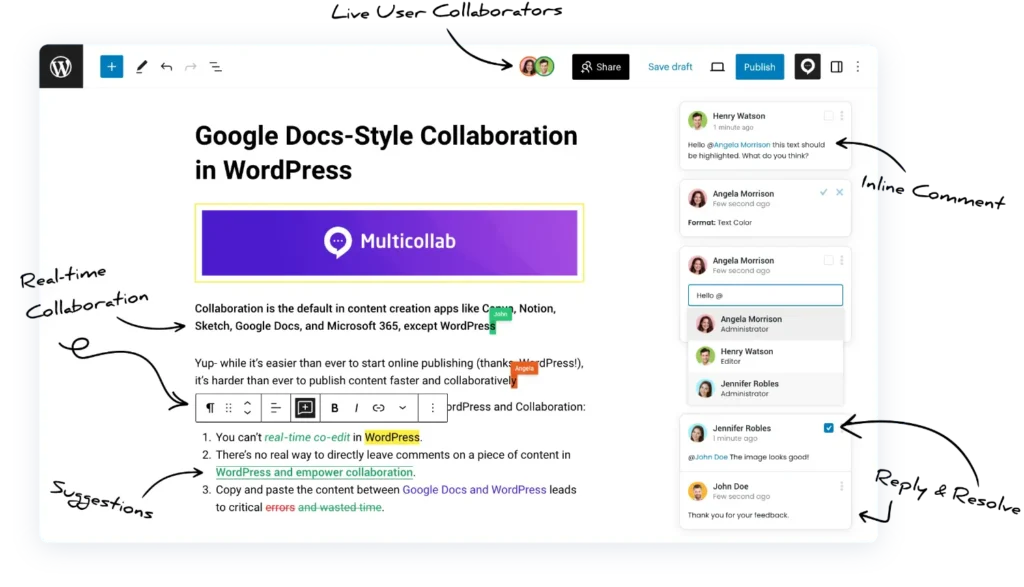
Inline comments allow editors to leave feedback on specific blocks. Suggestion mode enables reviewers to propose edits without overwriting drafts. Real-time updates keep writers and editors aligned while working on the same content.
For published content, the Create Version workflow provides version isolation. Editors can propose changes to live posts without affecting the published version. Teams review and refine updates, then publish the revision when ready.
Content Workflows add structured review stages. Teams define permissions, review gates, and approval requirements for content before it moves from draft to published. This enforces editorial process without requiring external tools or manual coordination.

Because these capabilities exist inside WordPress, teams no longer need external documents to manage reviews. Collaboration stays connected to the content throughout drafting, review, revision, and approval.
Multicollab functions as a native collaboration layer rather than a separate workflow.
Who this collaboration model is for
Native WordPress collaboration is designed for teams where multiple people touch content before and after publishing.
This includes:
Editorial teams with dedicated writers, editors, and managing editors who review content in stages.
Agencies managing client content where feedback flows between internal teams and external stakeholders.
Publishers producing long-form or multi-author content that requires structured review before publication.
Marketing teams updating published content regularly and needing review processes for those updates.
Distributed teams collaborating across time zones where asynchronous review is more practical than real-time editing.
The model is not specific to company size or content volume. It applies wherever editorial review is part of the publishing process.
Conclusion
Real WordPress collaboration requires inline feedback, suggestion-based editing, and real-time visibility. Without these capabilities, teams move collaboration into external tools like Google Docs, creating version conflicts and slower publishing.
Native collaboration keeps feedback/edits/approvals inside WordPress, eliminates tool-switching, preserves formatting, and maintains a single source of truth throughout the content lifecycle.
When collaboration capabilities exist inside WordPress, review cycles shorten, version confusion disappears, and publishing becomes predictable. WordPress stops being the final step in the process.
Multicollab becomes the place where editorial work actually happens.
Download a Free Actionable Guide: 45+ Actionable Tips to Optimize Performance for High-Traffic WordPress Websites
Performance Optimization Techniques: Speed up your site with caching, image compression, and code minification.
Hosting and Scalability Suggestions: Learn to choose the right hosting solutions and scale efficiently.
Security and Protection Guidelines: Safeguard your site from DDoS attacks, malware, and performance threats.
Content and Plugin Management Tips: Optimize your database, plugins, and themes for peak performance.