

Table of Contents
Your WordPress draft may be ready for review, but the feedback rarely stays in WordPress. One editor comments in Google Docs, another sends changes through Slack, and a stakeholder replies by email. Writers spend more time locating and comparing feedback than improving the content. Important changes are missed, review rounds increase, and publication dates slip.
Multicollab is a WordPress editorial collaboration plugin that helps content teams collect, discuss, resolve, and act on feedback without moving drafts into Google Docs or tracking changes across email and Slack. It adds inline comments, Suggestion Mode, guest collaboration, notifications, activity tracking, and publishing checks directly to the Gutenberg editor.
A collaborative feedback loop creates one continuous review cycle inside WordPress: request feedback, discuss changes, revise the draft, resolve comments, confirm approval, and publish. The latest content and its review history remain connected, giving writers and editors a clearer path from draft to publication.
This guide explains how editorial teams can stop losing feedback across tools and build a faster, more controlled WordPress content review process.
Key Takeaways
- Editorial feedback becomes difficult to manage when the draft, comments, revisions, and approvals live in different tools.
- WordPress should act as the single source of truth for the current draft and its feedback.
- Reviewers need defined responsibilities, focused review requests, and clear response deadlines.
- Comments should support questions and discussion, while suggestions should propose direct text changes.
- External contributors should receive only the access needed to complete their review.
- A draft should not be published while required feedback, suggestions, or checklist tasks remain unresolved.
- Review turnaround, revision time, review rounds, and overdue requests show whether the process is improving.
Why editorial feedback gets lost across tools
Most feedback problems do not begin with the quality of the comments. They begin with where those comments are collected.
An editorial team may draft in Google Docs, discuss changes in Slack, send stakeholder questions by email, track deadlines in a project management platform, and publish in WordPress. Each tool handles part of the process, but nobody has a complete view of the current draft and everything required before publication.
This fragmented process creates several problems.
Reviewers work from different versions
A reviewer may comment on an older document after the writer has already updated the WordPress draft. The writer then has to determine whether the feedback is still relevant and manually apply it to the latest version.
Comments lose their context
Feedback sent through email or chat often refers to a paragraph, heading, or sentence without showing exactly where the change belongs. The writer has to interpret the request before responding to it.
Decisions become difficult to find
An important editorial decision may be made during a meeting or inside a Slack thread. When another reviewer raises the same issue later, the team has no visible record connected to the draft.
Conflicting feedback creates more revision rounds
Editors, subject experts, clients, and managers review content from different perspectives. Without clear responsibilities and one decision owner, their comments can pull the draft in different directions.
Nobody knows what is blocking publication
When comments and approvals are distributed across tools, editors cannot quickly see whether the draft is waiting for revisions, expert review, stakeholder approval, or final publishing checks.
Centralizing the feedback loop does not remove the need for communication tools. It gives those tools a clearer role. Email and Slack can notify reviewers, while the WordPress draft holds the actual feedback, revisions, and decisions.
What is a collaborative feedback loop?
A collaborative feedback loop is a structured review cycle in which writers submit content, reviewers provide contextual feedback, authors make revisions, and editors confirm that every required change has been addressed. The process repeats until the content meets the agreed publishing standard.
Inside WordPress, the loop follows a clear path:
Draft → Review request → Contextual feedback → Revision → Resolution → Approval → Publication
The loop is considered closed when required comments and suggestions have been reviewed, assigned changes are complete, the appropriate stakeholder has approved the content, and the draft meets the team’s publishing requirements.
Feedback loop vs. editorial workflow vs. approval workflow
These processes work together, but they solve different problems.
| Process | Purpose | Main question |
|---|---|---|
| Collaborative feedback loop | Collects, discusses, applies, and resolves feedback | Have the requested changes been addressed? |
| Editorial workflow | Moves content from planning through publication and maintenance | What stage is the content currently in? |
| Content approval workflow | Defines who can authorize content for publication | Who can approve this draft? |
| Editorial checklist | Confirms that all required publishing tasks are complete | Is the content ready to publish? |
The feedback loop is one part of the broader editorial workflow. Final authorization belongs to the WordPress content approval workflow.
Build one source of truth for editorial feedback
The WordPress draft should be the central location for content review. Writers and reviewers should be able to find the latest copy, open discussions, suggested edits, resolved comments, assigned actions, and publishing readiness without comparing multiple platforms.
Keep the following items connected to the draft:
- Inline comments and replies
- Suggested text changes
- Reviewer mentions and assignments
- Supporting files or references
- Resolved discussions
- Review status
- Required publishing tasks
- Final approval readiness
Communication platforms can still send notifications and deadline reminders. The important rule is that substantive feedback should be added to the WordPress draft. If the team begins debating a content change inside Slack or email, record the final decision where the affected content can be seen.
Assign the right reviewers before review begins
Adding more reviewers does not automatically improve content. It can increase delays when responsibilities overlap or nobody has final authority.
Define the role of each participant before requesting feedback:
- Writer: Creates the draft, asks for clarification, and completes revisions.
- Editor: Reviews the structure, clarity, voice, consistency, and overall usefulness.
- Subject-matter expert: Verifies factual or technical accuracy.
- SEO reviewer: Checks search intent, headings, metadata, links, and potential content overlap.
- Legal or compliance reviewer: Reviews claims or requirements within their area of responsibility.
- Client or stakeholder: Confirms business, brand, or project requirements.
- Final approver: Decides whether the content is authorized for publication.
- Publisher: Completes formatting, publishing checks, scheduling, and the final live-page review.
Providing feedback does not make every reviewer a final approver. One named person should remain accountable for the final editorial decision.
Request focused and actionable feedback
Broad review requests produce broad feedback. Reviewers may focus on personal preferences, repeat work completed by another reviewer, or comment outside their area of responsibility.
Every review request should state:
– Which part of the content requires review
– What the reviewer should check
– Whether the response is required or optional
– When the feedback is due
– Who will decide when reviewers disagree
– What happens after the review is completed
Feedback should identify the issue, explain why it matters, and make the required next action clear. A writer should not have to guess what the reviewer wants changed.
Separate feedback into two groups:
- Required changes: Accuracy, legal, factual, brand, accessibility, or approved content requirements that must be resolved.
- Optional suggestions: Improvements the editor or writer may accept when they strengthen the content without changing the approved goal.
This distinction keeps minor preferences from blocking publication.
Use inline comments for questions and discussion
Inline comments are useful when a reviewer needs clarification, wants to identify a concern, or needs to discuss a decision before changing the text. Because the comment is attached to the relevant content, the writer immediately understands what it affects.
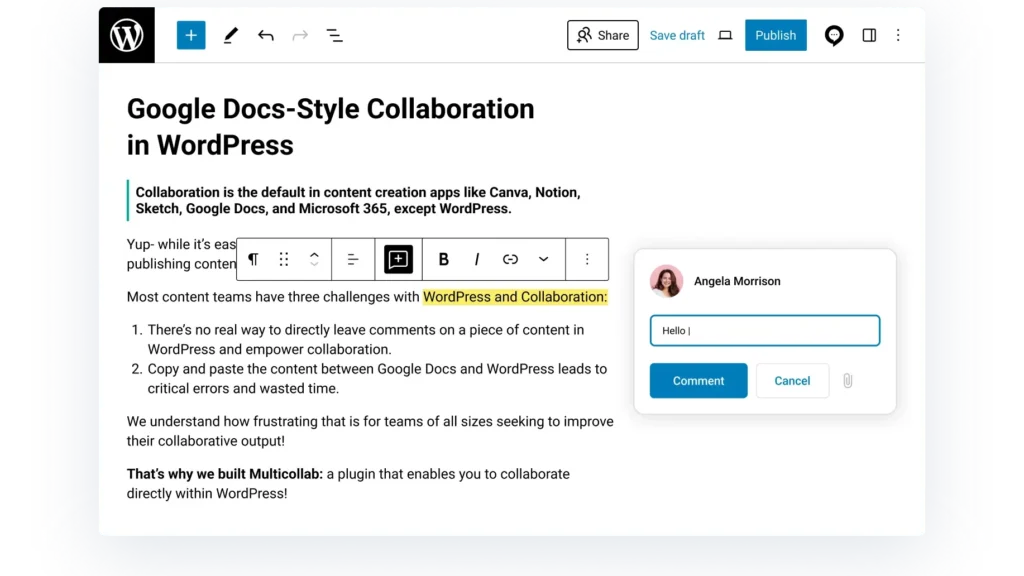
An effective comment should:
– Address one issue at a time
– Remain attached to the relevant text or media
– Tag the person responsible for responding
– Explain whether a change is required
– Be resolved when the discussion and action are complete
Replying inside the same thread preserves the review history. It also prevents reviewers from repeating questions that have already been answered.
Use Suggestion Mode for proposed text changes
Suggestion Mode is better when a reviewer wants to propose an exact addition, deletion, or rewrite. The proposed change remains separate from the approved content until an authorized user accepts or rejects it.
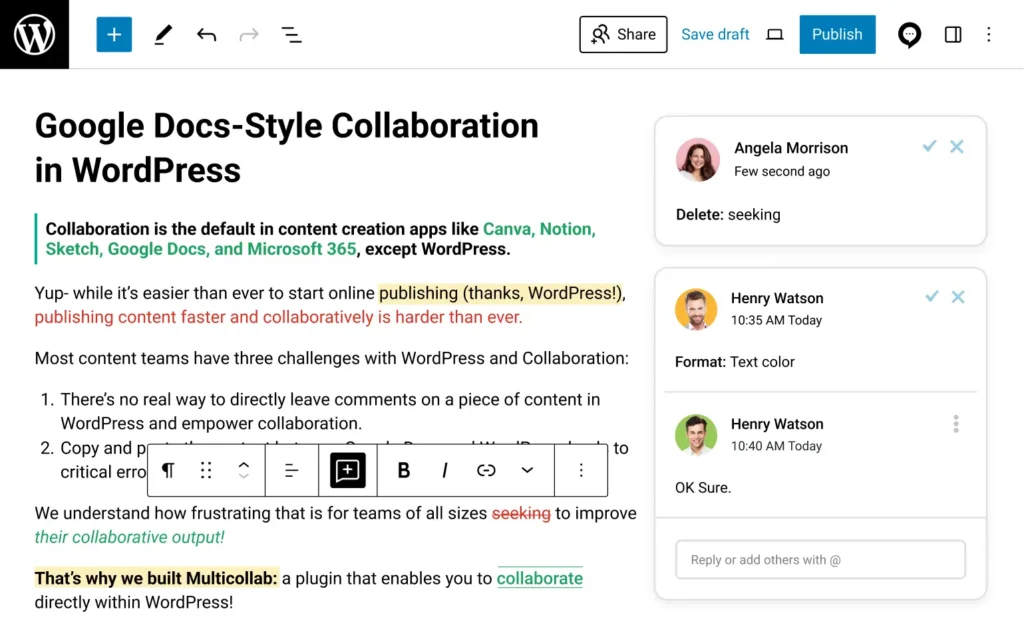
Use suggestions when the requested wording is clear. Use comments when the team needs to discuss the intent, confirm a fact, or choose between possible directions.
Before final approval, editors should review all remaining suggestions rather than accepting changes automatically. Multicollab’s Review All Suggestions capability helps authorized users process outstanding edits from one place.
Real-time collaboration and Suggestion Mode support different types of work and do not currently run together. Real-time collaboration is intended for simultaneous co-editing, while Suggestion Mode supports controlled review and tracked proposed changes. Teams should select the appropriate mode for the current editorial stage.
Set deadlines for every review stage
A publication deadline does not tell reviewers when their feedback is due. Each review stage needs its own response window.
Set deadlines for:
– Editorial review
– Subject-matter review
– SEO review
– Legal or compliance review
– Client or stakeholder review
– Final approval
Keep review periods realistic for the length and risk of the content. Send the draft only when it is ready for that reviewer’s attention. Repeatedly requesting review on incomplete content makes it harder for stakeholders to understand which version requires action.
If a reviewer cannot respond, the workflow should define a backup reviewer or escalation path. A missing response should not leave the draft in an undefined status.
Prevent conflicting feedback from slowing revisions
Conflicting comments usually indicate unclear decision authority or overlapping review responsibilities.
When reviewers disagree:
- Return to the content goal and intended audience.
- Separate factual requirements from stylistic preferences.
- Identify which reviewer owns the relevant subject.
- Give the final editorial decision to the named approver.
- Record the decision with the affected content.
- Resolve the discussion after the required action is complete.
Do not ask several reviewers to rewrite the same section independently. Assign one person to make the revision after the decision has been reached.
Include external reviewers without opening the full dashboard
Clients, freelance editors, guest authors, and subject experts may need to participate in the feedback loop. Giving every external reviewer a standard WordPress account can expose unrelated areas of the site or create an unnecessary onboarding burden.
With guest collaboration, invited contributors can receive an access level that matches their responsibility. They can review the content without receiving unrestricted access to the WordPress dashboard.
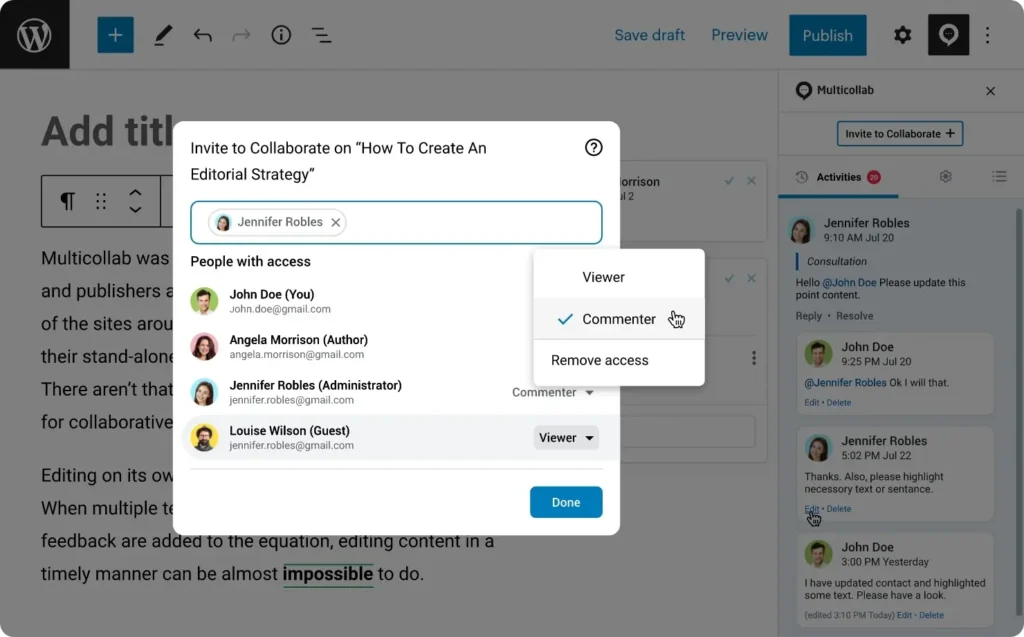
External access should remain limited to the required content and review period. Remove or expire access when the person’s involvement is complete.
Use notifications to bring reviewers back to WordPress
Notifications are useful when they point to a specific action. They become another source of fragmentation when the team begins discussing the content inside the notification channel.
Email and Slack notifications can alert reviewers about:
- Mentions
- Replies
- New comments
- Suggested edits
- Review requests
- Assigned actions
- Resolved discussions
The notification should bring the reviewer back to the WordPress draft. The comment, reply, suggestion, or decision should remain connected to the content being reviewed.
Prevent unresolved feedback from reaching publication
A content review process fails if the page is published while required feedback remains open.
Before publication, confirm that:
– Required comments have been addressed and resolved.
– Suggested edits have been accepted or rejected.
– Mandatory editorial tasks are complete.
– Accuracy and compliance checks are finished where required.
– The correct person has approved the final draft.
– The publisher can see that the content is ready.
Multicollab’s Editorial Checklist can define required and optional tasks for posts, pages, and supported custom post types. Publishing preferences can remind users about unresolved work or stop publication until required items are complete.
This connects the feedback loop to publishing readiness. Writers can see what remains, editors can confirm that reviews are complete, and publishers do not need to search other tools for approval evidence.
How Multicollab fixes fragmented editorial reviews
Multicollab keeps feedback, proposed edits, reviewer discussions, external contributions, and publishing checks inside WordPress. Each capability addresses a specific point where editorial reviews commonly become disconnected.
| Editorial problem | Multicollab capability | Result for the team |
|---|---|---|
| Feedback is scattered across tools | Inline comments and replies | Discussions remain connected to the draft |
| Review instructions lack context | Comments on specific text and media | Writers can see exactly what the feedback applies to |
| Reviewers need to propose new wording | Suggestion Mode | Proposed edits can be accepted or rejected |
| Too many suggestions remain open | Review All Suggestions | Editors can process outstanding changes centrally |
| External reviewers need limited access | Guest collaboration | Clients and experts can participate without unrestricted dashboard access |
| Review requests are missed | Email and Slack notifications | Reviewers receive timely alerts requiring action |
| Supporting information is stored separately | File attachments | Reference material remains connected to the discussion |
| Managers lack review visibility | Activity Center and Dashboard | Teams can monitor feedback activity and progress |
| Publishing requirements are missed | Editorial Checklist | Required and optional tasks remain visible |
| Unresolved feedback reaches publication | Publishing preferences | Teams can remind users or prevent publication until required work is complete |
The plugin should support the editorial process rather than replace clear roles and decision rules. Teams still need to decide who reviews, who revises, who approves, and which feedback must block publication.
Measure whether reviews are becoming faster
A successful feedback loop should reduce waiting and confusion without lowering review quality.
Track a small set of operational measures:
- Feedback turnaround time: Time between requesting a review and receiving useful feedback.
- Revision turnaround time: Time required for the writer to complete requested changes.
- Number of review rounds: How often the draft moves between reviewer and writer.
- Unresolved comments: Required discussions that remain open.
- Unreviewed suggestions: Proposed edits awaiting a decision.
- Overdue review requests: Reviews that have passed their response deadline.
- Approval turnaround time: Time required to make the final publishing decision.
- Draft-to-publish time: Total time from the first complete draft to publication.
- Content returned after approval: Issues discovered after the draft was considered ready.
Review these measures alongside the team’s experience. Faster reviews are not useful if feedback becomes rushed, unclear, or incomplete.
Frequently asked questions about WordPress editorial feedback
What is a collaborative feedback loop?
A collaborative feedback loop is a review cycle in which content is submitted, reviewers provide contextual feedback, writers complete revisions, and editors confirm that required changes are resolved before approval and publication.
How do you collect editorial feedback in WordPress?
Use a WordPress collaboration solution that keeps comments, replies, suggested edits, review assignments, and supporting files connected to the draft. Email and Slack can send notifications, but the actual feedback should remain in WordPress.
Can reviewers leave inline comments on WordPress drafts?
WordPress does not provide Google Docs-style inline editorial comments by default. Multicollab adds inline comments to supported text and media in the Gutenberg editor so reviewers can attach feedback to the relevant content.
What is the difference between comments and suggested edits?
Comments are best for questions, clarification, concerns, and discussion. Suggested edits are best when a reviewer wants to propose an exact text change that an authorized user can accept or reject.
Can external reviewers participate without full WordPress access?
Yes. Multicollab’s guest collaboration capability allows clients, freelancers, and subject experts to participate with limited access appropriate to their role, without unrestricted access to the WordPress dashboard.
How can teams prevent publishing with unresolved feedback?
Review all open comments and suggestions, complete required editorial checklist tasks, confirm final approval, and use publishing controls that remind users or stop publication when mandatory work remains incomplete.
Keep the feedback loop inside WordPress
Editorial feedback should help content move forward. It should not force writers to compare document versions, search chat threads, or reconstruct decisions from email.
Keep the latest draft, contextual comments, proposed edits, reviewer discussions, required tasks, and approval readiness in one place. Use external communication tools to notify people, not to store the review itself.
With a structured feedback loop and clear responsibilities, editorial teams can reduce repeated revisions, identify blockers earlier, and move WordPress drafts through review with greater control. Try Multicollab to bring editorial feedback and content review directly into the WordPress editor.
Download a Free Actionable Guide: 45+ Actionable Tips to Optimize Performance for High-Traffic WordPress Websites
Performance Optimization Techniques: Speed up your site with caching, image compression, and code minification.
Hosting and Scalability Suggestions: Learn to choose the right hosting solutions and scale efficiently.
Security and Protection Guidelines: Safeguard your site from DDoS attacks, malware, and performance threats.
Content and Plugin Management Tips: Optimize your database, plugins, and themes for peak performance.