
Table of Contents
Multicollab is a popular WordPress plugin designed to bring Google Docs-style collaboration and editorial workflows directly into the WordPress Gutenberg block editor.
An editorial workflow is the repeatable process a content team follows to plan, assign, create, review, approve, publish, promote, and update content. It defines who owns each stage, what must be completed before content moves forward, and how progress is tracked.
Key Takeaways
- An editorial workflow defines every stage a piece of content passes through, from ideation to performance review.
- Each stage needs an owner, a deadline, and clear completion requirements.
- Editorial calendars, approval workflows, and checklists support an editorial workflow, but they are not the same thing.
- Centralized feedback and clear approval rules reduce confusion and prevent unnecessary revision cycles.
- Teams should measure both content results and workflow efficiency.
- The best workflow is simple enough for the team to follow consistently and flexible enough to support different content types.
Without a clear workflow, drafts become stuck in review, feedback gets scattered across tools, and team members are unsure who should make the final decision. A documented process gives every article a clear route from the first idea to measurable results.
This guide explains the eight stages of an effective editorial workflow, the roles involved, common bottlenecks, practical examples, and the metrics you can use to improve your process. You will also find a reusable editorial workflow template that you can adapt for your team.
What is an editorial workflow?
An editorial workflow is a documented sequence of tasks used to move content from an initial idea to publication and ongoing optimization. It identifies the people responsible for each task, the status of the content, the standards it must meet, and the approval required before it moves to the next stage.
For example, a blog post may move through the following statuses:
Idea → Brief approved → Assigned → Drafting → In review → Changes requested → Approved → Scheduled → Published → Updating
The workflow is not limited to blog posts. It can be used for news articles, product pages, newsletters, case studies, landing pages, reports, videos, and other content formats.
Why do content teams need an editorial workflow?
A content team can publish without a documented workflow, but the process often depends on memory, personal follow-ups, and disconnected tools. It becomes difficult to manage cross-team collaboration in WordPress as the volume of content or number of contributors increases.
A clear editorial workflow helps a team:
- Assign ownership at every stage.
- Set realistic deadlines and review periods.
- Maintain a consistent voice and quality standard.
- Keep feedback connected to the relevant content.
- Prevent unapproved or incomplete content from being published.
- Give managers visibility into delays and workload.
- Create a repeatable process that new contributors can understand.
- Learn from performance data and improve future content.
The goal is not to add more administrative steps. It is to remove uncertainty from the publishing process.
Editorial workflow vs. related content processes
Several terms are used when discussing content operations. They support one another, but each has a different purpose.
| Term | Main Purpose | Example |
| Editorial workflow | Defines how content moves from idea to publication and optimization | Idea, brief, draft, review, approval, publishing, promotion, analysis |
| Editorial calendar | Defines what will be published and when | A monthly schedule of topics, owners, channels, and publication dates |
| Content approval workflow | Defines who reviews and authorizes content | Editor approval followed by legal or stakeholder approval |
| Editorial checklist | Confirms that required tasks are complete | Check links, sources, featured image, formatting, and SEO fields |
| Content strategy | Defines why content is created and whom it serves | Audience, goals, positioning, themes, formats, and distribution channels |
An editorial calendar tells you when an article should be published. An editorial workflow tells you how the article will become ready to publish.
The eight stages of an editorial workflow
The exact process will vary by team and content type. However, most effective workflows include the following eight stages.
| Stage | Primary owner | Required output | Exit requirement |
| 1. Ideation and planning | Content strategist or manager | Approved topic | Topic supports a defined audience and business goal |
| 2. Briefing and assignment | Content manager | Complete content brief | Scope, owner, keyword, deadline, and angle are approved |
| 3. Content creation | Writer or creator | Complete first draft | Draft follows the approved brief |
| 4. Review and editing | Editor and subject expert | Edited and verified draft | Required feedback has been addressed |
| 5. Approval | Content lead or stakeholder | Approved final draft | Designated approvers have signed off |
| 6. Publishing | Publisher or CMS manager | Live, quality-checked content | Formatting, links, metadata, and tracking are verified |
| 7. Promotion | Marketing or distribution owner | Distributed content | Planned channels and supporting assets are complete |
| 8. Analysis and iteration | Content strategist or analyst | Performance findings | Insights and future actions are documented |
1. Ideation and planning
The workflow begins with a topic that serves a clear audience need. Ideas may come from keyword research, customer questions, support conversations, product updates, sales calls, competitor gaps, or existing content performance.
Before approving an idea, confirm:
- Who is the intended reader?
- What question or problem will the content address? \What action should the reader take afterward?
- How does the topic support the content strategy?
- Does similar content already exist on the website?
- Should an existing page be updated instead of creating a new one?
This last question helps prevent duplicate or competing pages.
2. Briefing and assignment
Once the topic is approved, convert it into a clear content brief. The brief should remove uncertainty for the writer while leaving room for original thinking.
A useful brief includes:
- Working title and content type
- Target audience and search intent – Primary topic and related questions
- Unique angle or first-hand insight – Recommended structure
- Required examples, sources, visuals, and internal links
- Brand and style requirements
- Assigned writer, reviewer, and approver
- Draft, review, and publication deadlines
- Desired call to action
Assign one person as the owner of the content. Several people may contribute, but one owner should remain responsible for moving it forward.
3. Content Creation
The writer develops the first draft using the approved brief. The draft should answer the main question early, provide enough context for the intended audience, and add information that is not available in generic summaries.
Depending on the content, creation may also include:
- Interviewing a subject-matter expert –
- Collecting original data or customer examples
- Creating screenshots, diagrams, or video
- Verifying product behavior – Citing reliable sources
- Preparing supporting social or email copy
The writer should complete a self-review before submitting the draft. This reduces the time editors spend fixing preventable issues.
4. Review and editing
Review should happen in defined layers rather than through one unstructured round of feedback.
Self-review: The author checks the draft against the brief, removes repetition, verifies links, and corrects obvious errors.
Editorial review: The editor improves structure, clarity, grammar, brand voice, and usefulness.
Subject-matter review: A knowledgeable reviewer checks accuracy, product details, examples, and technical claims.
SEO review: The reviewer checks search intent, title, headings, internal links, metadata, image text, and potential keyword cannibalization.
Feedback should be specific and connected to the relevant text. Reviewers should explain the reason for a major change instead of leaving vague instructions such as “improve this.”
5. Approval
Approval confirms that the content is ready to publish. It should not become another full editing round unless the content fails a required standard.
Define in advance:
- Who can give final approval?
- Which content requires legal, product, or client review?
- What happens when reviewers disagree?
- How long does each approver have to respond?
- Can content be published with unresolved optional feedback?
- Which incomplete items must block publication?
For detailed guidance, see how to create a WordPress content approval workflow.
6. Publishing
Publishing includes more than clicking the Publish button. The person responsible should confirm that the live page matches the approved draft and works properly across devices.
The publishing check should cover:
- Page title, URL, and meta description
- Heading structure
- Featured image and alt text
- Internal and external links
- Formatting and mobile display
- Author and updated date
- Canonical URL and indexability
- Structured data where appropriate
- Analytics and conversion tracking
- Final call to action
Schedule the content according to the editorial calendar, but leave enough time to resolve unexpected formatting or technical issues.
7. Promotion
Good content needs a distribution plan. The promotion stage should identify the channels that match the topic and audience rather than sharing every article everywhere.
Promotion may include:
- Email newsletters
- LinkedIn and other social channels
- Relevant customer or community groups
- Sales and customer-success resources
- Internal product education – Content partnerships
- Links from related existing articles
Create promotion assets during the editorial process when possible. Waiting until after publication often delays distribution.
8. Analysis and iteration
The workflow continues after publication. Review performance at a suitable interval based on the content type. A time-sensitive announcement may need quick analysis, while an SEO article may need several weeks before useful trends appear.
Record:
- Whether the content reached its intended audience
- Which queries or channels brought visitors
- Whether readers engaged with the content
- Whether they completed the desired action
- Which sections performed well or need improvement
- When the content should be updated again
These findings should inform future briefs, not remain isolated in an analytics report.
How to build an editorial workflow for your team
The eight stages provide the framework. The following decisions turn that framework into a process your team can use consistently.
1. Start with the result you want
Define what the workflow should improve. Common goals include reducing time to publish, preventing missed approvals, improving accuracy, or giving managers better visibility.
Choose one or two priorities first. A workflow designed to solve every possible problem can become too complicated to follow.
2. Map roles and decision rights
Identify who is responsible, accountable, consulted, and informed at each stage.
| Role | Typical responsibility |
| Content manager | Prioritizes topics, assigns work, and monitors progress |
| Writer | Researches and creates the first draft |
| Editor | Improves structure, clarity, consistency, and voice |
| Subject-matter expert | Verifies accuracy and provides specialist input |
| SEO reviewer | Checks search intent, metadata, links, and content overlap |
| Designer | Creates or reviews visual assets |
| Approver | Provides final authorization |
| Publisher | Formats, schedules, checks, and publishes the content |
| Analyst | Reviews performance and recommends updates |
One person can perform multiple roles on a small team. What matters is that the responsibility is visible.
3. Choose clear status labels
Use statuses that describe the content’s current condition, not the person working on it.
A practical set is:
Backlog → Brief in progress → Ready to assign → Drafting → In editorial review → In expert review → Changes requested → Awaiting approval → Approved → Scheduled → Published → Update required
Avoid vague labels such as “Pending” unless the workflow explains exactly what is pending and who owns the next action.
4. Define entry and exit requirements
Each stage should have a clear starting condition and completion condition. For example, a draft should not enter editorial review until the writer has completed the brief requirements and self-review. It should not enter approval until required editorial and expert feedback has been addressed.
These rules prevent incomplete work from being passed forward.
5. Set deadlines and review windows
Assign deadlines to the content and to individual review stages.
For example:
- First draft: two working days
- Editorial review: half working day
- Subject-matter review: one working day
- Revisions: one working days
- Final approval: half working day
These are examples, not universal standards. Base the timing on content complexity, reviewer availability, and publishing frequency.
6. Establish feedback and approval rules
Document where feedback should be added, who resolves it, and when a review is considered complete. Ask reviewers to consolidate their feedback and separate required changes from optional suggestions.
For high-risk content, require named approval. For routine content, allow a lighter process so senior reviewers do not become a bottleneck.
7. Choose tools based on the workflow
Do not build the process around a tool’s default settings. Define the workflow first, then select tools that support it with the least unnecessary switching.
The team should have one reliable place to find:
- The latest content version
- Current status and owner
- Deadlines
- Comments and decisions
- Required tasks
- Final approval
8. Test and improve the process
Run the workflow with a small group and a few real content pieces. Ask where work became unclear, where people waited, and which steps added little value.
Review the workflow every quarter or after a major change in team size, publishing volume, or content type. Remove steps that no longer serve a clear purpose.
Reusable editorial workflow template
Copy this table into your project management tool, spreadsheet, or editorial platform.
| Field | Details to add |
|---|---|
| Content title | Working or approved title |
| Content type | Blog, landing page, case study, newsletter, video, or another format |
| Audience | Primary reader or customer segment |
| Goal | Intended business or editorial result |
| Owner | Person responsible for moving the content forward |
| Writer | Assigned content creator |
| Editor | Assigned editorial reviewer |
| Expert reviewer | Product, legal, technical, or subject expert, if required |
| Approver | Person authorized to approve publication |
| Current status | Current workflow stage |
| Primary deadline | Intended publication date |
| Next action | Specific task required to move the content forward |
| Next-action owner | Person responsible for completing the next task |
| Review due date | Deadline for the current reviewer |
| Required checklist | Links, sources, images, formatting, SEO, accessibility, legal, and product checks |
| Approval status | Not requested, awaiting approval, changes requested, or approved |
| Published URL | Final live page URL |
| Promotion channels | Email, social media, sales, community, or other distribution channels |
| Review date | Date scheduled for performance analysis or content updates |
| Performance notes | Results, insights, and recommendations |
Copyable editorial checklist
- The content answers the main reader question early.
- The draft matches the approved brief and search intent.
- Facts, quotes, examples, and product details are verified.
- Required reviewers have completed their checks.
- All mandatory feedback has been addressed.
- The title and description clearly explain the page’s value.
- Headings follow a logical structure.
- Internal and external links work correctly.
- Images are relevant, compressed, and include descriptive alt text.
- The content is readable and functional on mobile devices.
- The author, dates, canonical URL, and schema are correct.
- Analytics and conversion tracking are working.
- The final approver has authorized publication.
- A promotion and performance review plan has been assigned.
Three editorial workflow examples
Example 1: Small content team A three-person marketing team may not need a separate person for every role.
- The content manager approves the topic and creates the brief.
- The writer creates and self-edits the draft.
- The content manager performs the editorial and SEO review.
- A product expert checks technical accuracy when needed.
- The content manager approves, formats, and schedules the article.
- The writer prepares promotion copy.
- The team reviews performance during its monthly content meeting.
The workflow remains clear even though one person performs several functions.
Example 2: Publisher or newsroom A publisher handling high content volume needs faster routing and stronger visibility.
- An assigning editor approves the pitch and deadline.
- A reporter or writer completes the draft.
- A section editor reviews the story and requests changes.
- A copy editor checks style, clarity, and consistency.
- A subject or legal reviewer checks sensitive claims when required.
- A senior editor provides final approval.
- A producer formats and publishes the story.
- The audience team distributes it and monitors early performance. Not every article needs every review.
The workflow should define which conditions trigger additional approval.
Example 3: WordPress team with external contributors An agency or brand may work with freelance writers, internal editors, clients, and product experts.
- The internal content manager creates the brief and assigns a freelancer.
- The freelancer submits the draft in WordPress.
- The editor leaves contextual comments and suggested changes in the draft.
- The product expert checks factual details without receiving unnecessary administrative access.
- The client or final stakeholder reviews the updated content.
- The content manager confirms required tasks and approves publication.
- The publisher schedules the approved WordPress post.
This process is easier when external contributors can participate securely and feedback remains attached to the WordPress draft.
Common editorial workflow bottlenecks and how to fix them
| Bottleneck | Likely cause | Practical fix |
|---|---|---|
| Drafts wait too long for review | Review ownership or deadlines are unclear | Assign a named reviewer and review due date |
| Feedback conflicts | Several reviewers comment without clear decision rights | Name one final editorial decision-maker |
| Content goes through repeated revisions | Briefs or completion requirements are incomplete | Strengthen the brief and define clear exit criteria |
| Approvers become overloaded | Every content type follows the same approval process | Use approval paths based on content risk |
| Comments are scattered | Feedback is shared through emails, chats, and documents | Keep all feedback with the working content |
| The wrong version is published | Drafts move between several tools | Maintain one source of truth |
| Deadlines are regularly missed | The team tracks publication dates but not review dates | Add deadlines for every major workflow stage |
| Published content becomes outdated | No post-publication owner or review date exists | Assign an update owner and review schedule |
| Managers cannot identify delays | Status labels are vague or outdated | Use specific statuses and display the next required action |
| The workflow feels too heavy | Low-risk content must pass through too many steps | Create simplified and advanced workflow paths |
How to measure editorial workflow performance
Content performance and workflow performance are related but different. A post can rank well even if the production process was inefficient. It can also move quickly through the workflow but fail to serve the audience.
Track both sets of metrics.
| Metric | What it measures | Why it matters |
|---|---|---|
| Draft-to-publish time | Days from the first draft to publication | Shows the overall workflow speed |
| Time in each stage | Time spent drafting, reviewing, approving, and publishing | Identifies the actual workflow bottleneck |
| On-time publication rate | Percentage of content published by the planned date | Shows scheduling reliability |
| Review turnaround time | Time reviewers take to respond | Reveals review capacity and ownership issues |
| Revision rounds | Number of major review cycles | Highlights weak briefs or conflicting feedback |
| First-pass approval rate | Percentage of drafts approved without major revisions | Indicates the quality of briefs and initial drafts |
| Overdue task count | Number of incomplete tasks past their deadlines | Shows operational risk |
| Content update rate | Percentage of content reviewed according to schedule | Helps prevent content decay |
| Organic visibility and engagement | Search impressions, clicks, engagement, and conversions | Shows whether the content reaches and helps its audience |
| Conversion contribution | Sign-ups, demos, downloads, leads, or sales influenced by content | Connects content performance to the intended business result |
Do not use these metrics to pressure individuals into rushing. Use them to find unclear steps, unrealistic workloads, and avoidable waiting time.
How to choose editorial workflow tools
Different tools solve different parts of the process. Evaluate them based on the workflow problem they address.
| Tool category | Best for | Common limitation |
|---|---|---|
| Editorial calendar | Planning topics and publication dates | Offers limited drafting and review functionality |
| Project management platform | Assigning tasks and tracking deadlines | Feedback may remain separate from the content |
| Communication platform | Asking quick questions and sharing notifications | Important decisions can become buried in conversations |
| Collaborative document tool | Drafting content, adding comments, and suggesting edits | Content may need to be copied and reformatted in the CMS |
| Digital asset manager | Organizing and managing approved media | Does not manage the complete editorial workflow |
| WordPress collaboration plugin | Drafting, reviewing, and collaborating directly inside WordPress | Most useful for teams that publish content through WordPress |
Look for capabilities such as:
- Contextual comments and replies
- Suggested edits with accept or reject controls
- Clear roles and permissions
- Guest or external collaboration
- Notifications and mentions
- Required task or checklist tracking
- Activity history and progress visibility
- Compatibility with the team’s CMS
The best tool is the one your team can use consistently without splitting the latest draft, feedback, and approval across several locations.
How to manage an editorial workflow in WordPress with Multicollab
WordPress provides basic user roles and content statuses, but editorial teams often need more detailed collaboration inside the block editor. Multicollab adds contextual feedback, suggested edits, collaboration, permissions, and workflow visibility directly within WordPress.
Here is how its capabilities fit into an editorial workflow.
Keep review feedback connected to the draft
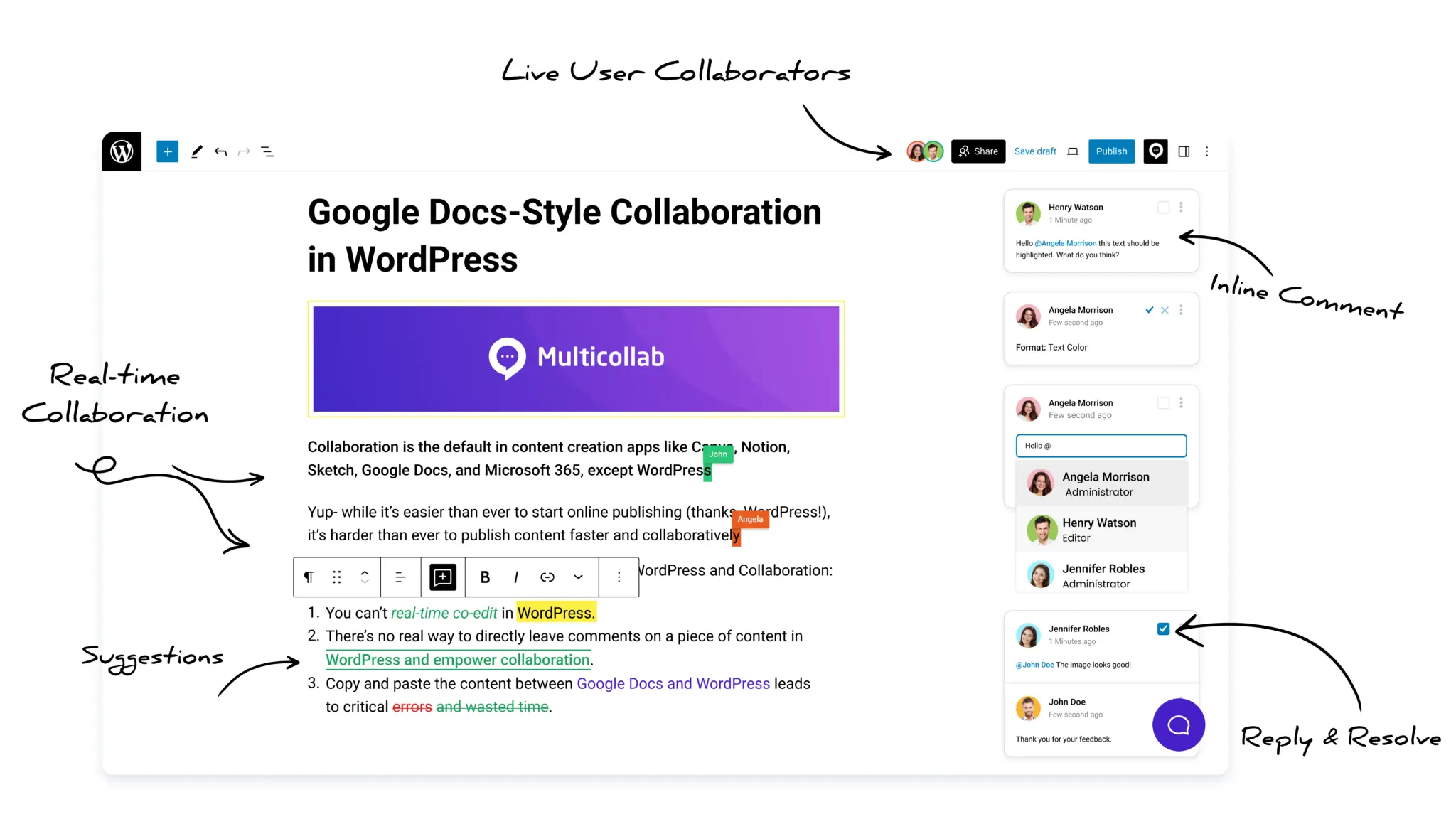
Editors can add inline comments to selected text or media. Writers can reply, make the requested change, and resolve the discussion without searching through separate email or chat threads. Suggestion Mode allows a reviewer to propose text changes that an authorized team member can accept or reject. This creates a controlled review process while preserving the writer’s original draft until a suggestion is approved.
Support live and asynchronous collaboration
Teams can use real-time collaboration in WordPress when several contributors need to work together at the same time. For a formal review stage, they can use comments and suggestions asynchronously. Real-time collaboration and Suggestion Mode serve different working styles and do not currently run together. Teams should select the appropriate mode for each stage.
Review the real-time collaboration documentation for current requirements and limitations.
Bring external contributors into the process
With guest collaboration, teams can invite clients, freelancers, or subject experts to participate without giving them unrestricted WordPress dashboard access. Assign the access level that matches the person’s responsibility.
Control roles and publishing responsibilities
Permissions help teams determine who can view, comment, edit, resolve discussions, or publish. This supports a clear separation between creators, reviewers, and final approvers.
Use notifications to keep work moving
Email and Slack notifications can alert collaborators about comments, replies, mentions, and suggestions. Notifications should point people to a specific action instead of becoming general activity noise.
Track required editorial tasks
Editorial checklists can be used to confirm that essential tasks are complete before publication. Teams can define required and optional checks for items such as the featured image, links, SEO fields, factual review, or final approval.
For a broader implementation guide, see why teams use Multicollab for a WordPress editorial workflow.
Want to keep drafting, feedback, approvals, and publishing inside WordPress? Explore Multicollab or try the hands-on demo to see how it fits your editorial process.
Frequently asked questions
What are the main stages of an editorial workflow?
The main stages are ideation and planning, briefing and assignment, content creation, review and editing, approval, publishing, promotion, and analysis. Some teams combine stages, while publishers with complex requirements may add legal, compliance, design, or fact-checking reviews.
What is the difference between an editorial workflow and an editorial calendar?
An editorial calendar schedules topics, owners, channels, and publication dates. An editorial workflow defines the tasks, responsibilities, reviews, and approvals required to make each scheduled item ready for publication.
Who should own the editorial workflow?
A content manager, managing editor, or editorial operations lead usually owns the overall workflow. Each content item should also have one named owner responsible for moving it through the required stages.
How many approval stages should a workflow include?
Use the fewest approval stages necessary to control quality and risk. Routine blog posts may need one editorial approval, while legal, financial, technical, or client content may need additional specialist approval. Requiring senior approval for every item can create avoidable delays.
What should an editorial checklist include?
The checklist should cover the content brief, factual accuracy, sources, grammar, brand voice, search intent, metadata, links, images, accessibility, formatting, permissions, analytics, legal requirements, and final approval. Customize it by content type instead of applying every check to every page.
How can a team reduce editorial bottlenecks?
Assign one owner to each stage, set review deadlines, define completion requirements, separate required changes from optional feedback, and use one location for the latest draft and its discussions. Track time spent in each stage to identify where work actually stops.
What is the best editorial workflow for a small team?
A small team can use a simplified workflow: approve the idea, prepare the brief, create the draft, complete editorial and expert review, approve, publish, and analyze. One person may handle several roles, but ownership and approval should still be documented.
Can external contributors participate in a WordPress editorial workflow?
Yes. A collaboration solution can give freelancers, clients, and subject experts limited access to review or contribute without giving them unrestricted control of the WordPress dashboard. Use role-based permissions and remove access when it is no longer required.
How do you measure whether an editorial workflow is working?
Track draft-to-publish time, time in each stage, review turnaround, revision rounds, on-time publication rate, first-pass approval rate, overdue tasks, and scheduled content updates. Pair these operational metrics with content engagement and conversion results.
How often should an editorial workflow be reviewed?
Review it at least quarterly and whenever the team, publishing volume, content risk, or toolset changes significantly. Use workflow data and team feedback to remove unnecessary steps and strengthen unclear handoffs.
Build a workflow your team will actually follow
An effective editorial workflow does not need to be complicated. It needs clear stages, visible ownership, realistic deadlines, useful feedback, and a consistent definition of what “ready to publish” means.
Start with the eight-stage framework in this guide. Adapt the roles, review depth, and deadlines to your team. Test the process on real content, measure where work slows down, and improve it over time.
If WordPress is your publishing platform, keeping comments, suggested edits, permissions, checklists, and collaboration close to the draft can reduce tool switching and make the current status easier to understand. Try Multicollab to build a more connected editorial process inside WordPress.
Download a Free Actionable Guide: 45+ Actionable Tips to Optimize Performance for High-Traffic WordPress Websites
Performance Optimization Techniques: Speed up your site with caching, image compression, and code minification.
Hosting and Scalability Suggestions: Learn to choose the right hosting solutions and scale efficiently.
Security and Protection Guidelines: Safeguard your site from DDoS attacks, malware, and performance threats.
Content and Plugin Management Tips: Optimize your database, plugins, and themes for peak performance.