
Table of Contents
Multicollab is a WordPress plugin that helps multi-author teams coordinate on the same content, with inline comments, real-time co-editing, and stage-based approval workflows.
Key Takeaways
- WordPress supports multiple authors natively, but its built-in roles are limited. Plugins add the control most content teams need.
- The right plugin depends on the job: collaboration, permissions, scheduling, or frontend submissions.
- For real-time editorial collaboration, Multicollab brings commenting, suggestion mode, and approval workflows into the Gutenberg editor.
- For roles and permissions, PublishPress Capabilities and User Role Editor give granular control beyond the default WordPress roles.
- For planning and intake, Editorial Calendar handles scheduling, while User Submitted Posts and WP User Frontend let non-technical or guest authors contribute without backend access.
- Most multi-author sites use a combination, one plugin for collaboration and another for roles or submissions.
Running a WordPress blog with several writers gets complicated fast. The more people on your team, the harder it is to track who is working on what, keep the editorial calendar moving, and control who can do what on your site. WordPress supports multiple authors out of the box, but its default roles and permissions are limited, which is where the right plugins make the difference.
This guide covers six plugins that can transform your multi-author blogging experience in WordPress, each serving a different part of the job, from real-time collaboration to roles, scheduling, and frontend submissions.
The best multi-author management plugins for WordPress in 2026 are:
- Multicollab (real-time collaboration and editorial workflow),
- PublishPress Capabilities (roles and permissions),
- User Role Editor (granular role control),
- Editorial Calendar (content scheduling),
- User Submitted Posts (frontend submissions), and
- WP User Frontend (frontend posting for non-technical authors).
1. Multicollab (best for real-time editorial collaboration)
Multicollab is a WordPress plugin that helps multi-author teams coordinate on the same content, with inline comments, real-time co-editing, and stage-based approval workflows.
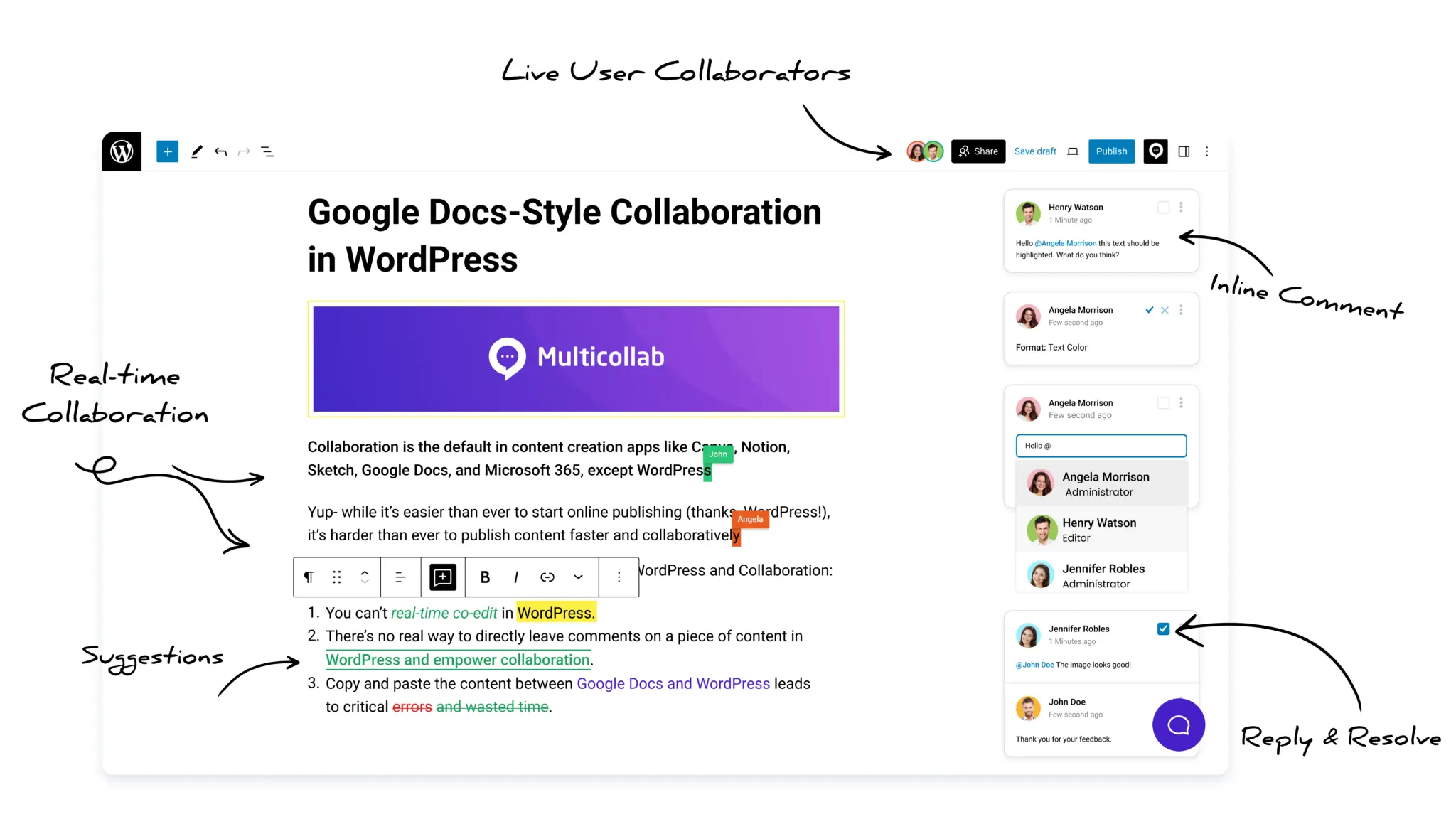
For multi-author teams, the hardest part is not adding authors, it is coordinating them on the same content without stepping on each other. Multicollab solves that by bringing Google Docs-style collaboration directly into the Gutenberg editor, so writers, editors, and reviewers work in one place.
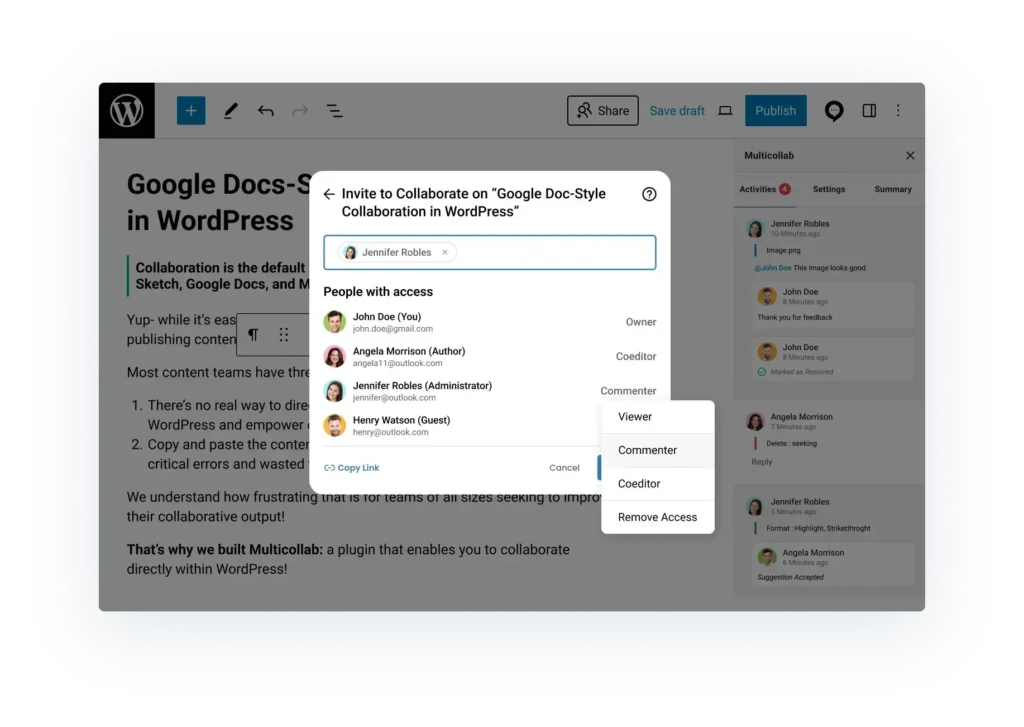
What Multicollab gives multi-author teams:
- Inline comments and @mentions on any text, image, or media block, so feedback stays in context.
- Suggestion Mode with color-coded tracked changes that editors accept or reject in bulk (Pro plan).
- Real-time co-editing for up to five people in the same post (Pro plan).
- Content Workflows that move posts through Draft, Review, Approval, and Publish, with an owner assigned at each stage (Pro plan).
- Editorial Checklist to enforce standards before a multi-author post goes live (Pro plan).
- Role-based permissions and guest collaboration as a Commenter or Viewer, so external contributors join without a WordPress account.
- Easy author reassignment, so content ownership transfers cleanly between team members.
Multicollab also sends email and Slack notifications, so no mention or update goes unnoticed and the whole team stays in sync. Among the tools in this list, Multicollab is the one focused on real-time editorial collaboration rather than author profiles or permissions alone. For a deeper look, see our guides on how to work collaboratively on WordPress and collaborative editing.
2. PublishPress Capabilities (best for roles and permissions)
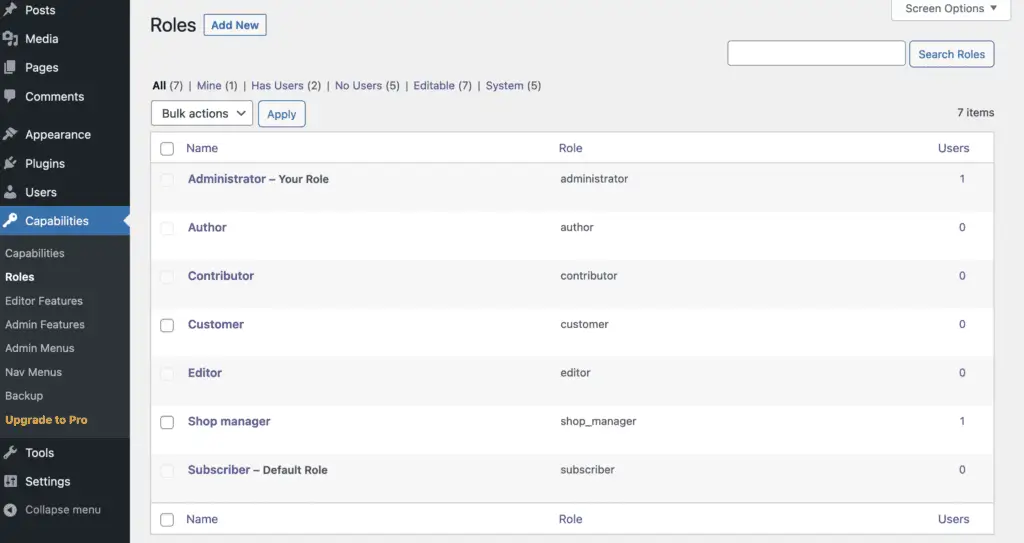
PublishPress Capabilities gives WordPress teams detailed control over capabilities and permissions, which makes managing multiple authors far more manageable. Its features include:
- Editor and admin customization, so you control what each role sees in Gutenberg, the Classic Editor, and the WordPress admin area.
- Permission archiving, so every change is saved and you can revert if something goes wrong.
- Integration with plugins like WooCommerce and Elementor for fine-grained permission control.
This kind of role control pairs naturally with a clear content approval workflow, where each person’s permissions match their stage in the process.
3. User Role Editor (best for granular role control)
User Role Editor lets WordPress teams manage multi-author environments by adjusting the permissions attached to each role. It is built to be intuitive, and it adapts whether you run a single site or a multisite network.
- Multisite support that scales from one site to a full network.
- Role-based content visibility and widget restrictions in the Pro version.
- Simple, granular control over what each author role can and cannot do.
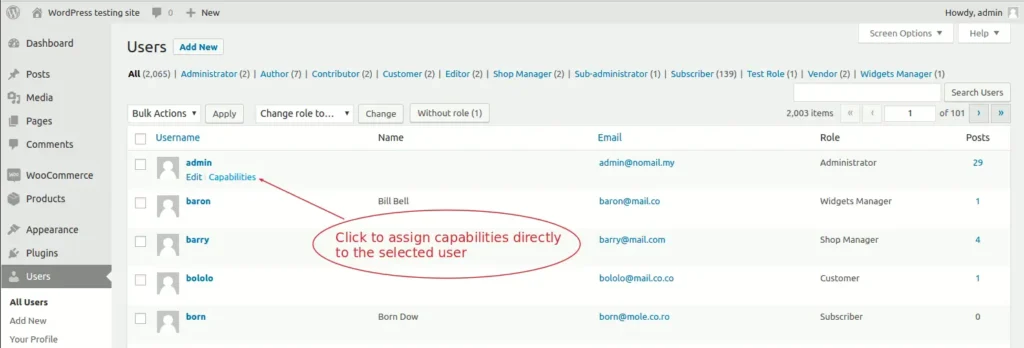
For teams that want collaboration permissions handled inside the editor instead, secure collaboration tools like Multicollab manage comment and suggestion access by role.
4. Editorial Calendar (best for content scheduling)
Editorial Calendar is primarily a content planning tool that also helps manage multiple authors. Teams can assign drafts and posts to specific authors and see the whole publishing schedule at a glance.
- Instant status checks, so you can see whether a post is in draft, queued, or live.
- A central scheduling hub that keeps multiple authors coordinated.
- Drag-and-drop scheduling to move posts around the calendar.
A calendar handles the when, but not the review process. Pair it with a defined editorial workflow so content moves cleanly from assignment to publish.
5. User Submitted Posts (best for frontend submissions)
User Submitted Posts lets contributors send in content from the front end of your site, without needing access to the WordPress admin area. It is useful for blogs that accept guest contributions.
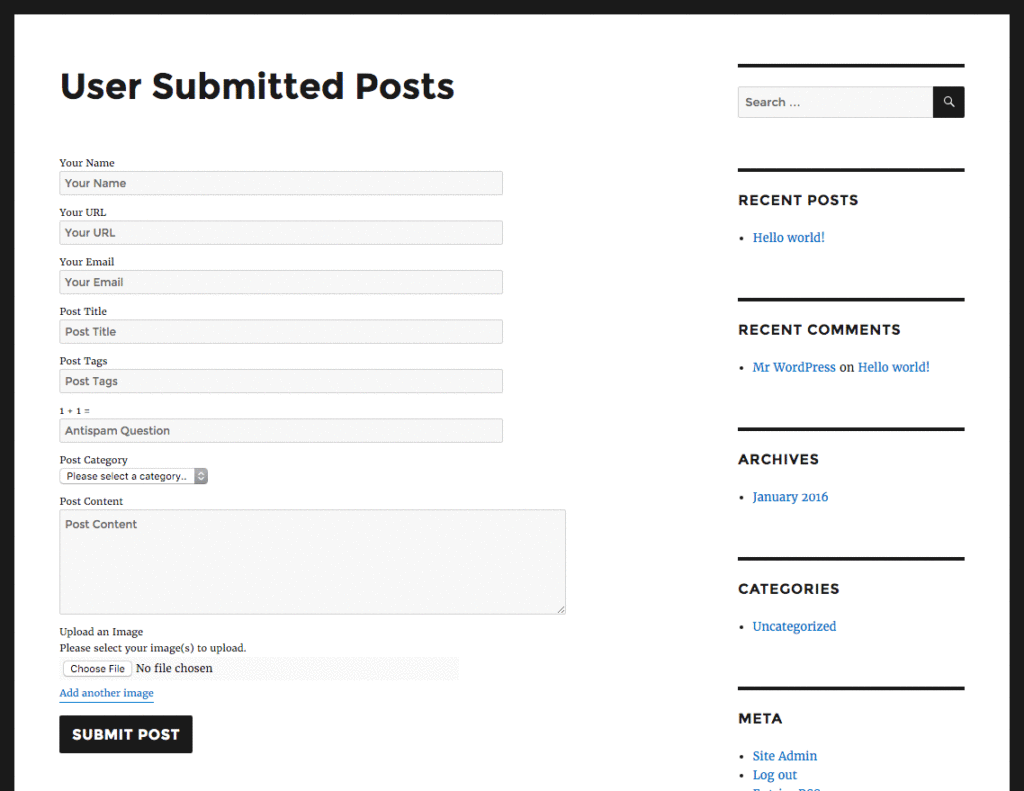
- A frontend submission form for posts, so guests contribute without backend access.
- Control over what submitters can include, from text to images.
- A smoother intake process for guest and occasional contributors.
6. WP User Frontend (best for non-technical authors)
The WordPress backend can feel complicated for authors without technical experience. WP User Frontend solves this by moving posting to the front end, making it easier for newer users to create and submit drafts.
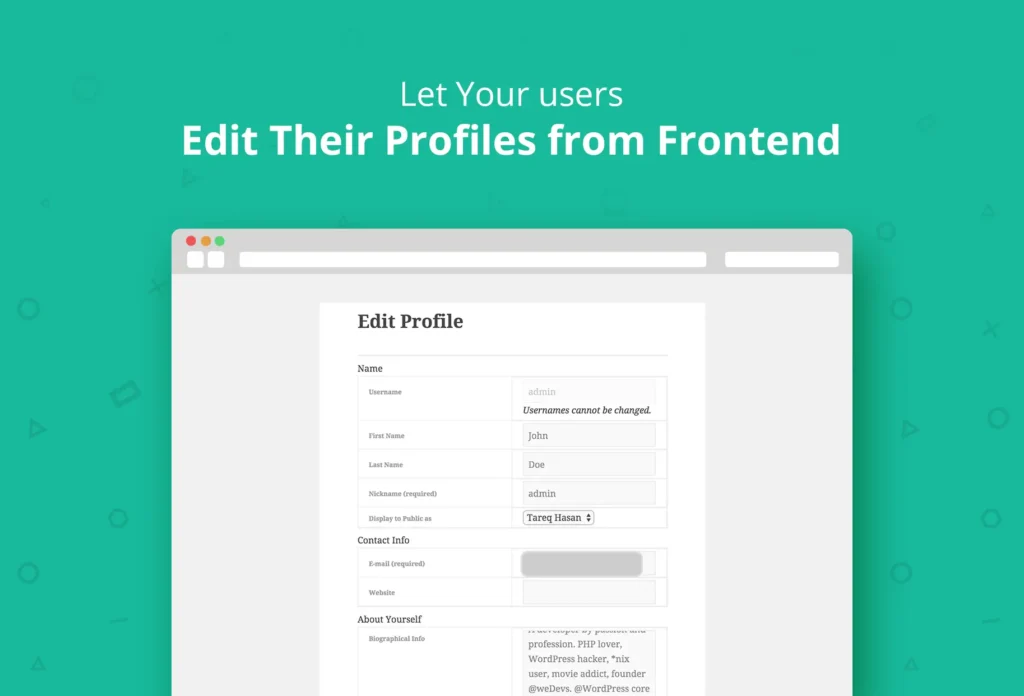
- A frontend login and registration form for fast, secure contributor access.
- Shortcodes and template tags to control content visibility and display.
- Multilingual support for diverse, distributed author teams.
How to choose the right multi-author plugin
There is no single best plugin, because each one solves a different problem. Choose based on what your team struggles with most:
- If the pain is collaboration and review, start with Multicollab.
- If the pain is who-can-do-what, use PublishPress Capabilities or User Role Editor.
- If the pain is planning and deadlines, use Editorial Calendar.
- If the pain is intake from guests or non-technical writers, use User Submitted Posts or WP User Frontend.
Most multi-author sites end up combining two: one for collaboration and one for roles or submissions.
Conclusion
Managing a multi-author WordPress blog comes down to coordination: keeping writers aligned, controlling access, and moving content from draft to publish without friction. The six plugins here each cover a piece of that, and the right mix depends on your team’s biggest bottleneck.
If that bottleneck is collaboration itself, Multicollab brings real-time co-editing, inline comments, suggestion mode, and editorial workflows into the WordPress editor, so your authors work together in one place instead of scattering feedback across email and documents. Try the 14-day trial today.
FAQs:
Can a WordPress blog have multiple authors?
Yes. WordPress supports multiple authors natively, and many successful blogs use several writers to diversify content and bring varied expertise. Plugins extend this with better roles, scheduling, and collaboration.
Which plugin is best for managing multiple authors in WordPress?
It depends on the need. For real-time collaboration and editorial workflow, Multicollab is the strongest choice, with inline comments, suggestion mode, Content Workflows, and an Editorial Checklist inside Gutenberg. For roles and permissions, PublishPress Capabilities and User Role Editor are better fits.
How do I add multiple authors in WordPress?
Assign the Author or Contributor role to each user under Users in your WordPress dashboard. For multiple bylines on a single post, use a plugin like PublishPress Authors or Co-Authors Plus, since WordPress credits only one author per post by default.
What is the best plugin for assigning multiple authors to one post?
PublishPress Authors and Co-Authors Plus are the established choices for multiple bylines on a single post. For teams that also need to collaborate on that content, Multicollab adds inline comments, suggestion mode, and approval workflows on top of WordPress authoring.
Can a single post have multiple authors?
Not by default. WordPress assigns one author per post. A multi-author or co-author plugin adds the ability to credit and let several writers work on the same post.
Download a Free Actionable Guide: 45+ Actionable Tips to Optimize Performance for High-Traffic WordPress Websites
Performance Optimization Techniques: Speed up your site with caching, image compression, and code minification.
Hosting and Scalability Suggestions: Learn to choose the right hosting solutions and scale efficiently.
Security and Protection Guidelines: Safeguard your site from DDoS attacks, malware, and performance threats.
Content and Plugin Management Tips: Optimize your database, plugins, and themes for peak performance.