

Table of Contents
Multicollab is a WordPress plugin that helps teams collaborate on content in real time, with inline comments, suggestion mode, and approval workflows built into the Gutenberg editor.
Key Takeaways
- Collaboration is no longer optional. In 2026, hybrid work is the dominant model for knowledge teams, and the question is how to collaborate well, not whether to.
- The benefits are real and measurable: higher quality, faster problem-solving, more creativity, shared knowledge, and stronger accountability.
- The drawbacks are mostly solvable. Slow feedback loops, unclear roles, and weak accountability are process problems, not reasons to avoid collaborating.
- Clear roles and the right tools make the difference. Teams with a formal collaboration plan are far more engaged and less burned out.
- The work model matters less than the system. Co-located, hybrid, and distributed teams can all collaborate well with the right structure.
Collaboration is now the default way teams work. By 2026, roughly half of knowledge workers globally operate in hybrid roles, and nearly 80% of workers use collaboration tools every day. The old debate about whether teams should collaborate is settled. The real question is how to do it well, because collaboration done badly is where many organizations quietly lose time and money.
This guide covers the genuine pros and cons of collaboration in the workplace, with a clear-eyed view of 2026: the benefits are significant, and the common drawbacks are mostly solvable problems of process and tooling.
We will also look at how collaboration plays out across co-located, hybrid, and distributed teams, and how the right tools keep it running smoothly.
The pros and cons of collaboration at a glance
The main benefits of workplace collaboration are higher quality work, faster problem-solving, more creativity, better knowledge sharing, and shared accountability. The main challenges are slow feedback loops, unclear roles, and weak accountability. In 2026, those challenges are not reasons to avoid collaboration. They are signs that a team needs clearer roles, better communication, and the right tools.

The benefits of collaboration in the workplace
Higher quality work
Collaboration improves quality through review and diverse input. When people examine each other’s work, they catch errors, fill gaps, and sharpen ideas before anything ships. Peer review cycles turn a single perspective into a tested one, which is why most high-quality content and products pass through several sets of hands before release.
Faster problem-solving and better decisions
A team brings more knowledge to a problem than any one person holds. By pooling expertise, teams reach solutions faster and make better-informed decisions. Companies with highly engaged, collaborative teams see 23% higher profitability than less engaged ones, a gap that comes largely from solving the right problems quickly.
More creativity and innovation
Collaboration sparks ideas that would not surface in isolation. When people build on each other’s thinking, they reach solutions no single person would have found alone. Brainstorming, debate, and shared exploration create the conditions for genuine innovation, and they raise morale at the same time.
Better knowledge sharing
Collaboration spreads knowledge across a team instead of trapping it in individuals. When a designer learns from an engineer, or a junior writer learns from an editor, the whole team gets stronger. This cross-pollination builds a culture of continuous learning that pays off long after any single project ends, and it is a core part of mastering content collaboration.
Shared accountability
Good collaboration creates shared ownership of outcomes. When a team makes decisions together, members feel responsible for the result and committed to it. That shared buy-in strengthens trust and cohesion, and it makes teams more resilient when projects get hard.
The challenges of collaboration (and how to solve them)
Collaboration has real friction points. The difference in 2026 is that each one has a known fix. These are problems to manage, not reasons to work in silos.
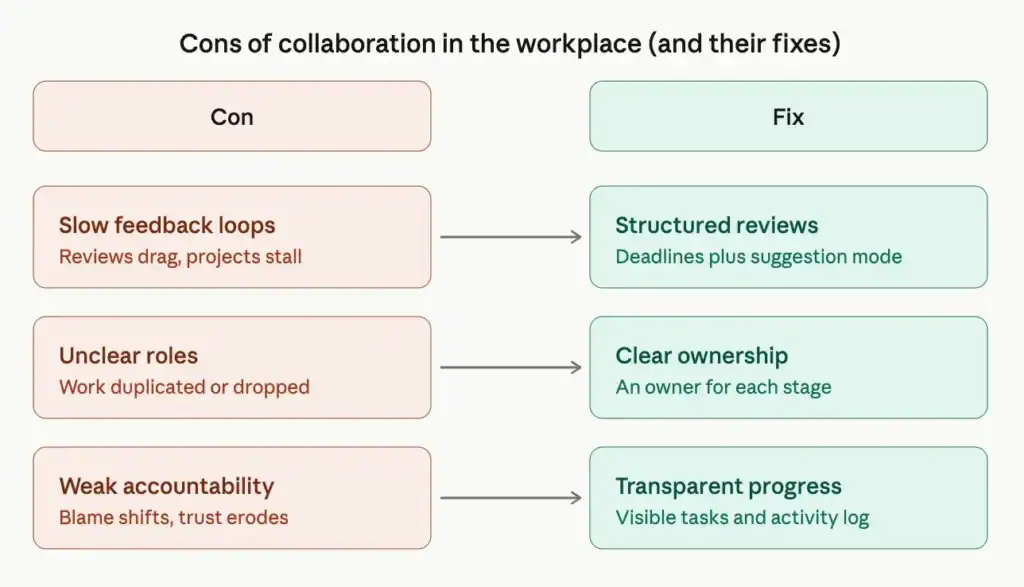
Challenge 1: Slow feedback loops
When too many people weigh in without structure, review cycles drag and projects stall. Endless comment threads and unclear sign-off slow everything down. Executives know the cost: a large majority say poor communication interferes with the speed and quality of work.
The fix: Structure the review process. Set clear deadlines for feedback, limit who needs to approve what, and use a tool that lets reviewers suggest specific edits rather than leaving vague comments. A defined editorial workflow keeps reviews moving, and strong content review practices turn feedback into progress instead of debate.
Challenge 2: Unclear roles and responsibilities
Without clear ownership, work gets duplicated or dropped. People step on each other or assume someone else has a task covered. This is the single most common reason collaboration fails, and it shows up as confusion, missed deadlines, and frustration.
The fix: Define roles and responsibilities at the start of every project. Assign a clear owner to each stage of the work, and make those assignments visible to the whole team. A content approval workflow that names who is responsible at each step removes the ambiguity before it causes problems.
Challenge 3: Weak accountability and trust
When responsibility is shared but ownership is vague, accountability gets diffused. People shift blame or quietly disengage, and trust erodes. This is the highest-stakes challenge, because once trust breaks down, collaboration stops working entirely.
The fix: Make ownership and progress transparent. Clear goals, visible task assignments, and an activity record of who did what keep everyone accountable without micromanaging. When the team can see progress in one place, trust follows.
Other challenges to watch
Two smaller risks are worth keeping an eye on. Collaborative inertia happens when too many ideas and opinions stall decision-making; the fix is clear objectives and a decision deadline. Organizational silos form when teams stop sharing information; the fix is centralized communication so work does not get trapped inside departments. Both are easier to prevent than to repair, and both are common collaboration problems that come down to clear communication.
Collaboration across co-located, hybrid, and distributed teams
Where a team sits changes how it collaborates, but not whether it can. In 2026, around half of knowledge workers are hybrid, and well-organized hybrid teams are about 5% more productive than fully remote or fully on-site teams. The lesson from the data is consistent: the work model matters less than the system around it.
Co-located teams collaborate through in-person interaction, spontaneous conversation, and shared physical space. The advantage is fast, informal communication. The risk is that decisions made in hallways never get documented, leaving remote or absent members out of the loop.
Distributed and remote teams collaborate through tools and written communication. The advantage is focus and a wider talent pool. The risk is isolation and slower informal feedback, which makes communication strategies for remote teams and asynchronous collaboration essential. Notably, hybrid and remote workers often report stronger connection to their company than fully on-site workers, which challenges the old assumption that collaboration only happens face to face.
Hybrid teams combine both, and the data favors them when they are structured well. Teams with a formal hybrid collaboration plan are 66% more likely to be engaged and 29% less likely to be burned out. The common thread across all three models is the same: clear roles, documented decisions, and shared tools.
How the right tool makes collaboration work
Best practices only hold up when the tools support them. For teams that create content in WordPress, Multicollab brings collaboration directly into the editor, so the benefits above are easy to capture and the challenges are easy to manage. If you are weighing options, our guide to choosing a content collaboration platform is a useful starting point.
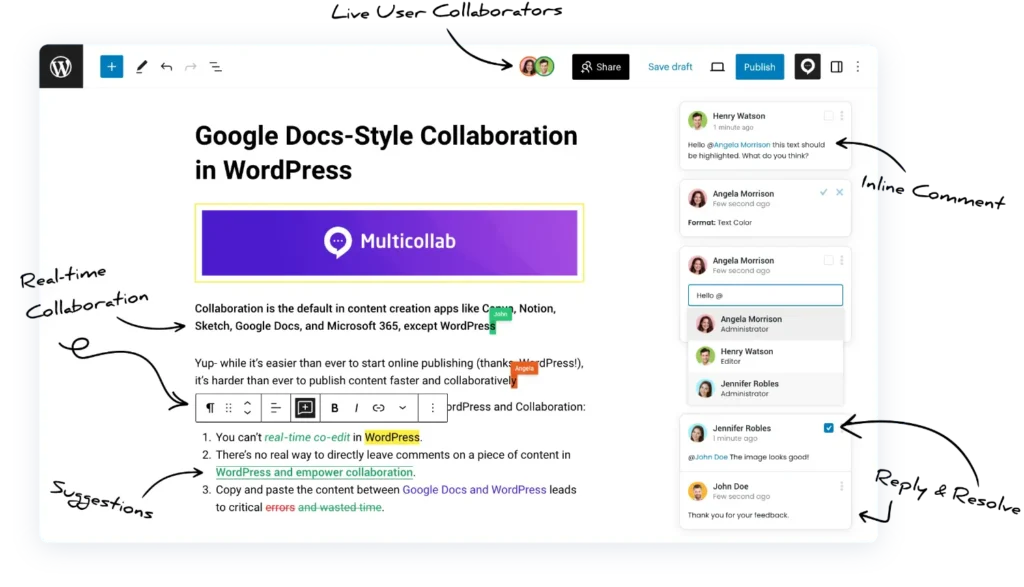
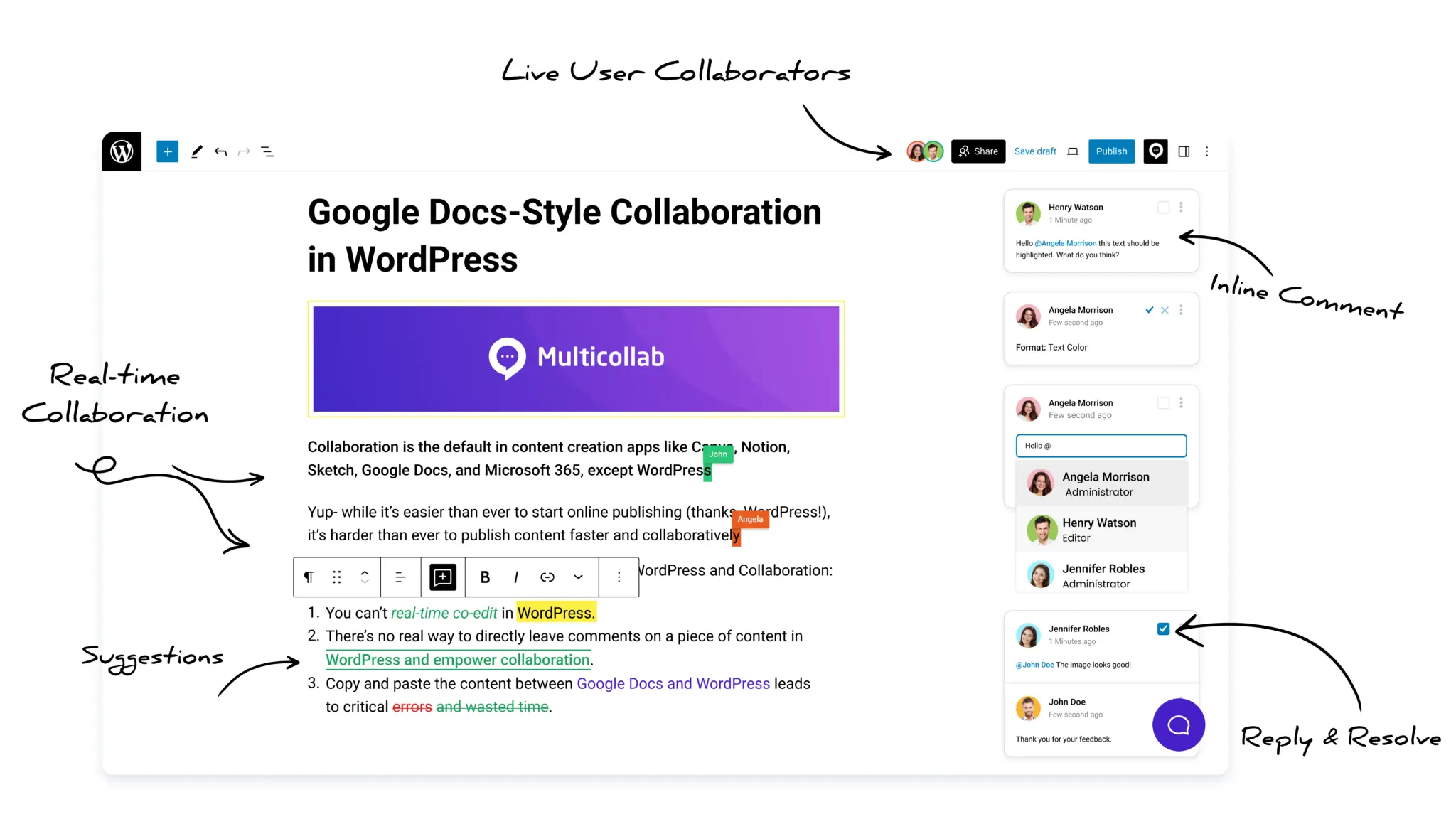
Real-time co-editing and inline comments: Work on the same content together and leave feedback on any block, which shortens feedback loops and keeps communication in one place rather than scattered across email. These real-time collaboration benefits are what make WordPress a genuine alternative to drafting in separate documents.
Suggestion Mode: Propose specific edits as tracked changes that an editor can accept or reject in bulk, which solves the slow-feedback problem directly. This feature is available on the Pro plan.
Content Workflows: Move content through clear stages such as Draft, Review, Approval, and Publish, with an owner assigned at each step, which removes role ambiguity. Available on the Pro plan.
Editorial Checklist: Enforce standards before content goes live, so quality stays high without manual policing. Available on the Pro plan.
Activity tracking and permissions: See who did what and control who has access at each stage, which keeps accountability clear and trust intact through secure collaboration.
It is worth noting that WordPress added native block-level commenting in version 6.9 through its Notes feature, a useful first step. For the full editorial process, including suggestion mode, workflows, and real-time co-editing, a dedicated tool still fills the gap. Our guide on how to work collaboratively on WordPress covers the full setup.
Conclusion
In 2026, the pros of workplace collaboration clearly outweigh the cons. Collaboration raises quality, speeds up problem-solving, fuels creativity, spreads knowledge, and builds accountability. The challenges that remain, slow feedback, unclear roles, and weak accountability, are real but solvable with clear process and the right tools.
The teams that win are not the ones that avoid collaboration’s friction. They are the ones that design it out, with clear roles, transparent ownership, and tools that keep everyone working in the same place.
If your team creates content in WordPress, Multicollab brings real-time collaboration, suggestion mode, and editorial workflows into the editor, so you get the benefits of collaboration without the usual slowdowns. See our complete guide to collaborative editing to put it into practice.
Take the next step in transforming your workplace collaboration by getting started with Multicollab today!
Frequently Asked Questions
What are the main pros and cons of collaboration in the workplace?
The main benefits are higher quality work, faster problem-solving, more creativity, better knowledge sharing, and shared accountability. The main challenges are slow feedback loops, unclear roles, and weak accountability when ownership is not defined. In 2026, those challenges are seen as solvable process problems rather than reasons to avoid collaboration.
What are the biggest disadvantages of collaboration?
The most common disadvantages are slow feedback loops that delay projects, unclear roles that cause duplicated or missed work, and diffused accountability when responsibility is shared without clear ownership. Each can be addressed with structured reviews, defined roles, and transparent progress tracking.
What are the benefits of collaboration in the workplace?
Collaboration improves the quality of work through review and diverse input, speeds up problem-solving, increases creativity, spreads knowledge across the team, and builds shared accountability. Engaged, collaborative teams are also significantly more profitable than disengaged ones.
How can teams collaborate more effectively?
Set clear roles and responsibilities at the start of each project, centralize communication, set realistic deadlines for feedback, and use a tool that tracks ownership and progress. These steps capture the benefits of collaboration while preventing the most common slowdowns.
Does collaboration work for remote and hybrid teams?
Yes. Well-organized hybrid teams are about 5% more productive than fully remote or fully on-site teams, and hybrid teams with a formal collaboration plan are far more engaged and less burned out. The work model matters less than having clear roles, documented decisions, and shared tools.
What tools help with workplace collaboration?
Collaboration tools centralize communication, track progress, and manage permissions. For teams working in WordPress, Multicollab brings commenting, suggestion mode, real-time co-editing, content workflows, and activity tracking into the editor, so feedback and accountability stay in one place.
Download a Free Actionable Guide: 45+ Actionable Tips to Optimize Performance for High-Traffic WordPress Websites
Performance Optimization Techniques: Speed up your site with caching, image compression, and code minification.
Hosting and Scalability Suggestions: Learn to choose the right hosting solutions and scale efficiently.
Security and Protection Guidelines: Safeguard your site from DDoS attacks, malware, and performance threats.
Content and Plugin Management Tips: Optimize your database, plugins, and themes for peak performance.