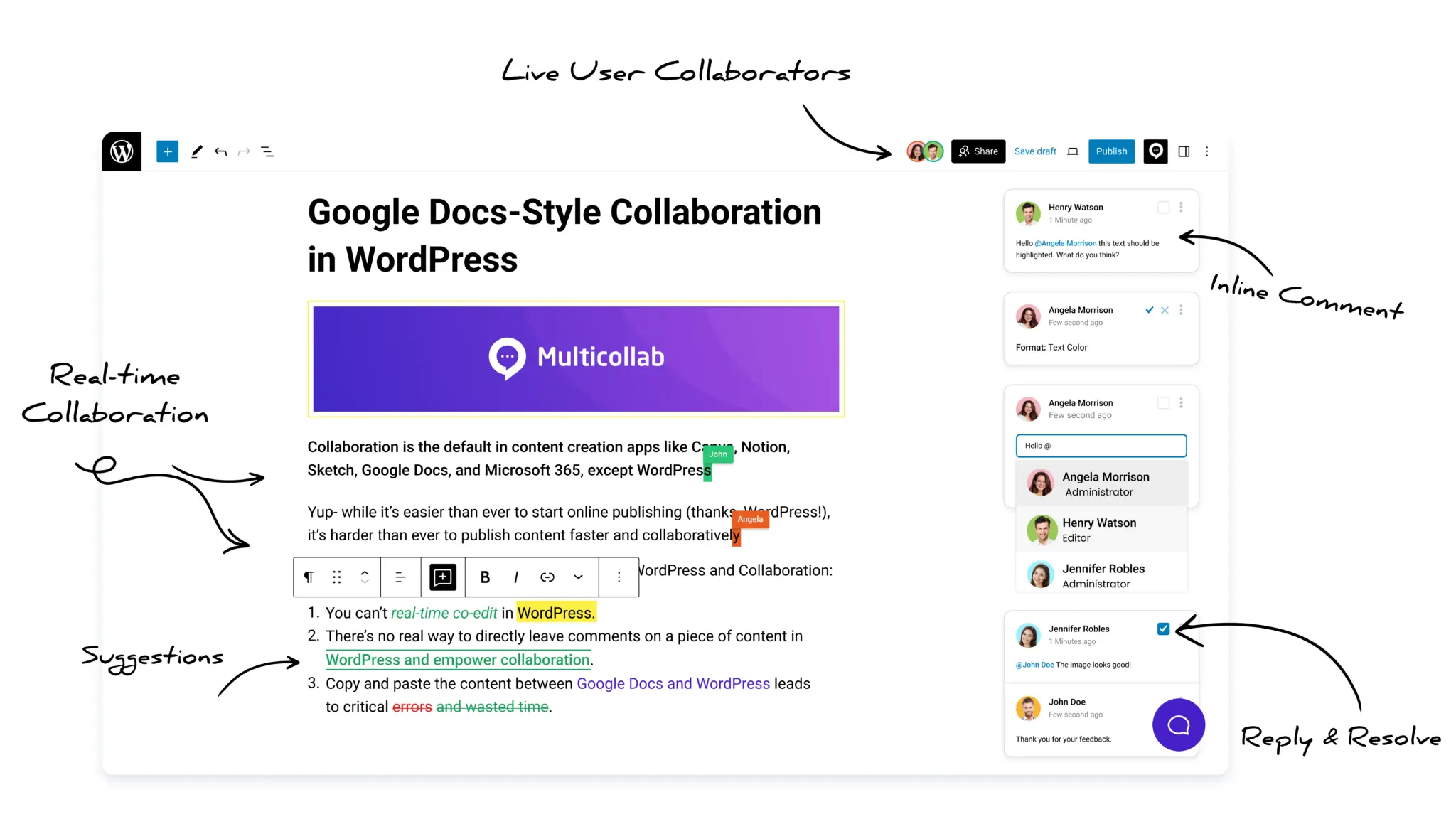


Table of Contents
Key Takeaways
- WordPress Notes is a useful built-in collaboration feature, but it is still not a complete alternative to Multicollab.
- The removal of real-time collaboration from WordPress 7.0 highlights the current limitations of WordPress editorial collaboration.
- WordPress Notes mainly solves block-level commenting, while editorial teams need full workflow and approval systems.
- Features like inline comments, suggestion mode, guest collaboration, and live versioning remain major gaps in WordPress Notes.
- For serious publishing operations in 2026, dedicated editorial collaboration tools like Multicollab provide capabilities WordPress core does not yet offer.
WordPress 6.9 shipped Notes in December 2025, finally giving the block editor a built-in way to leave threaded comments on individual blocks. It was a long-awaited feature, and a real step forward for the platform.
WordPress 7.0 was supposed to be the second half of that story. The release, scheduled for May 20, 2026, was meant to bring real-time co-editing into core, along with several enhancements to Notes itself.
Then, on May 8, real-time collaboration was pulled from the release. The official statement cited concerns around race conditions, server load, memory efficiency, and recurring bugs found in late testing.
So, with 7.0 launching in a week without its coveted collaboration feature, it’s worth taking an honest look at where WordPress editorial collaboration actually stands right now. What did Notes solve? What did 7.0 postpone? And what does this all mean for the teams who use WordPress to run real publishing operations?
Let’s dive in.
What Notes solved
WordPress Notes is a meaningful addition to WordPress core.
Inside the post editor, any user with permission to edit a post can select a block, click “Add note,” and leave a threaded comment. Replies stay threaded under the original. Notes can be resolved, edited, or deleted.
Behind the scenes, each note is stored as a standard WordPress comment, which means developers can access them through the existing comments API and REST endpoints. Notes are enabled by default for posts and pages, and can be extended to custom post types with a few lines of code. (The official WordPress 6.9 developer note for Notes covers the full technical details.)
For the first time, WordPress has a native way for editors, writers, and reviewers to discuss content inside the editor instead of through Slack, email, or external documents. For small teams and solo writers, WordPress Notes is genuinely enough.
What 7.0 was supposed to add
Reading the official WordPress 6.9 developer note for Notes, the roadmap for 7.0 was ambitious. Six enhancements were listed:
- Fragment notes, which would let users leave a note on part of a block, or across multiple blocks
- @ mentions, so users can tag a teammate and trigger a notification
- Improved notifications, including digest controls to manage volume
- Improved floating layout for wider screens
- Minified mode, where notes display as icons next to blocks
- Wider availability across the editor, including templates
- Real-time collaboration, integrated with Notes
The intention was clear: 7.0 would close the gap between WordPress and the modern collaborative editors people are used to.
Then real-time collaboration was pulled. The performance testing data published the same day showed the core team is still evaluating the right storage strategy for RTC. There is no committed timeline for when it returns.
WordPress Core vs Editorial Operations: The structural gap
Here’s the part worth being clear about. WordPress core is shipping a foundation for collaboration. It is not shipping an editorial operations system.
A foundation for collaboration gives you a place to leave feedback. An editorial operations system manages the whole production process:
- how a post moves from draft to published,
- who can advance it through which stages,
- who has to sign off before it goes live,
- how outside reviewers participate,
- how published content gets safely updated, and
- how every action gets logged.
Notes is the comment field. Editorial work is everything around the comment field.
This isn’t a criticism of Notes. The core team has been clear that Notes is the start of Phase 3 of Gutenberg, not the end of it.
But for editorial teams running real publishing operations today, the gap between “WordPress has comments” and “WordPress has an editorial operations system” is significant, and core’s roadmap is not going to close it in the next release or two.
What WordPress editorial teams still need
If you publish content seriously in WordPress, here are the capabilities that aren’t in 6.9, aren’t shipping in 7.0, and aren’t likely to arrive in core for several release cycles.
1. Inline comments, not just block-level
Notes attach to entire blocks. If a paragraph has six sentences and one phrase needs work, the note covers the whole paragraph. The reviewer has to describe in words which phrase they mean. For long-form editorial content, that friction adds up.
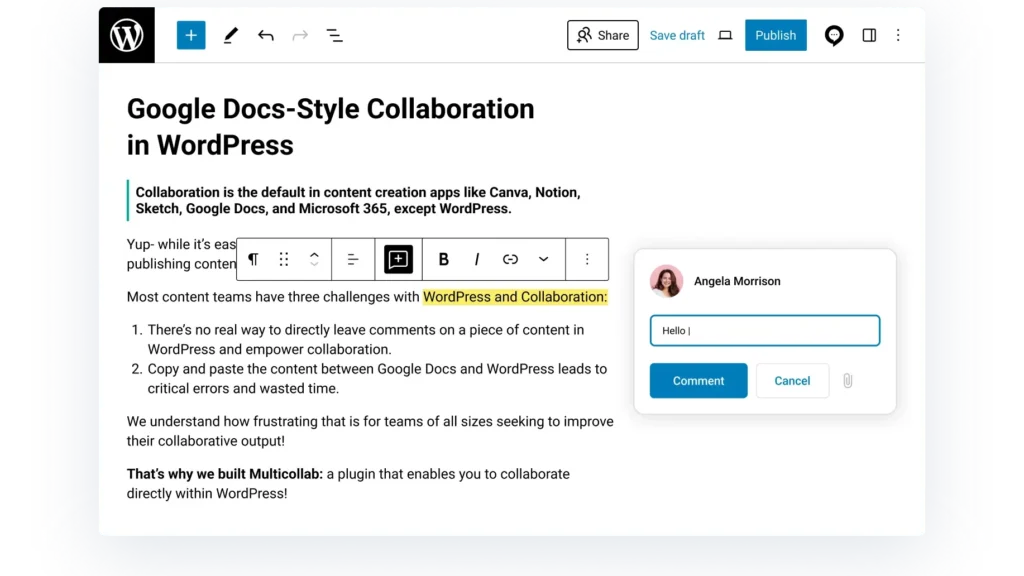
Multicollab’s inline commenting attaches to the exact text or media you highlight, just like Google Docs. It’s a small difference per comment, but across a hundred reviews per month, it’s the difference between a tool that helps and a tool that adds steps.
2. Suggestion Mode (track changes)
Notes are comments about edits. They aren’t edits themselves. A reviewer who wants to propose a rewrite can describe it in a note, but the author still has to retype the rewrite manually.
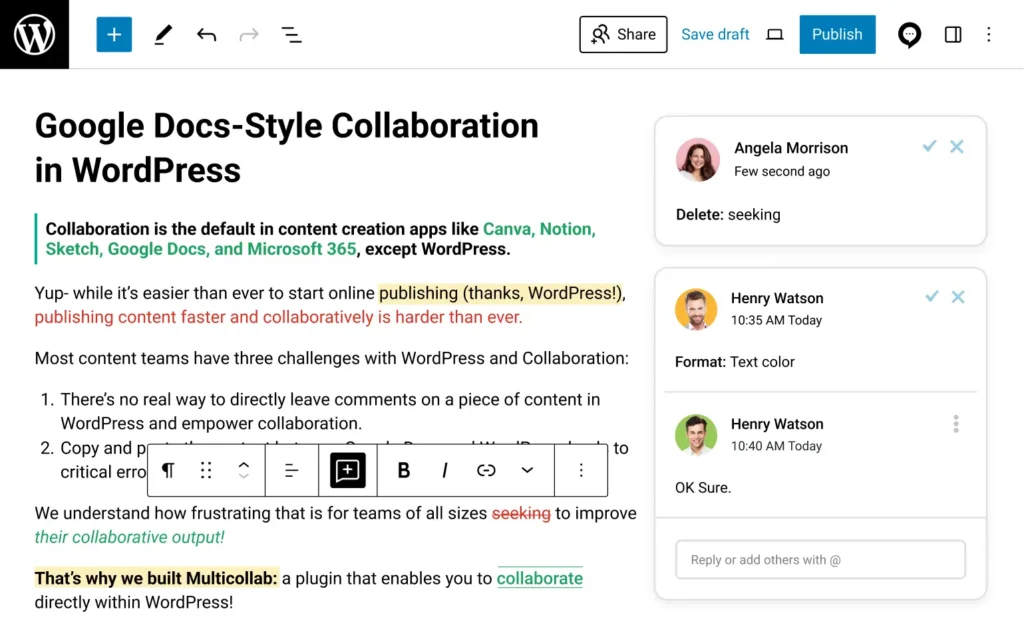
Suggestion Mode lets reviewers propose actual wording. Additions appear in green. Deletions appear in red. Each contributor’s edits are color-coded. Authors accept or reject suggestions one by one or in bulk. For any team where editors propose specific phrasing rather than just flagging issues, this is the single largest workflow gap in Notes today.
3. Guest collaboration without WordPress accounts
To leave a note in WordPress 6.9, you need a WordPress user account with editing permissions. There is no concept of an external reviewer. For agencies reviewing posts with clients, newsrooms working with freelance editors, or any team with stakeholders outside the WordPress install, this is a hard wall.
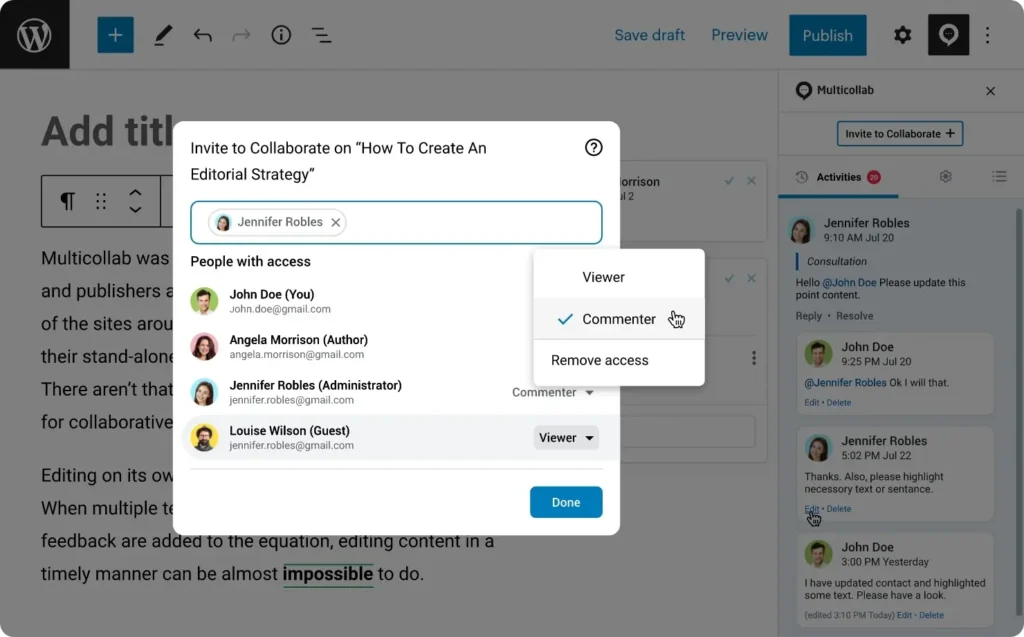
Multicollab solves this with secure links that expire in 24 hours, with Viewer, Commenter, or Co-Editor roles. The reviewer leaves their feedback. The link expires. No account is ever created.
4. Content workflows with stages and approvals
Notes track conversations. They don’t track status. A post can have ten resolved notes and still be nowhere near ready to publish, because “ready to publish” depends on your editorial process, not on whether comments are closed.

Real editorial teams need named stages (Draft, Editor Review, SEO Review, Legal Check, Approval, Publish), role-based permissions for who can advance a post through each stage, and a record of who approved what. Multicollab’s Content Workflows handle this directly inside the editor. Notes does not.
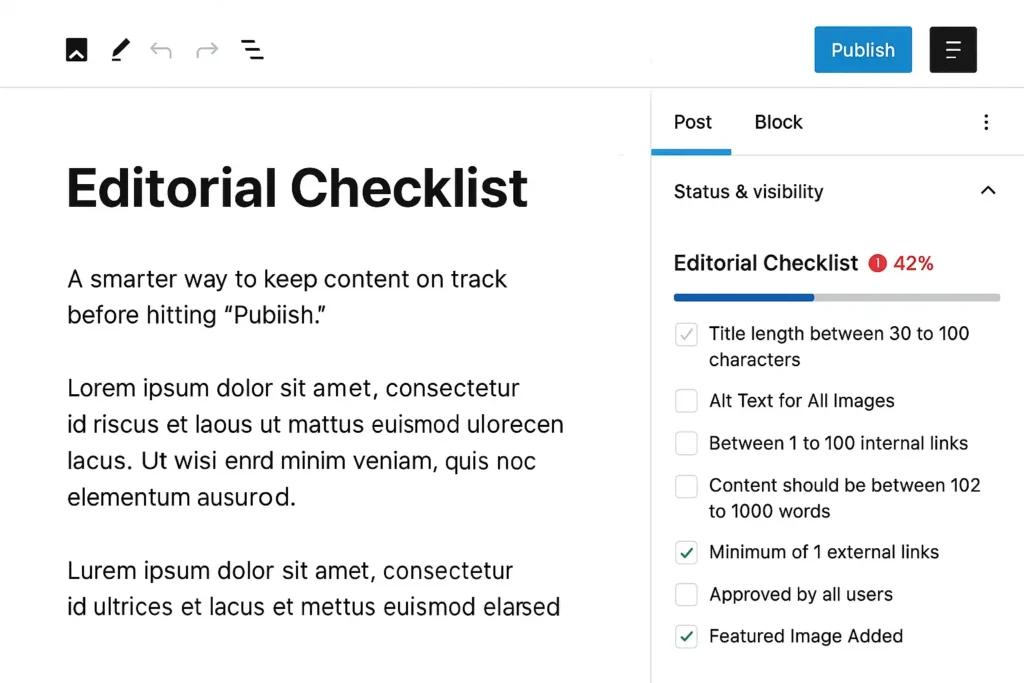
5. Editorial checklists and publishing controls
Some teams require a featured image. Some require a meta description. Some require legal sign-off for regulated content. Editorial checklists make these requirements explicit and can block publishing until they’re complete. This is a publishing-controls problem, not a commenting problem, and Notes does not address it.
6. Live content versioning
Published posts often need updates. Doing that safely, by drafting changes, routing them through review, and merging them only after approval, is a real operational need for teams maintaining evergreen or compliance-sensitive content. Multicollab’s Live Content Versioning handles this. Notes does not.

7. Real-time co-editing, today
WordPress was building it. It’s now indefinitely postponed. Multicollab has shipped real-time co-editing through WebSocket technology since 2023, supporting up to five users at once, with guest access. For teams that need live collaboration now rather than in some future release, this is the most concrete gap of all.
WordPress Notes vs Multicollab: How to think about this decision
If you’re a solo writer or a small in-house team using WordPress, Notes is genuinely enough. You don’t need to pay for editorial collaboration software. Use what core ships, and revisit the question when your team grows or your process gets more complex.
If you’re running an actual editorial operation, the choice has to be different. The question isn’t whether Notes is good (it is). The question is how much editorial overhead you’re willing to keep absorbing in Slack, spreadsheets, and email while waiting for WordPress core to mature into a complete operations system.
Closing thoughts
WordPress collaboration is going to keep evolving. The work the core team is doing is real, and it matters. The Notes foundation is solid. The setbacks in 7.0 are honestly handled (shipping a stable release without RTC is the right call). And future versions will keep closing the gap.
But for editorial teams that need a complete operations system today, the gap is wide enough that waiting isn’t a strategy. The teams running serious publishing operations on WordPress have been using purpose-built editorial collaboration plugins for years, and the 7.0 setbacks make a clear case for why that’s likely to continue for some time.
If you want to see what a complete editorial operations system looks like inside WordPress, you can try a live demo of Multicollab. It’s the fastest way to understand the shape of what core isn’t building yet.
Download a Free Actionable Guide: 45+ Actionable Tips to Optimize Performance for High-Traffic WordPress Websites
Performance Optimization Techniques: Speed up your site with caching, image compression, and code minification.
Hosting and Scalability Suggestions: Learn to choose the right hosting solutions and scale efficiently.
Security and Protection Guidelines: Safeguard your site from DDoS attacks, malware, and performance threats.
Content and Plugin Management Tips: Optimize your database, plugins, and themes for peak performance.