
Table of Contents
Key Takeaways
- High-quality content comes from consistent processes, not scattered tools or last-minute fixes.
- WordPress publishers avoid chaos by keeping drafts, feedback, and revisions in one place.
- Real-time collaboration, inline comments, and suggestion tools make reviews faster and clearer.
- Editorial checklists and built-in SEO checks help every post meet your publishing standards.
- Multicollab brings all of this directly into WordPress, making quality easier to maintain at scale.
Maintaining impeccable content quality is a must for any serious publisher. For top WordPress publishers, every article, blog post, and landing page has to be accurate, well-written, and SEO-friendly. Along with these, the ideal scenario is keeping the team calm and focused instead of buried in IM/Slack messages.
If you’ve ever wondered how leading publishers manage near-perfect content quality without constant back-and-forth on IMs, this guide will show you exactly how they do it.
We’ll look at the tools, workflows, and habits that help WordPress teams maintain quality while staying organized and stress-free.

Why content quality is non-negotiable
Content quality is not something publishers fix at the end. It is the foundation of everything you publish. Readers can feel the difference between content that is crafted with care and content that is rushed. Quality affects how long they stay, how much they trust you, and whether they come back.
High-quality content also signals authority. When your writing is clear and accurate, it strengthens your reputation and builds trust with your audience. Search engines notice this too. Modern ranking systems reward content that is helpful, well-structured, and factually reliable.
Poor-quality content creates doubt, damages your brand’s voice, and makes it harder for your articles to perform well in search.
For leading WordPress publishers, content quality is much more than fixing typos. It is the sum of dozens of small, consistent standards, such as:
- Accurate information backed by credible sources
- Clear writing that follows your brand voice
- Proper structure with strong headlines and easy-to-read flow
- SEO basics like metadata, alt text, and internal links
- Clean formatting that works across devices
- Proofreading and fact-checking before publishing
When all of these elements come together, quality becomes predictable instead of stressful.
Many teams feel overwhelmed at first, especially when juggling feedback in Slack or scattered Google Docs. But once you introduce the right editorial workflow inside WordPress, quality becomes easier to maintain:
- Everyone knows who owns each step
- Reviews happen in context
- Nothing gets lost in long chat threads
- Quality checks become part of your routine, not an afterthought
This is why top WordPress publishers rely on strong processes and tools like Multicollab. They don’t leave quality to chance. They build systems that support it from the first outline to the final SEO check.
Now let’s look at what those systems actually look like in real publishing teams.
The traditional approach: Slack overload and content chaos
If you’ve ever worked on a busy content team, this scenario will feel familiar:
A writer drafts in Google Docs. The editor drops feedback in a Slack thread. Someone else emails an updated version. By the time you’re ready to publish, no one is completely sure which file is final.
This scattered mixed-tool workflow feels normal at first, but it quickly becomes chaotic.
Comments live in too many places. Writers jump between tabs trying to piece together what to fix. Editors open a WordPress draft and wonder if it’s outdated. And the team spends more time searching for feedback than actually improving the content.
A big part of the problem is relying on Slack /instant messages for detailed editorial discussions. Slack is helpful for quick check-ins or urgent questions, but it is a terrible place to store line-by-line feedback. Important notes get buried. Threads get split. Messages move up the timeline and disappear from view.
As a result, teams fall into the same predictable traps:
- Feedback scattered everywhere with no central home
- Multiple versions of the same article floating across Docs, emails, and Slack
- Constant pings and interruptions that break writing or editing focus
- Approvals lost in long threads because someone missed a message
- Writers unsure of the final direction because feedback feels fragmented
All of this creates delays, confusion, and unnecessary stress. It also increases the chance of publishing a draft with errors, outdated sections, or missing SEO elements.
Most teams eventually reach the same conclusion: this approach doesn’t scale. As the content volume grows, Slack becomes noisier, and the workflow becomes harder to manage.
That’s why top WordPress publishers started rethinking the entire process. Instead of spreading feedback across three or four tools, they looked for ways to centralize discussions, track revisions clearly, and keep their entire team working in sync inside WordPress.
What 100% content quality looks like
When top WordPress publishers talk about “100 percent content quality,” they’re talking about creating content that is reliable, useful, consistent, and ready to perform from the moment it’s published.
For successful teams, high-quality content usually includes a mix of the following standards:
- Clear and polished writing: The writing is easy to read, follows a consistent tone of voice, and aligns with the publication’s style. Sentences are clean. Ideas flow naturally. Grammar tools help, but the final polish comes from human judgment.
- Accuracy and originality: Facts are checked. Claims are verified. Quotes are correct. The content brings a fresh point of view instead of repeating what everyone else is saying.
- Brand voice alignment: Whether the tone is friendly, educational, analytical, or bold, the content feels like it belongs to the same brand. Consistency across writers builds trust.
- SEO built into the process: Keywords are chosen intentionally. Metadata is written with care. Internal links help readers dig deeper. The content structure supports readability and search performance.
- Strong user experience: Headings are clear. Images add context. Alt text is included. Pages load fast. Formatting helps readers scan and understand the content without friction.
- Purpose and audience clarity: Every piece has a job. It might educate, guide, persuade, compare, or solve a problem. High-quality content stays focused and meets the reader where they are.
Publishers who achieve this level of quality build systems that support it every day. And once you understand what goes into true quality, it becomes much easier to create it consistently.
Structured editorial workflows: The key to consistency
Top WordPress publishers follow a clear, structured workflow that guides every piece of content from the first idea to the final publish button. This structure removes uncertainty, reduces back-and-forth messages, and helps teams stay aligned no matter how many articles they handle each week.
A strong editorial workflow usually includes steps like these:
1. Ideation or pitch review: The team agrees on topics that match audience needs and business goals. Ideas are reviewed, refined, and approved before writing begins.
2. Assignment and briefing: Writers receive a clear brief that explains the angle, the purpose of the piece, the SEO considerations, and any resources they should use.
3. Drafting inside WordPress: Many successful publishers ask writers to draft directly in WordPress. This avoids version confusion, eliminates copy-paste formatting issues, and keeps everything in one place.
4. Editing and revisions: Editors leave in-context comments so writers can see exactly what needs to change. This step is where clarity, accuracy, structure, and tone start tightening up.
5. Proofreading for polish: A copyeditor checks grammar, punctuation, consistency, and style. This is the quality-control layer that catches small issues before readers see them.
6. SEO and readiness checks: Keywords, metadata, headings, alt text, internal links, and readability scores are reviewed. The goal is to ensure the content can perform the moment it goes live.
7. Approval and scheduling: Once everything looks final, the piece is marked as approved. It is then scheduled or published according to the editorial calendar.
8. Post-publish review: After the post goes live, analytics are monitored. Teams track performance, engagement, and opportunities for improvements or updates.
When these steps are documented and followed consistently, the entire team benefits.
Editors spend less time sending status updates. Writers know exactly what’s expected. Managers have clear visibility into progress.
And most importantly, the workflow reduces unnecessary instant messages asking things like, “Is this draft ready?” or “Has someone reviewed this yet?”
A structured workflow doesn’t slow teams down. It creates the clarity that makes quality possible at scale.
Tools and practices that ensure flawless content
Even the best editorial workflow needs the right tools to support it. Top WordPress publishers use a mix of collaboration tools and features, editing helpers, SEO checkers, and team habits that make it easier to produce high-quality content without constant message chasing.
Here are the tools and practices that consistently raise the bar for content teams.
1. Real-time collaboration and in-context feedback
Modern publishers keep everything inside WordPress. Using tools like Multicollab, writers and editors collaborate directly on the post, leaving comments, suggestions, and edits exactly where they’re needed.
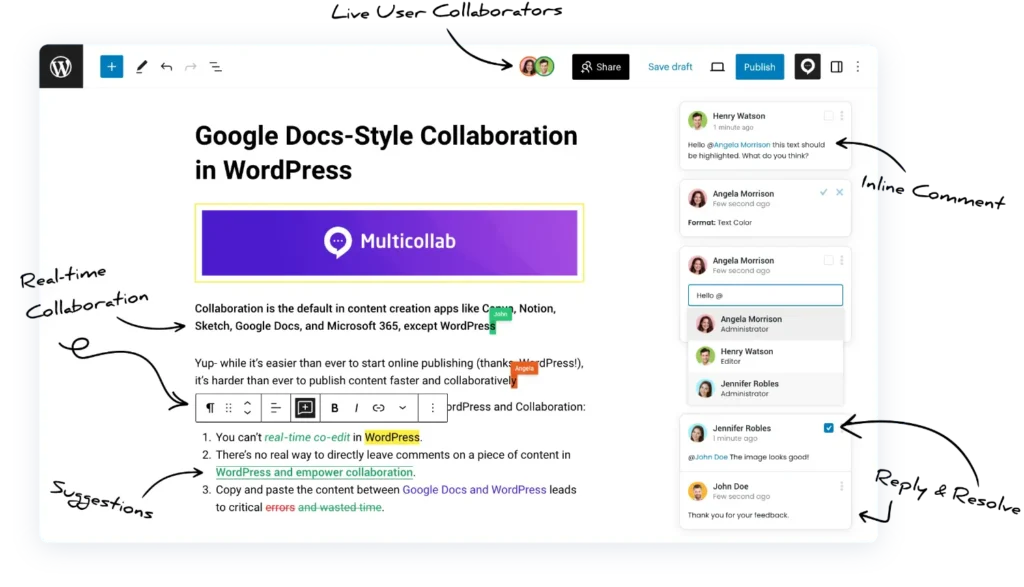
This removes the need for Google Docs handoffs, endless email attachments, or scattered chat messages. Feedback happens in one place, in real time, and stays connected to the actual content.
Why this matters:
- Keeps all revisions in one location
- Removes version confusion
- Makes the editing process faster and clearer
2. Grammar, style, and readability tools
Tools like Grammarly or Hemingway work as a second set of eyes. They catch grammar mistakes, awkward phrasing, and overly complex sentences before editors even begin their review.
These tools don’t replace editors, but they significantly reduce the amount of clean-up work needed.
Why this matters:
- Helps maintain a consistent tone
- Speeds up the editing stage
- Reduces basic errors and readability problems
3. SEO plugins inside WordPress
Plugins such as Yoast SEO and Rank Math give instant feedback right where the content lives. They check keyword usage, headings, meta descriptions, readability, internal linking, and more.
This ensures that SEO isn’t something added at the end, but part of the writing process from the start.
Why this matters:
- Improves search visibility
- Keeps SEO steps from being forgotten
- Makes optimization accessible to every team member
4. Editorial calendar and workflow plugins
Tools like PublishPress help teams manage content at scale. You can assign custom statuses such as “In Review,” “Needs SEO,” or “Ready to Publish” and see everything on a clean calendar view.
This structure reduces the need for instant-message nudges because everyone knows where each article stands.
Why this matters:
- Less chasing for updates
- Clear progress tracking
- Better planning for busy teams
5. Smart notification integrations
Instead of using messaging apps for detailed discussions, top publishers use them as simple alert systems. For example, when an article moves from Draft to Pending Review, the editor receives an automatic notification.
This keeps the team informed without turning chat apps into the main collaboration channel.
- Reduces noise
- Keeps people informed only when needed
- Prevents missed approvals
6. A strong culture of quality
Tools alone can’t guarantee great content. Successful publishers build habits that keep quality high:
- Clear ownership of each step in the workflow
- Training for new writers and editors
- Checklists used consistently
- Regular post-publish reviews to learn what worked
This culture ensures that quality isn’t dependent on individual effort. It becomes part of how the team operates every day.
Together, these tools and practices help WordPress publishers create clean, accurate, search-ready content without drowning in instant messages or losing track of revisions.
How Multicollab delivers 100% content quality inside WordPress
If your team has ever bounced between Google Docs, email, and instant messages just to get one article ready, you already know the cost: lost time, lost context, and eventually, lost quality.
Multicollab solves this by moving the entire collaboration process into WordPress itself, where your content actually lives.
Instead of switching tools or chasing comments in multiple places, writers, editors, SEO specialists, clients, and stakeholders can work together in the WordPress editor.
Here’s how Multicollab helps publishing teams deliver consistent, high-quality content at scale.
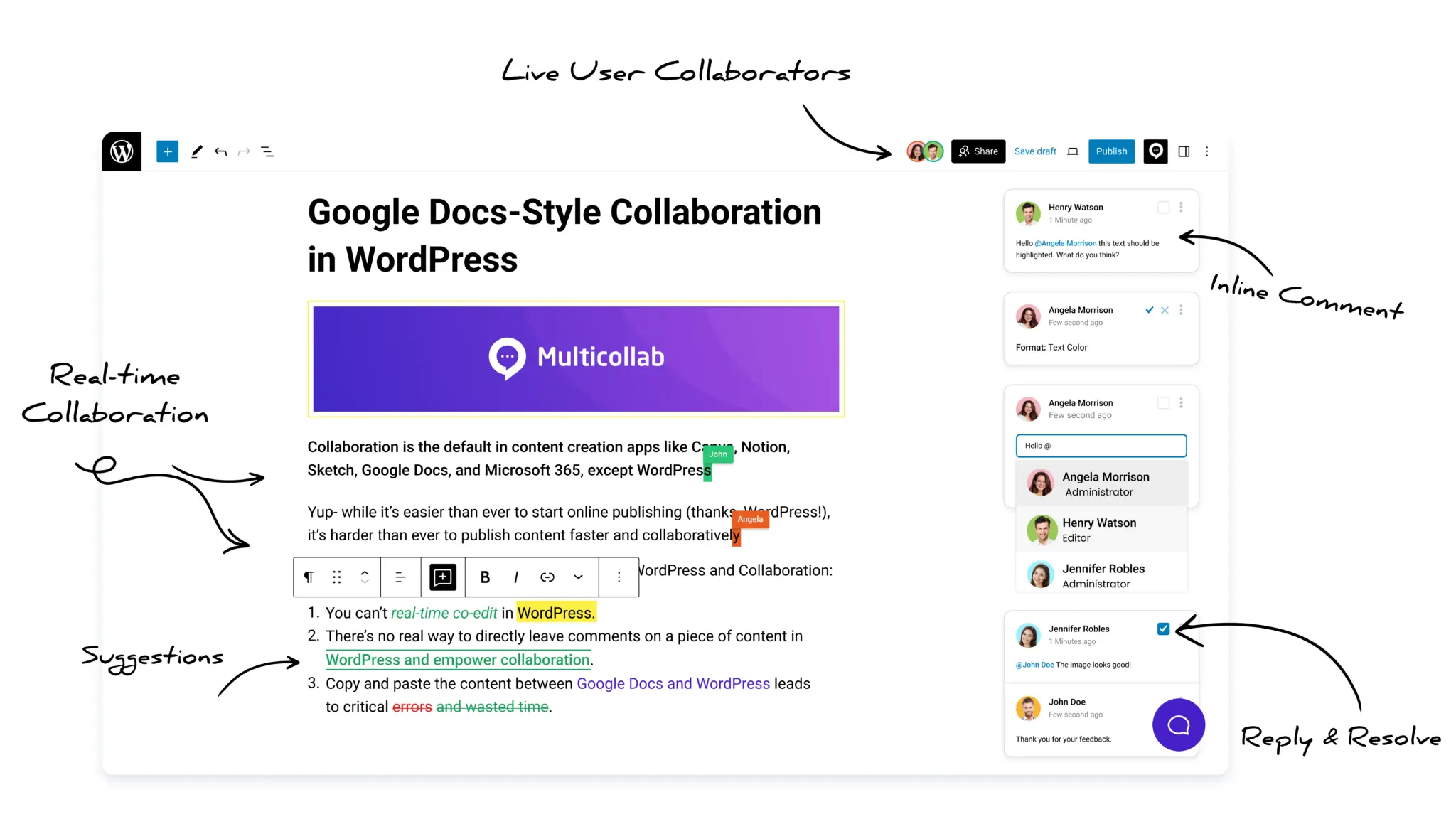
1. Real-time collaboration inside WordPress
Teams can work together in the same post at the same time. No version confusion. No uploaded attachments. No waiting for someone to “finish their turn.”
- Multiple users editing a post simultaneously
- Instant updates for changes happening in the editor
- Fast review cycles without external docs
- A more natural “Google Docs style” experience in WordPress
This alone removes countless hours of switching, copy-pasting, and merging content.
2. Inline comments on any block, text, or media
Just select a word, sentence, paragraph, or image and you can add a comment to it. Editors can leave precise feedback that stays anchored to the exact piece of content it refers to.
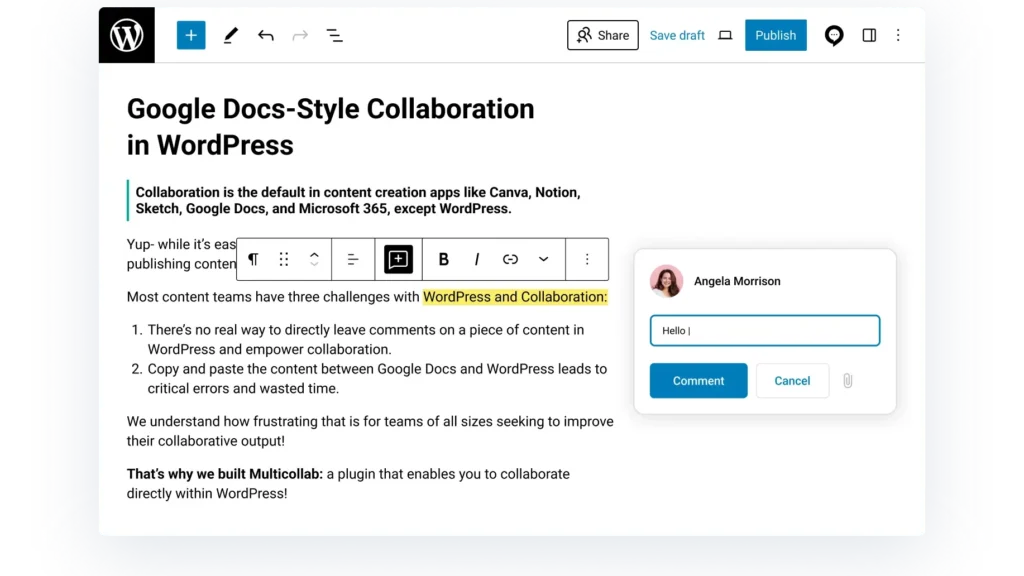
- Zero guesswork about what needs fixing
- Fully contextual feedback
- Faster revisions with fewer misunderstandings
- Consistent communication without external tools
It’s everything people love about Google Docs, but built directly into the WordPress block editor.
3. Suggest Mode for tracked edits
When Suggest Mode is enabled, every change appears as a tracked edit. Writers and editors can accept or reject suggestions with a click.
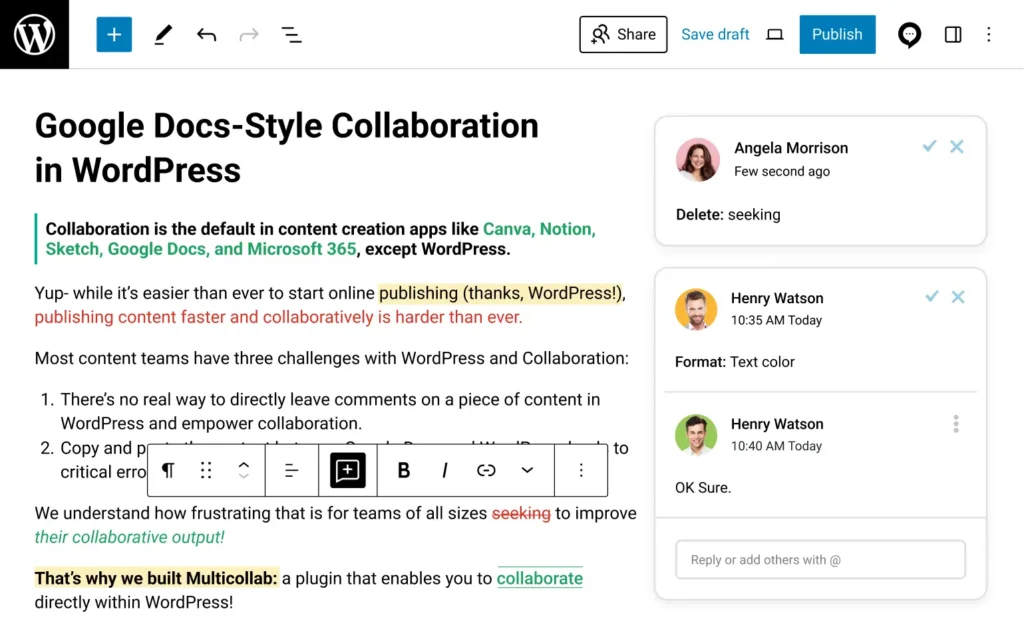
- Full visibility into added, edited, or deleted text
- Safe review cycles without overwriting someone’s work
- Clear collaboration on sensitive or high-stakes content
This is especially powerful for large editorial teams where accuracy and accountability matter.
4. Mentions, replies, and assigned comments
Multicollab brings teamwork into WordPress. You can tag someone, assign a comment, reply in a thread, or resolve comments once complete.
- Clear ownership for every suggestion
- Faster alignment between writers and editors
- No more guessing who should fix what
- Cleaner, more organized discussions around content
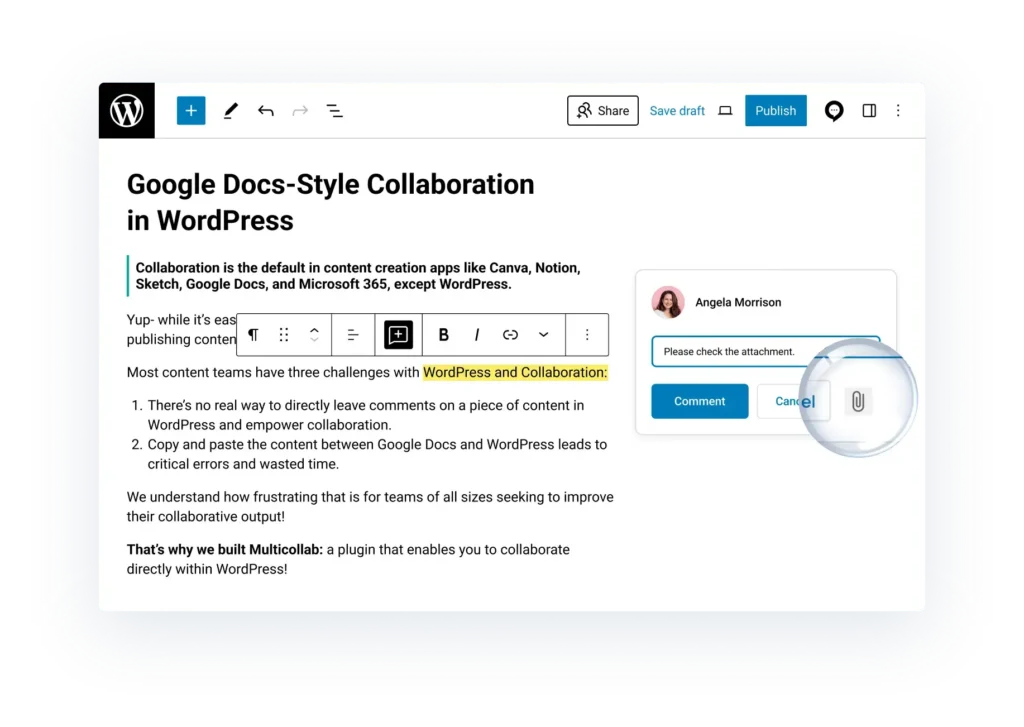
Comments even support attaching documents or images when a simple sentence isn’t enough.
5. Editorial Checklist inside WordPress
High-quality content should pass a checklist before publishing. Multicollab lets teams create a custom checklist inside each post.
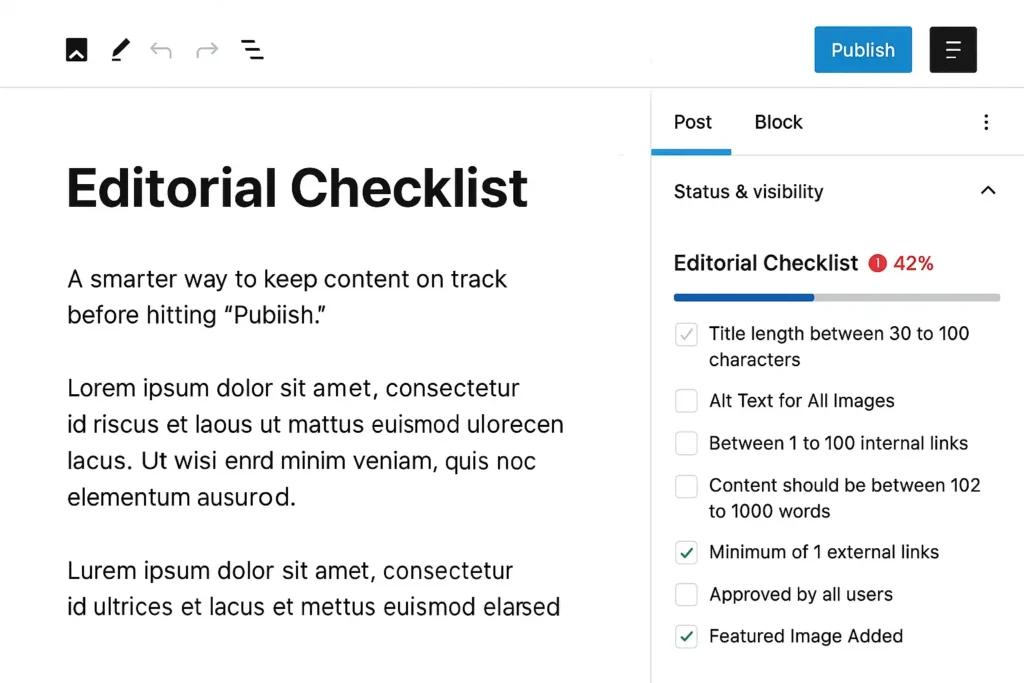
You can track things like:
- Title length
- Alt text for all images
- Required links
- Word count guidelines
- Approval steps
- Featured image added
- Any custom requirement your team needs
Tasks can be mandatory or optional, and access can be restricted by user role.
This is one of the easiest ways to standardize content quality across your entire publication.
6. Email notifications that keep everyone in sync
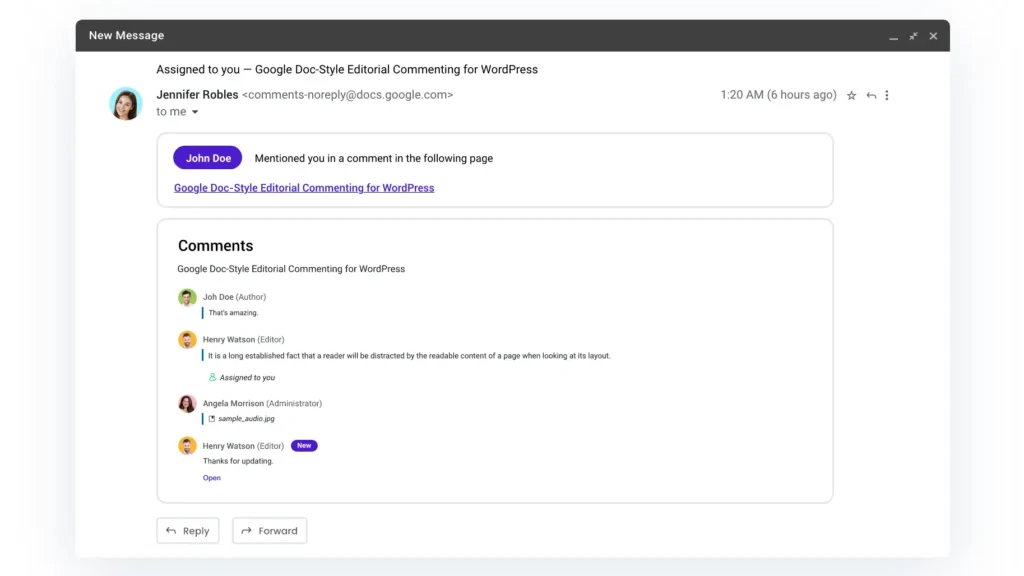
When someone tags you, assigns you a comment, or replies to your thread, you get an instant email update.
Your team no longer has to check the post every few minutes to see what changed.
- Faster responses
- Better visibility
- No more waiting for status updates
- Editors get pulled in only when needed
This is ideal for distributed or async editorial teams.
7. Guest collaboration without creating WP accounts
Clients, subject-matter experts, or external editors can review a draft without needing a WordPress login.
- Commenter – can leave comments and replies
- Viewer – can read the draft and view comments
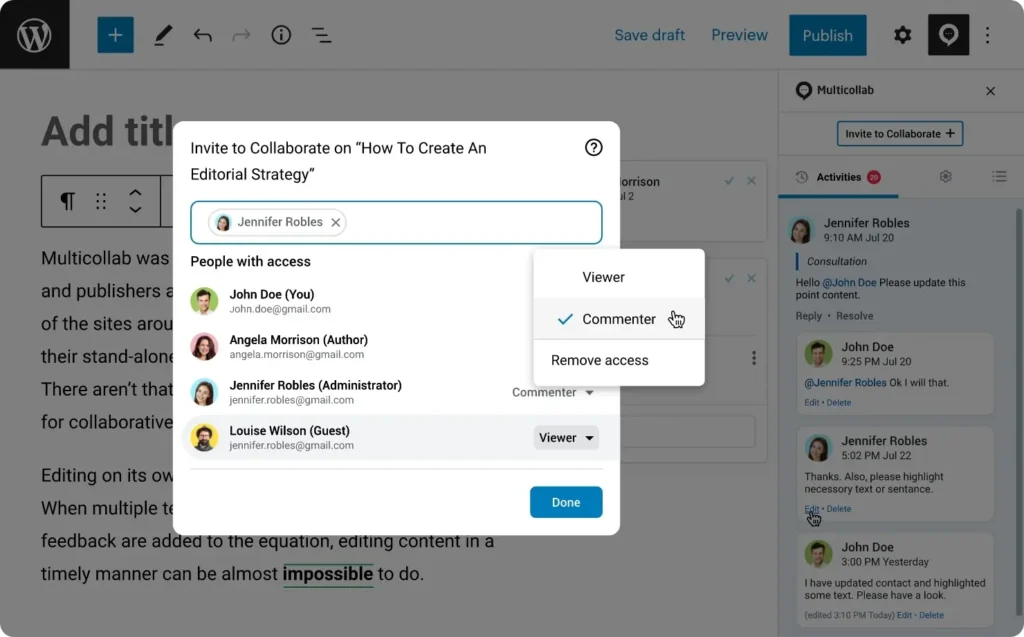
This makes stakeholder reviews safer, smoother, and far more efficient.
8. Optional Slack notifications
If your team prefers quick updates in Slack, Multicollab can send notifications there too.
Editors can receive alerts for:
- Mentions
- Assignments
- Replies
- Resolved comments
Slack becomes an alert system apart from being a collaboration tool. Feedback still stays inside WordPress.
9. Attach documents directly to comments
Sometimes you need more than a message. Multicollab allows attachments like screenshots, PDFs, reference docs, or even audio notes.
- More clarity
- More context
- Faster decisions
- Better communication on complex changes
It’s useful for designers, product managers, SEO specialists, and legal reviewers.
10. Activity Timeline and advanced reporting
Multicollab gives teams a full audit trail of everything happening inside their content workflow.
You can track:
- Who made edits
- Who left comments
- When changes happened
- Activity across all posts and pages
- Comment activity snapshots
- Team engagement trends
This is powerful for editors-in-chief, managers, and agencies handling large volumes of content.
11. Custom permissions to control who can edit, comment, or approve
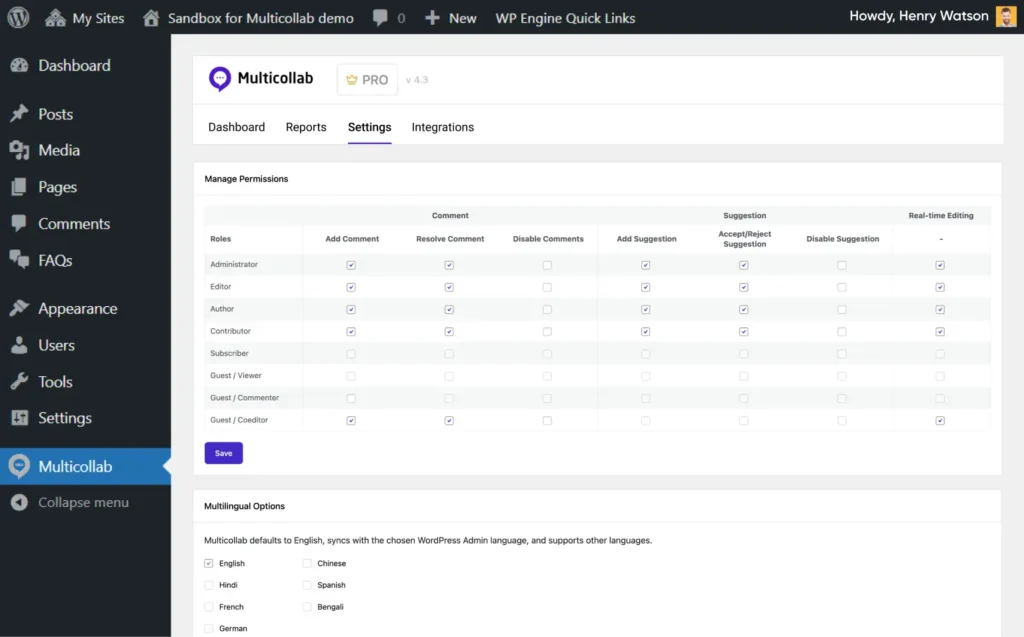
You can set rules for:
- Who can add comments
- Who can resolve comments
- Who can toggle Suggest Mode
- Who can accept or reject suggestions
- Who can participate in specific workflows
This prevents accidental edits and keeps your editorial process clean and secure.
The bigger picture: A centralized, high-quality WordPress editorial workflow
Content quality is accomplished when the entire publishing process is clear, consistent, and built around collaboration that actually works.
When your writers, editors, SEO specialists, and stakeholders can work together inside the WordPress editor, quality stops being a “checklist at the end” and becomes part of the workflow itself.
Reviews get faster. Edits get clearer. Versions stay organized. Nothing slips through the cracks.
That’s exactly what Multicollab brings to modern publishing teams. By adding real-time collaboration, inline comments, suggestions, checklists, notifications, guest reviews, and transparent reporting directly into WordPress, it becomes much easier for teams to maintain the standards they care about.
If your goal is to publish consistently high-quality content without drowning in tools or constant messages, the solution isn’t to work harder. It’s to work in a space that’s built for collaboration from the inside out.
And for WordPress publishers, that space is WordPress itself, powered by Multicollab.
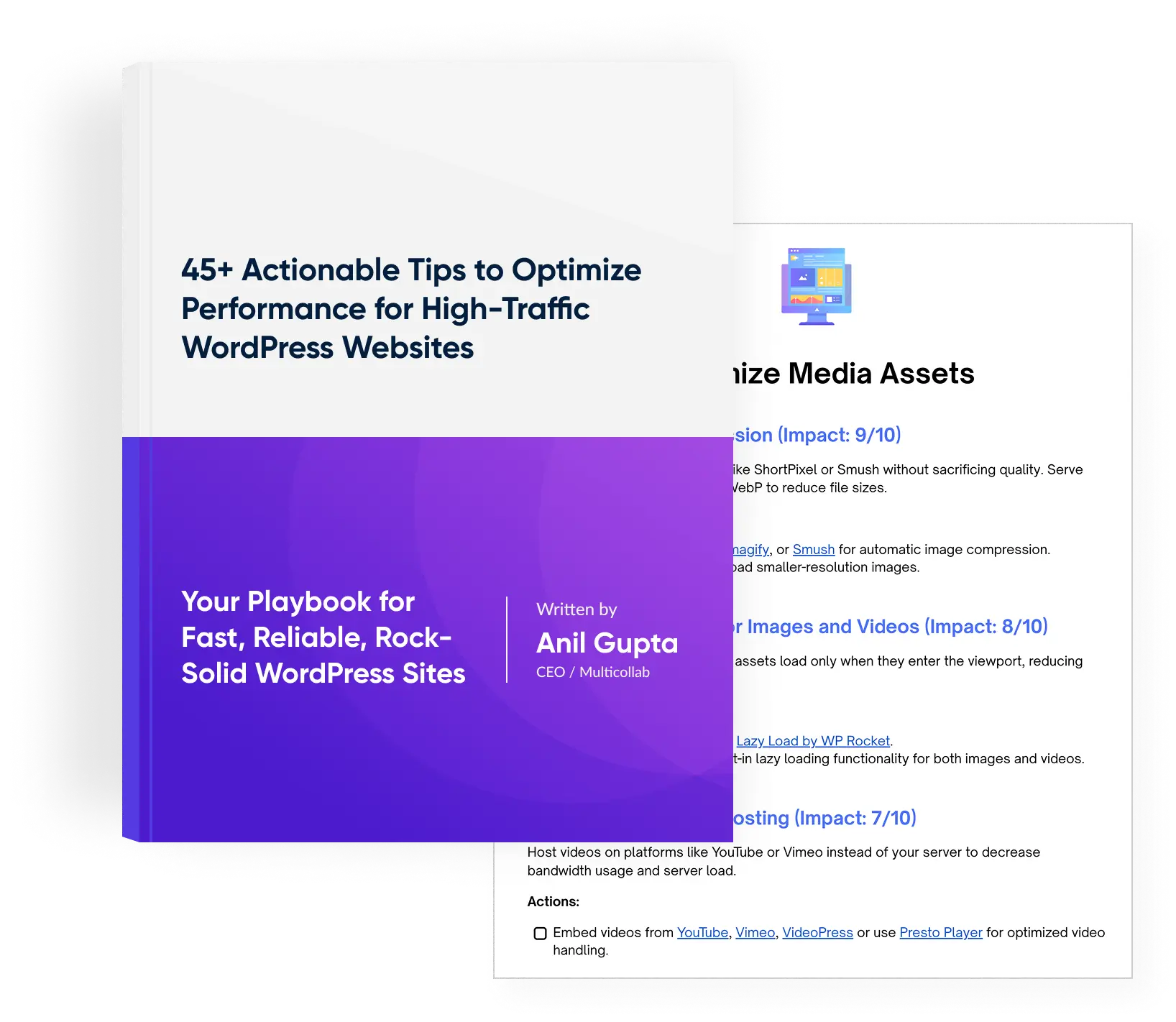
Download a Free Actionable Guide: 45+ Actionable Tips to Optimize Performance for High-Traffic WordPress Websites
Performance Optimization Techniques: Speed up your site with caching, image compression, and code minification.
Hosting and Scalability Suggestions: Learn to choose the right hosting solutions and scale efficiently.
Security and Protection Guidelines: Safeguard your site from DDoS attacks, malware, and performance threats.
Content and Plugin Management Tips: Optimize your database, plugins, and themes for peak performance.